
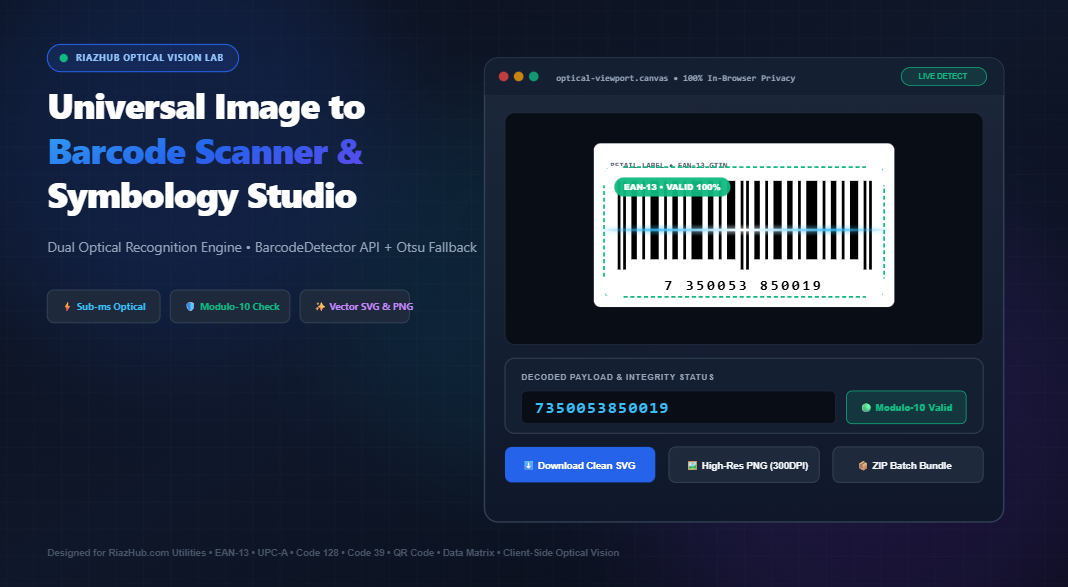
Universal Image to Barcode Scanner: Optical Decoding & Vector Symbology Guide
Static image barcode decoding has long been plagued by low contrast, glare, motion blur, and privacy-invasive server round-trips. With the advent of modern browser-level computer vision and dynamic thresholding algorithms, you can now parse, decode, verify check digits, and re-synthesize pristine vector barcodes in real time.
1. The Problem with Conventional Barcode Capture
In logistics warehouses, retail distribution, inventory auditing, and e-commerce operations, workers and developers regularly encounter barcodes encapsulated within photos, PDF packing slips, smartphone camera snapshots, and shipping labels. Unlike dedicated handheld hardware laser scanners which sweep high-intensity coherent laser light across physical surfaces at hundreds of scans per second extracting data from a 2D static raster image poses immense mathematical challenges:
- Ambient Uneven Lighting: Shadows cast across corrugated cardboard create severe gradient illumination shifts that render static global thresholds useless.
- Optical Skew and Distortion: Camera angles introduce perspective distortion, altering the critical bar-to-space width ratios (the X-dimension).
- Compression Artifacts: JPEG chroma subsampling and lossy quantization blur high-frequency transition edges between adjacent black bars and white spaces.
- Security and Confidentiality Risks: Many online utilities force users to upload proprietary waybills, serial numbers, and pharmaceutical packaging to third-party cloud servers, risking severe GDPR and supply chain data leaks.
To solve these vulnerabilities, the Universal Image to Barcode Scanner & Universal Symbology Studio operates entirely client-side, bringing enterprise-grade optical recognition directly into your web browser.
2. Dual Optical Recognition Engine: How It Works Under the Hood
Reliable barcode decoding in a web application requires resilience across diverse hardware architectures and operating systems. The studio achieves near-instantaneous decoding by deploying a Dual-Layer Optical Vision Architecture:
When scanning an image, the tool first queries native silicon-level hardware acceleration via the browser’s BarcodeDetector API. If hardware acceleration is unavailable, unsupported, or encounters degraded symbology, it gracefully cascades down to a pure JavaScript Scanline Sampler with Otsu Binarization.
A. Primary Layer: Hardware-Accelerated BarcodeDetector API
Modern Chromium and WebKit runtimes provide access to low-level hardware computer vision primitives through the Shape Detection API. When you load an image in the Image to Barcode Studio, the engine inspects the image bitmap across multiple formats simultaneously:
// Browser-Native Optical Recognition Pipeline
const barcodeDetector = new BarcodeDetector({
    formats: [
        'ean_13', 'ean_8', 'upc_a', 'upc_e',
        'code_128', 'code_39', 'code_93', 'codabar',
        'itf', 'qr_code', 'data_matrix', 'aztec', 'pdf417'
    ]
});

const detectedBarcodes = await barcodeDetector.detect(imageBitmap);
detectedBarcodes.forEach(barcode => {
    console.log(`Format: ${barcode.format}, Raw Value: ${barcode.rawValue}`);
});
B. Fallback Layer: Pure JavaScript Scanline Sampler & Otsu Thresholding
Not all devices or browsers support native hardware barcode detectors, especially when dealing with legacy browsers or rotated camera files. The fallback engine converts the source canvas into an 8-bit grayscale pixel buffer and executes Otsu’s Global Histogram Binarization to calculate the optimal mathematical threshold:
// Otsu's Maximum Inter-Class Variance Formula:
// σ²_b(t) = ω₀(t) * ω₁(t) * [μ₀(t) - μ₁(t)]²
// Calculates the threshold 't' that minimizes intra-class variance
// separating foreground bars from background reflective space.
Once binarized into pure boolean states (0 for white space, 1 for black bar), the engine sweeps multi-angle transverse scanlines across the region of interest. It samples run-length encodings of bars and spaces to accurately decode interleaved 1D symbologies such as Code 128, EAN-13, UPC-A, and Code 39.
3. Universal Symbology Guide: 1D vs. 2D Matrix Standards
Barcodes are categorized by their geometric encoding structure. While 1D linear barcodes encode data through alternating line widths, 2D matrix symbologies pack two-dimensional grid patterns with integrated Reed-Solomon error correction.
The table below outlines the core symbologies supported by the Universal Image to Barcode Scanner:
| Symbology | Type | Data Capacity | Checksum / Error Correction | Primary Industry Use Case |
|---|---|---|---|---|
| EAN-13 | 1D Linear | 13 Numeric Digits | Modulo-10 (Weighted 1 & 3) | Global Retail POS & Supermarkets |
| UPC-A | 1D Linear | 12 Numeric Digits | Modulo-10 Checksum | North American Retail & Consumer Goods |
| Code 128 | 1D High-Density | Full 128 ASCII Set | Modulo-103 Check Digit | Logistics, Warehousing & GS1-128 Waybills |
| Code 39 | 1D Discrete | Alphanumeric (43 Chars) | Optional Modulo-43 | Automotive, Defense, DOD Logistics |
| ITF-14 | 1D Interleaved | 14 Numeric Digits | Modulo-10 with Bearer Bars | Corrugated Carton Packaging & Freight |
| QR Code | 2D Matrix | Up to 7,089 Numerics / 4,296 Alpha | Reed-Solomon (7% to 30% recovery) | Mobile URLs, Ticketing, Contactless Pay |
| Data Matrix | 2D Matrix | Up to 3,116 Numerics / 2,335 Alpha | ECC 200 Error Correction | Aerospace, Electronics, Surgical Equipment |
| PDF417 | Stacked 2D | Up to 1.1 KB Data | Reed-Solomon Levels 0–8 | Driver’s Licenses, Boarding Passes, Visas |
4. How to Extract and Convert Barcodes from an Image in Seconds
Extracting payload data and re-synthesizing high-resolution barcodes with the Universal Image to Barcode Scanner Studio requires only four intuitive steps:
Drag and drop any image file (PNG, JPG, WebP, GIF, or BMP), paste from your clipboard using Ctrl+V, or use your smartphone camera to capture a label.
The engine instantly executes bounding box polygon mapping, detects quiet zones, and extracts the raw symbology payload along with its exact format specification.
Verify check digits (Modulo-10, Modulo-103) in real-time. Copy raw text, parse structured URL/Wi-Fi schemas, or edit payload values directly in the studio.
Instantly synthesize clean, high-resolution SVG or crisp PNG barcodes from the decoded payload. Customize line colors, bar height, quiet zones, and human-readable text.
5. From Blurry Pixels to Infinite Vector Precision
One of the biggest frustrations in packaging redesign and label printing is receiving a low-resolution pixelated photograph of a barcode from a supplier or client. Printing a rasterized, blurry barcode often leads to scanning failures at checkout counters or sorting conveyors.
By utilizing the Universal Symbology Studio, you can convert low-fidelity raster inputs into mathematically exact, scale-independent Scalable Vector Graphics (SVG):
- Infinitely Scalable: Scale up to warehouse-sized signage or down to tiny electronic chip labels without pixelation.
- Print-Ready Contrast: Generates crisp
#000000bars on pure white quiet zones, guaranteeing maximum reflectance optical contrast (PCS > 90%). - Precise Quiet Zones: Automatically enforces mandatory 10X module margin standards on the leading and trailing edges to avoid scanner read aborts.
6. Uncompromising Privacy: 100% In-Browser Execution
Commercial supply chains and medical facilities cannot afford to risk leaking confidential information. Shipping waybills contain customer addresses, pharmaceutical boxes contain drug batch lot numbers, and asset tags reveal internal serial identifiers.
Unlike conventional cloud-based OCR APIs that transmit your files to remote endpoints, the RiazHub Barcode Scanner runs 100% locally in your client’s web browser memory. No bytes are sent over the network, no cookies track your documents, and all image buffers are immediately discarded when you clear the session.
7. Frequently Asked Questions (FAQ)
Can this tool read barcodes from tilted or upside-down images?
Yes. The scanner leverages omnidirectional detection. The native BarcodeDetector API handles full 360-degree orientation automatically, while the client-side fallback applies multi-angle radial sampling across Cartesian planes.
What should I do if a barcode is too dark or blurry to detect?
Ensure the image is cropped closely around the barcode region and that quiet zones (the empty space flanking either side) are visible. You can also adjust contrast and brightness before running the optical recognition engine.
Can I regenerate an SVG barcode from an EAN-13 code scanned from a photo?
Absolutely. Once decoded, the studio immediately enables the vector synthesizer, allowing you to export pristine, mathematically validated SVGs or high-DPI PNGs for label printing.
Are my scanned photos or decoded data stored on your server?
No. Zero data is transmitted to any server. The entire computer vision pipeline runs in client-side JavaScript and web worker threads on your device.
Does it support 2D matrix symbologies like QR Codes and Data Matrix?
Yes. The tool features universal compatibility with 1D linear symbologies (EAN-13, UPC-A, Code 128, Code 39, ITF-14) as well as 2D matrix symbologies (QR Code, Data Matrix, Aztec, and PDF417).
Universal Image to Barcode Scanner & Vectorizer Studio
Extract raw data from barcode photos, identify 1D & 2D symbologies, verify checksum integrity, and synthesize mathematically pure scalable vector barcodes directly inside your browser.
| # | Filename | Symbology | Decoded Value | Checksum | Action |
|---|---|---|---|---|---|
| No batch items processed yet. Drag multiple images into the left dropzone to populate this matrix. | |||||
🔬 Optical Vision & Symbology Science Reference
📐 1D Guard Bar Geometry & Binary Modules
Linear barcodes (EAN, UPC, Code 128) encode data into parallel dark bars and light spaces. Guard patterns 101 denote the start and stop boundaries, while 01010 marks the center divider in dual-sided retail symbologies.
Guard = [Bar(1), Space(1), Bar(1)] • Center = [Space(1), Bar(1), Space(1), Bar(1), Space(1)]
Module widths are measured dynamically via sub-pixel edge transition derivatives to withstand lens distortion and skewed scanning angles.
🛡️ Modulo-10 Checksum Algorithm
GS1 retail barcodes (EAN-13, EAN-8, UPC-A, ITF-14) enforce strict Modulo-10 check digit verification to eliminate cashier scanning errors and data transposition typos:
CheckDigit = (10 - (∑(Odd Positions) + 3 × ∑(Even Positions)) mod 10) mod 10
Our dual-engine validator cross-examines the calculated check digit against the printed check digit in real time.
🧠 Otsu Automatic Dynamic Binarization
When packaging labels are damaged, dirty, or low-contrast, Otsu's clustering algorithm separates foreground barcode bars from cardboard texture by calculating the optimal gray threshold $t$ that maximizes inter-class variance $\sigma_b^2$:
σ_b²(t) = ω₀(t) · ω₁(t) · [μ₀(t) - μ₁(t)]²
This transforms blurry, shadow-covered phone photographs into high-contrast binary matrices ready for instant decoding.
🔒 100% Client-Side Privacy Guarantee
All computer vision transformations, pixel array traversals (getImageData), BarcodeDetector API invocations, and SVG synthesis run strictly inside your local web browser. Zero product barcodes, warehouse shipping manifests, or inventory labels are ever uploaded to an external server.