
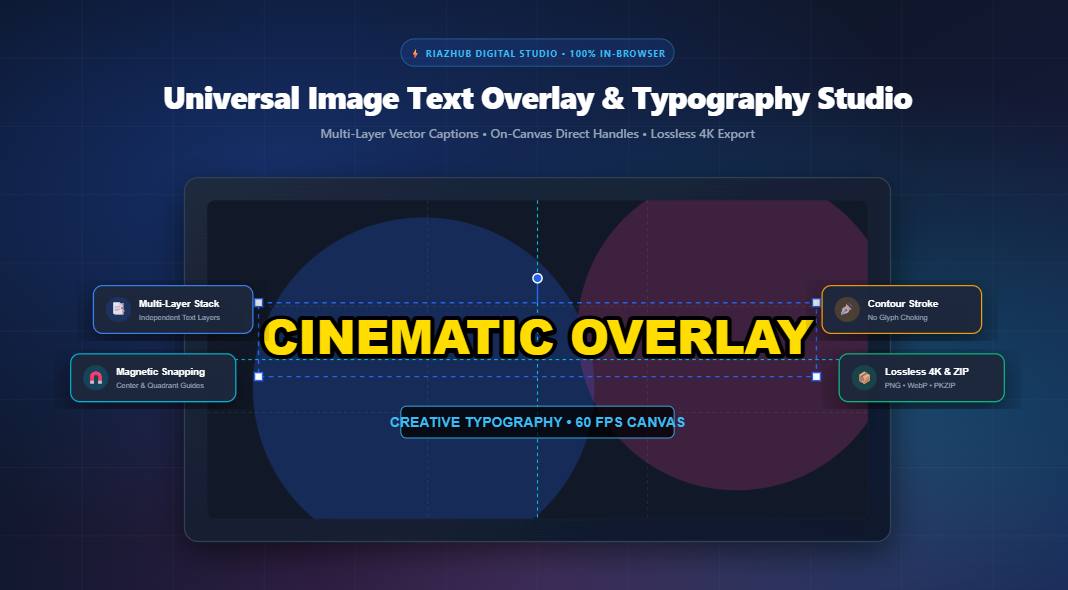
Mastering On-Canvas Typography: The Ultimate Guide to Multi-Layer Image Text Overlays
In modern digital marketing and social media storytelling, imagery alone rarely conveys the entire message. Whether you are generating high-click-through YouTube thumbnails, curating editorial quote graphics, applying subtle copyright watermarks, or tailoring multilingual social banners, text is the driving catalyst for viewer engagement.
However, traditional desktop graphics software can feel bloated and cumbersome, while simple online caption tools frequently compress and blur your photography, choke font glyphs with awkward outlines, and upload your sensitive creative assets to remote third-party servers. To eliminate these bottlenecks, the Universal Image Text Overlay & Typography Studio on RiazHub brings high-performance, studio-grade on-canvas typography directly into your web browser.
⚡ Design Captivating Typography Artwork Instantly
Access direct drag-and-drop handles, magnetic center snapping, Google Fonts, contour outlines, and lossless 4K export completely free and 100% private.
Why Browser-Based Canvas Typography is a Game Changer
Traditional web-based image editors often process files by uploading them to an external server, performing rasterization via ImageMagick or GD, and sending the compressed image back. This pipeline introduces noticeable lag, degrades pixel fidelity, and poses privacy risks.
By contrasting this with HTML5 Canvas 2D and sub-pixel vector compositing, the Image Text Overlay Studio on RiazHub executes 100% of mathematical transforms, glyph measurements, and raster encoding locally on your hardware. Here is why client-side typography compositing is superior:
- Zero Server Upload Latency: Immediate, real-time font rendering at 60 frames per second without waiting for server responses.
- Absolute Privacy: Personal photographs, confidential banners, and unreleased client assets never leave your computer or browser memory.
- Native Lossless Resolution: Text layers are calculated against the source image’s true natural pixel dimensions (up to 4K UHD), preventing blurriness across Retina and Ultra-HD screens.
- Instant Native Clipboard Integration: Seamlessly paste backdrops with Ctrl+V and copy finalized composite images straight to your operating system clipboard with a single click.
Deep Dive: The Multi-Layer Typography Architecture
Graphic design requires layering. You seldom need just a single headline; you often need an attention-grabbing title, an informational subtitle, a branded watermark badge, and a call-to-action slug. The RiazHub Image Text Overlay Tool treats every typographic component as an independent vector entity in a non-destructive layer stack.
| Capability | How It Works | Practical Advantage |
|---|---|---|
| Direct On-Canvas Handles | Interactive bounding box with 4 corner scale nodes and a top stem rotation handle. | Scale font sizes intuitively by dragging handles rather than guessing numerical values. |
| 360° Freeform Rotation | Fluid angle rotation with automatic magnetic snapping at 0°, 90°, and 180°. | Easily craft dynamic diagonal badge stickers or angled banner watermarks. |
| Contour Stroke Rendering | Outlines are stroked beneath the interior glyph fill with round joins. | Prevents “glyph choking”—characters retain their natural optical width and sharpness. |
| Ribbon / Pill Highlighting | Dynamic badge block with configurable opacity, padding, and corner radius. | Guarantees readability even over intricate, high-contrast photographic backdrops. |
The Science of Text Legibility: Outlines vs. Shadows vs. Ribbons
One of the most common issues designers face when captioning images is poor background contrast. A white headline over a landscape photo might be readable on the dark forest section, but completely disappears against the bright sky.
The RiazHub Typography Engine solves this with three distinct optical isolation tools:
1. Sub-Pixel Contour Stroke
Standard canvas stroke methods render lines centered on the vector path, which cuts into the letter’s fill. The studio bypasses this by drawing the outline with doubled thickness before applying the crisp fill over top. This creates an outward-expanding protective border without degrading delicate letter stems.
2. Atmospheric Drop Shadow
By utilizing adjustable Gaussian shadow blur alongside horizontal and vertical offsets, you can lift text off the background image, creating natural optical depth reminiscent of professional cinematic posters.
3. Ribbon & Pill Backdrop Boxes
For breaking news banners, viral social posts, and editorial quotes, wrapping your text in a semi-transparent dark or vibrant ribbon with smooth rounded corners provides guaranteed typographic contrast regardless of what happens in the background image.
Real-Time Studio Previews: Test Before You Export
When you create graphics in the Image Text Overlay & Typography Studio, you are not working blindly. The workspace features four dedicated viewport preview modes:
- Live Canvas Stage: The primary interactive editing stage with real-time magnetic guide snapping and optional Rule-of-Thirds composition lines.
- Before / After Split Screen: An interactive vertical swipe divider comparing the raw original backdrop photo against your composited typography artwork.
- Social Media Mockups: Live synchronized previews that display your image inside realistic mockups for a YouTube 16:9 Video Card, an Instagram 1:1 Square Post, and a Twitter/X 1.91:1 Link Card.
- Layers Diagnostic Manifest: A comprehensive technical table detailing layer coordinates, font families, font sizes, stroke parameters, and effect settings.
Step-by-Step: Crafting a High-Impact YouTube Thumbnail
To see how quickly you can produce studio-quality marketing assets, follow this 4-step workflow inside the RiazHub Typography Tool:
- Import Your Image: Drag and drop your thumbnail backdrop onto the dropzone or press Ctrl+V to paste directly from your clipboard.
- Apply a Quick Style Preset: Click the 🎬 YouTube Thumbnail preset button at the top. This instantly loads an ultra-bold 80px font, a solid 9px black outline, and an atmospheric high-contrast shadow.
- Fine-Tune on the Stage: Click and drag the text on the interactive canvas. Use the corner handles to scale the size and align it with the magnetic center guidelines.
- Export in Lossless Quality: Select WebP or PNG format, set the quality slider to 95% or 100%, and click ⚡ Export Overlay Image. You can also click Download Layers ZIP to export transparent PNG cutouts of each text layer alongside a JSON manifest.
Universal Multilingual & RTL Script Support
Graphic typography is truly universal. The studio features built-in bidirectional script intelligence (dir="auto") alongside specialized font families including Amiri and Noto Nastaliq Urdu. Whether designing graphics in English, Spanish, Urdu, Arabic, or Persian, text alignment and glyph contours adapt naturally without requiring third-party plugins.
Ready to Supercharge Your Visual Content?
Experience the precision of desktop graphic design software right inside your browser. No sign-up, no software installation, and zero watermarks.
Conclusion
High-quality typography elevates good photography into iconic visual media. With on-canvas direct transforms, contour outline rendering, magnetic alignment snapping, and lossless in-memory packaging, the Universal Image Text Overlay & Typography Studio on RiazHub provides content creators, marketers, and web designers with an indispensable utility. Bookmark the tool today and elevate your digital imagery in seconds!
Universal Image Text Overlay & Typography Studio
Design multi-layer typography, watermark banners, YouTube thumbnails, and social graphics with live drag-and-drop canvas handles, magnetic snapping, and lossless 4K export.
Drag & drop your background photo here
Supports JPG, PNG, WEBP, AVIF, SVG • High-DPI Lossless🎨 Text Color & Gradient Fill
✒️ Stroke / Contour Outline
Note: Outlines are rendered beneath glyph fills using sub-pixel vector dilation to avoid choking thin fonts.
🌫️ Dynamic Drop Shadow
🏷️ Ribbon / Pill Background Box
Drag the vertical divider left or right to inspect text edge sharpness and stroke compositing.
| # | Content Preview | Position (X, Y) | Font & Size | Rotation | Outline | Shadow | Ribbon Box | Status |
|---|
Mastering Canvas Typography, Contour Strokes & Sub-Pixel Rasterization
1. Vector Stroke Order & Glyph Choking
HTML5 Canvas stroke methods draw outward and inward from glyph vector spines. By executing ctx.strokeText() with doubled line width before calling ctx.fillText(), the stroke remains tucked beneath the crisp interior fill, eliminating inward text distortion.
2. High-DPI Sub-Pixel Metrics
Retina and 4K displays benefit from full native resolution rasterization. Our engine binds text layout calculations directly to natural pixel dimensions, avoiding blurry scaling artifacts common in CSS-scaled canvases.
3. Guaranteed Contrast & Legibility
Busy photographic backdrops often make light or dark fonts unreadable. Utilizing high-contrast contour strokes or semi-transparent ribbon backdrops creates an insulated optical safety buffer across all background luminance variations.
4. 100% Client-Side Privacy
Zero graphics, private snapshots, or typography metadata are ever transmitted to any remote servers. All canvas transforms, font glyph measurements, and binary PKZIP packaging run strictly in your web browser memory.