
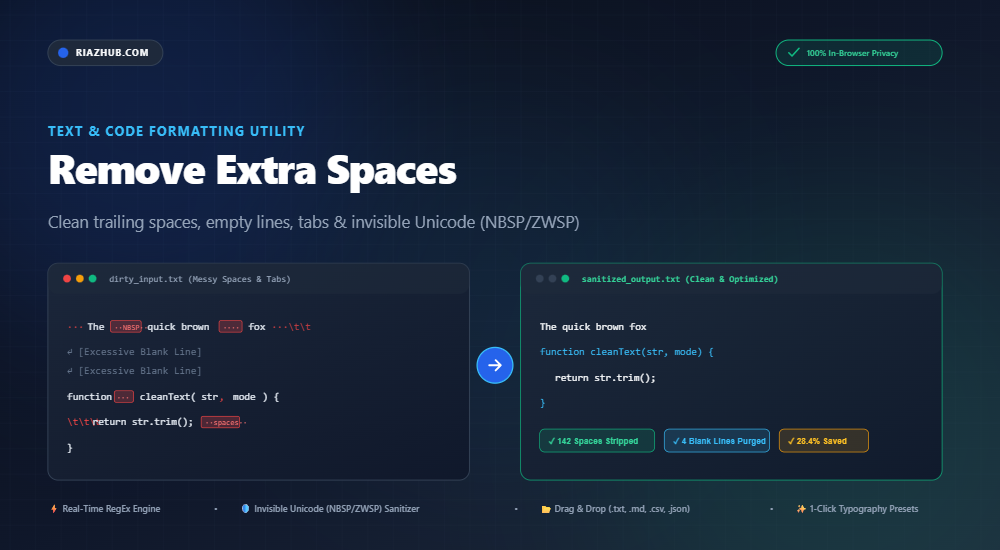
Mastering Whitespace Sanitization: How to Remove Extra Spaces, Invisible Unicode Characters, and Blank Lines
Whether you are formatting a critical legal contract, cleaning dirty spreadsheet exports, preparing markdown documentation, or debugging mysterious syntax errors in code compilers, stray spaces and invisible Unicode characters can cause massive headaches. Learn how to clean your text instantly with the browser-based Remove Extra Spaces & Whitespace Sanitizer Tool on RiazHub.
⚡ Instant Web-Based Solution
Need to clean your messy text right now? Jump straight to our free, privacy-first Remove Extra Spaces and Whitespace Sanitizer. No installation, no registration, and 100% client-side security.
The Hidden Cost of Extra Spaces, Tabs, and Irregular Line Breaks
Whitespace is essential for human readability in typography and document layouts. However, in digital data processing, content management systems (CMS), and software engineering, irregular whitespace can become a silent killer of productivity and data integrity:
- Compiler & Interpreter Failures: In languages like Python, YAML, and Makefiles, improper indentation, mixed tabs/spaces, or trailing whitespace lead directly to syntax crashes (
IndentationErrororSyntaxError). - Database Query Inconsistencies: Trailing spaces inside SQL queries or primary key lookups can cause string mismatch errors (e.g.,
"admin"vs"admin "). - Typography & Print Layout Glitches: Double spaces after periods (a relic of mechanical typewriter conventions), trailing line spaces, and unwanted multi-line gaps degrade typography standards across published articles, eBooks, and resumes.
- File Bloat & Bandwidth Overhead: Thousands of unnecessary trailing spaces and empty blank lines needlessly bloat JSON payloads, Markdown guides, and source files.
The Danger of Invisible Unicode Spaces: NBSP, ZWSP, and Beyond
One of the most insidious problems in modern text editing occurs when copying text from rich-text editors (Microsoft Word, Google Docs, Apple Pages, Slack, PDFs, or formatted web pages). These platforms frequently inject non-standard Unicode space characters that look completely identical to a regular space (ASCII 32) but have entirely different character codes.
| Unicode Code Point | Character Name | Common Origin | Potential Risk / Issue |
|---|---|---|---|
U+00A0 |
Non-Breaking Space (NBSP) | HTML entities ( ), Microsoft Word, Google Docs |
Breaks regex matchers, causes string comparison failures in databases and programming scripts. |
U+200B |
Zero-Width Space (ZWSP) | Web scraping, copied chats, anti-plagiarism watermarks | Completely invisible character that breaks string lengths, search indexing, and URL parsing. |
U+2002 / U+2003 |
En Space / Em Space | Desktop publishing software (Adobe InDesign, QuarkXPress) | Inconsistent spacing widths across standard fonts and terminal screens. |
U+FEFF |
Zero-Width No-Break Space / BOM | UTF-8 byte-order marks in text files | Can break JSON decoders, header responses, and bash shell scripts. |
When you run your text through the RiazHub Whitespace Sanitizer Utility, the built-in Unicode regex engine automatically identifies and purges all of these hidden codepoints in real time.
Key Features of the RiazHub Remove Extra Spaces Tool
The Remove Extra Spaces & Whitespace Sanitizer provides complete granular control over every aspect of whitespace manipulation:
1. Horizontal Whitespace Normalization
- Collapse Multiple Spaces: Automatically turns strings of 2, 3, 5, or 20 consecutive spaces into a single crisp space.
- Trim Leading & Trailing Whitespace: Cleans up the beginning and end of every single line without disrupting internal word spacing.
- Tabs to Spaces / Spaces to Tabs: Convert tab characters (
\t) to 2, 4, or 8 spaces, or convert spaces back into clean tab indentations. - Continuous Strip Mode: Completely purge every single space character for cryptographic hash comparison, barcode strings, or serial numbers.
2. Vertical Line Break & Paragraph Management
- Collapse Multiple Blank Lines: Consolidates excessive consecutive empty lines down to a clean single empty line break.
- Purge All Blank Lines: Strips every empty line to create compact, tightly packed text arrays or lists.
- Join Lines into a Single Paragraph: Flattens multi-line poetry, OCR scans, or PDF text extractions into a unified, flowing prose block.
3. Punctuation & Typography Polishing
- Automated Punctuation Spacing: Fixes misplaced spaces before punctuation (e.g., transforming
"Hello , world !"into"Hello, world!") and ensures consistent spacing following periods, commas, colons, and semicolons.
💡 1-Click Quick Presets for Instant Workflows
Don’t want to configure individual checkboxes? The online whitespace sanitizer includes one-click cleanup profiles:
- Standard Clean: 1 space between words, line ends trimmed, blank lines collapsed.
- Single Line String: Removes all newlines and flattens your document into a continuous text stream.
- Code / Markdown Friendly: Strips trailing spaces while strictly preserving essential code block indentations.
- Tight Typography: Cleans extra spaces, purges invisible Unicode, and corrects punctuation spacing.
How to Clean Text in 3 Easy Steps
- Input Your Raw Content: Paste your messy text into the input editor of the Remove Extra Spaces Tool, or drag and drop a
.txt,.md,.csv,.json, or.logfile directly onto the workspace. - Select Your Rules or Choose a Preset: Pick from horizontal, vertical, or typography options. The live metrics dashboard will instantly show you characters removed, spaces stripped, and compression percentage.
- Copy or Export Clean Text: Click “Copy Output” for instant clipboard access or hit “Download .txt” to save a pristine text file to your local drive.
100% Privacy & In-Browser Client-Side Processing
Security is paramount when working with confidential manuscripts, proprietary source code, database queries, and private communications. Unlike many online tools that upload your text to remote cloud servers for processing, the RiazHub Whitespace Sanitizer executes 100% locally in your web browser using modern JavaScript (ES6+).
No data is ever stored, logged, or transmitted across the network, making it safe for compliance-sensitive corporate and developer workflows.
Frequently Asked Questions (FAQ)
What is the difference between a normal space and a non-breaking space (NBSP)?
A standard space (ASCII 32) allows web browsers and word processors to break lines between words. A non-breaking space (U+00A0) prevents line breaks between adjacent words or numerals. While useful in layout design, an accidental NBSP in a programming script or spreadsheet formula will trigger silent errors. You can strip them instantly with RiazHub’s Remove Extra Spaces utility.
Can I upload and clean large text and code files?
Yes! The tool features a high-performance native file reader that supports plain text, Markdown (.md), CSV, JSON, logs, and code files. Drag and drop your file directly onto the editor box to clean it in milliseconds.
Does the tool support Right-to-Left (RTL) languages like Arabic and Urdu?
Yes. The editor utilizes bidirectional auto-detection (dir="auto"), allowing seamless whitespace removal and typography cleanup for English, Arabic, Urdu, Persian, Hebrew, and Asian scripts.
Ready to Sanitize Your Text?
Experience zero-latency whitespace cleaning, invisible character stripping, and typography formatting today.
Launch Remove Extra Spaces Tool →
Remove Extra Spaces Tool
Clean double spaces, trailing whitespace, unwanted blank lines, tabs, and invisible Unicode spaces in real time.
Invisible Unicode Traps
Pasting from Microsoft Word, Google Docs, PDFs, or rich-text editors often copies invisible non-breaking spaces (\u00A0) or zero-width spaces (\u200B). These cause silent syntax errors in JavaScript/Python compilers, break SQL database queries, and cause layout bugs in CSS.
Bandwidth & Performance
Eliminating excessive trailing spaces and redundant blank lines compresses payload sizes for JSON, Markdown, CSS, and HTML files. Clean typography also improves readability, reduces print and export document sizes, and keeps Git diffs tidy.
100% Client-Side Privacy
All string tokenization, regex sanitation, and file exports take place entirely inside your web browser. Zero text, code snippets, logs, or credentials are sent to our servers or third parties.