
How to Remove Line Breaks, Strip Hard Returns, and Join Fragmented Paragraphs in Text and PDFs
Copying text from PDF documents, OCR scans, email newsletters, or command-line logs often results in jagged, broken lines and frustrating hard returns at the end of every visual line. Learn why this happens and how to fix fragmented text in seconds using the free, in-browser Remove Line Breaks & Paragraph Joiner Tool on RiazHub.
⚡ Quick Online Solution
Need to clean your messy text right now? Access the free, privacy-focused Remove Line Breaks and Paragraph Joiner Tool. It formats paragraphs, eliminates broken hyphenated words, and joins lines entirely in your browser with zero server uploads.
The Hidden Problem: Why Does Copied Text Have Jagged Line Breaks?
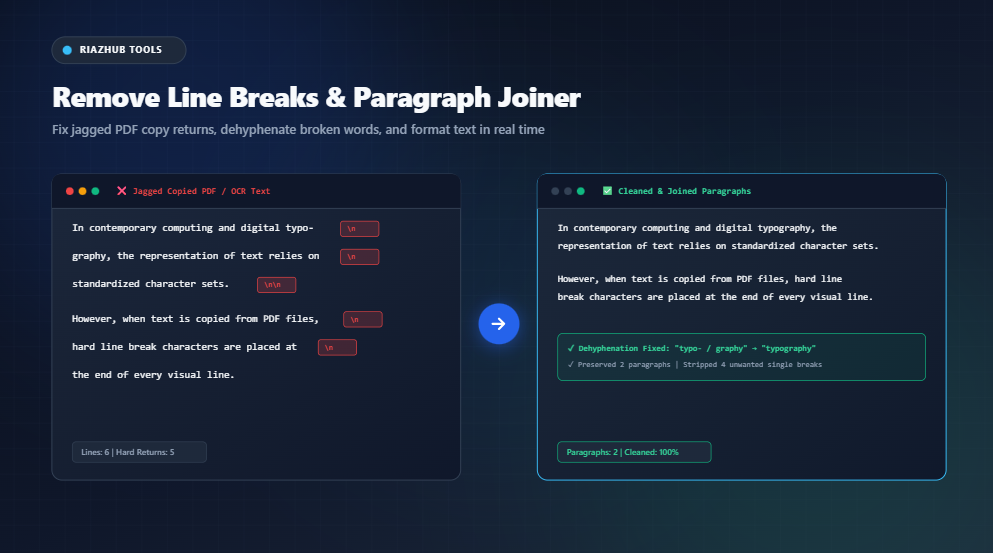
When working with digital documents, copying text from a PDF file or OCR-scanned receipt into Microsoft Word, Google Docs, or a web CMS often introduces unexpected formatting chaos. Instead of a smooth, fluid paragraph that wraps automatically to your screen size, the text looks fragmented, narrow, and jagged:
❌ Raw Copied Text (Fragmented)
In modern digital typography, the rep-
resentation of text across documents relies
on standardized character sets and
structured formats.
✅ Sanitized Output (Clean Paragraph)
In modern digital typography, the representation of text across documents relies on standardized character sets and structured formats.This occurs because PDF (Portable Document Format) is fundamentally an absolute visual layout specification. Unlike HTML or Word documents that treat paragraphs as dynamic flowable containers, a PDF viewer draws characters at exact 2D coordinate pairs on a fixed page canvas. When you highlight and copy text from a PDF, the clipboard parser inserts a hard newline character (\n or \r\n) at the end of each physical visual line.
Key Formatting Challenges When Fixing Line Breaks
Manually pressing the Backspace or Delete key at the end of hundreds of lines is tedious and error-prone. Standard search-and-replace functions in basic text editors also create unintended side effects:
- Losing Genuine Paragraph Boundaries: If you blindly replace all newline characters with a space, your entire document turns into one massive, unreadable wall of text. A smart sanitizer must distinguish between a single hard return (visual line wrap) and a double hard return (genuine paragraph break).
- Trailing Word Hyphenation Artifacts: Justified text in books, legal briefs, and academic journals splits long words at line ends with hyphens (e.g.,
rep-andresentation). Merging lines without intelligent dehyphenation produces broken words likerep- resentation. - Leading and Trailing Spaces: Line wrapping often leaves lingering whitespace padding before and after line breaks, leading to double or triple spacing after lines are merged.
The browser-based Remove Line Breaks Utility automatically addresses all of these problems with specialized regex transformation pipelines.
Understanding Operating System Line Endings: CRLF vs. LF vs. CR
Different computing operating systems encode newline breaks using different ASCII control characters. When sharing plain text files between platforms, mismatched line endings can cause syntax errors in code compilers, broken CSV imports, and layout distortions:
| Operating System / Format | ASCII Representation | Escape Sequence | Byte Hex Code |
|---|---|---|---|
| Windows / DOS | Carriage Return + Line Feed (CRLF) | \r\n |
0x0D 0x0A |
| Linux / Unix / macOS | Line Feed (LF) | \n |
0x0A |
| Legacy Mac OS (pre-OS X) | Carriage Return (CR) | \r |
0x0D |
When you paste or drop a file into the RiazHub Line Break Sanitizer, all incoming line ending conventions are automatically normalized into a uniform stream before applying cleanup rules.
4 Powerful Line Break Removal Modes for Every Use Case
Depending on your project requirements, our tool provides 4 specialized transformation profiles:
1. Preserve Paragraphs (PDF Copy Fixer)
This is the recommended mode for essays, legal documents, eBooks, and articles. It detects paragraph breaks (2 or more consecutive newlines) and preserves the separation between paragraphs, while joining internal fragmented lines into smooth, readable prose with automated word dehyphenation.
2. Single Line Converter
Merges an entire multi-line block of text into one continuous sentence separated by spaces. This is ideal for meta descriptions, tweet drafting, single-line terminal commands, and headline formatting.
3. Custom Delimiter (CSV & SQL Query Builder)
Replaces newline breaks with any custom delimiter, such as a comma (, ), semicolon (; ), pipe ( | ), or HTML tag (<br>). This is indispensable when converting a column of user IDs, emails, or SKU numbers into a formatted list for SQL queries:
-- Converts a vertical column of IDs into an SQL IN clause:
SELECT * FROM users WHERE user_id IN (1042, 1089, 2301, 4512);
4. Remove Breaks in Lists Only
Preserves bulleted and numbered items (such as •, -, 1.) while unwrapping multi-line descriptions belonging to the same bullet point.
How to Remove Line Breaks Step-by-Step
- Navigate to the Remove Line Breaks & Paragraph Joiner Tool on RiazHub.
- Paste your raw text into the Source Input box, or drag and drop a
.txt,.md,.csv, or.logfile directly onto the editor. - Select your preferred cleanup mode (e.g., Preserve Paragraphs or CSV / SQL List Ready).
- Toggle extra sanitization rules like Remove Hyphenation or Collapse Consecutive Spaces.
- View your real-time cleaned text in the Cleaned Output box and click Copy Cleaned Text or Export .txt.
Privacy and Security: 100% In-Browser Client-Side Processing
When handling confidential contracts, customer email databases, proprietary code logs, or private correspondence, security is paramount. The RiazHub Remove Line Breaks Tool executes 100% of string tokenization and regular expression parsing inside your local web browser using native JavaScript (ES6+).
No text data is ever transmitted to external servers, logged in databases, or exposed to third parties, ensuring total data privacy and zero latency.
Summary
Unwanted line breaks, broken hyphens, and ragged PDF formatting no longer need to slow down your workflow. Bookmark the Remove Line Breaks and Paragraph Joiner on RiazHub for instant, professional text cleaning on desktop, tablet, or mobile.
Remove Line Breaks Tool
Strip hard returns, eliminate jagged line breaks from PDF copies or OCR scans, join paragraphs smoothly, and format text with custom delimiters in real time.
Understanding Line Breaks, Hard Returns & PDF Copy Artifacts
Quick guide to understanding why line breaks happen and how to sanitize text for word processors, databases, and code.
PDF (Portable Document Format) stores text using exact visual 2D coordinates on a digital canvas rather than fluid semantic paragraphs. When you copy a paragraph from a PDF viewer, the software inserts a hard return character (\n) at the end of each physical visual line. When pasted into Word, Google Docs, or email clients, the text appears jagged and abruptly fragmented.
Our PDF Copy Fixer automatically detects paragraph breaks (double newlines) and dissolves internal single line breaks while joining hyphenated words seamlessly.
Different operating systems historically represented line endings with different ASCII control characters:
• Windows: Uses Carriage Return + Line Feed (\r\n or CRLF).
• Linux / Unix / macOS: Uses Line Feed (\n or LF).
• Legacy Mac OS (pre-OS X): Used Carriage Return (\r or CR).
This tool normalizes all line endings behind the scenes before running cleanup rules to ensure universal cross-platform consistency.
Yes, 100% private. All tokenization, sanitization, dehyphenation, and file downloads are executed entirely within your browser's local JavaScript virtual machine. No text is ever uploaded, logged, or transmitted across the internet to RiazHub servers or third parties.
Choose "Replace with Custom Delimiter" or click the "CSV / SQL List Ready" preset. Set your delimiter to , or ', '. This instantly converts a vertical list of hundreds of lines into a comma-separated list ideal for SQL WHERE id IN (...) queries or spreadsheet formulas.