
Mastering Schema.org JSON-LD Structured Data: Complete Guide & Rich Results Blueprint
Unlock enhanced Google SERP visibility, drive higher organic click-through rates (CTR), and establish direct machine comprehension across Google and AI search engines with valid, high-precision JSON-LD markup.
Schema.org JSON-LD structured data is the official semantic language of search engines. By translating your articles, products, events, and business entities into standardized JSON-LD (JavaScript Object Notation for Linked Data), you explicitly tell search crawlers what your content represents, who authored it, how much a product costs, and how real customers rate your services.
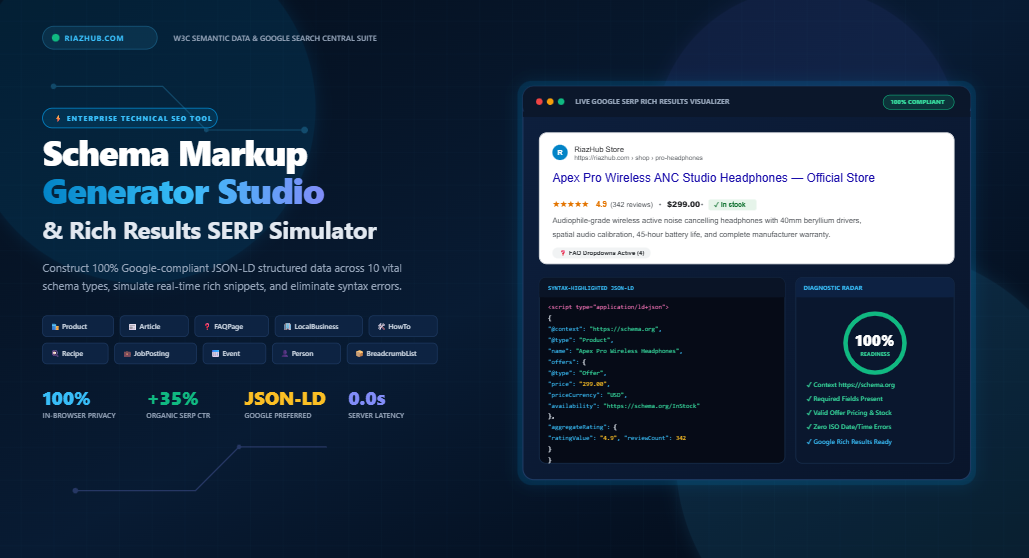
To eliminate syntax errors, schema nesting headaches, and property omissions, you can build and validate your code directly with the free RiazHub Schema Markup Generator & Rich Results Simulator, which synthesizes 100% Google Search Central compliant structured data in real time.
Why Google Recommends JSON-LD Over Microdata and RDFa
Historically, structured data was written directly inside HTML elements using Microdata attributes (like itemprop, itemscope) or RDFa. However, embedding semantic attributes inside template HTML introduces major technical drawbacks:
- Fragile Maintenance: When UI templates are refactored or CSS classes change, inline microdata tags often get broken, stripped, or misplaced.
- HTML Bloat: Microdata clutters document trees, increasing DOM node count and hindering page rendering performance.
- Limited Hierarchy: Defining deep entity relationships (e.g., nesting author profiles, publisher organizations, and aggregate reviews) inside HTML tags is complex and error-prone.
JSON-LD solves this entirely. As an independent <script type="application/ld+json"> block placed inside your HTML document’s <head> or <body>, JSON-LD completely decouples your data layer from presentation markup. Google Search Central explicitly documents JSON-LD as its preferred standard because search crawlers can parse the entire semantic graph in one clean, uninterrupted operation.
The 10 Essential Schema.org Typologies for Organic Search Domination
Implementing the right Schema typology directly unlocks distinctive Rich Results (interactive rich snippets, review star badges, FAQ accordions, and price tags) on Google Search. Using our dedicated Universal Schema.org Generator & SERP Simulator, you can immediately configure any of these 10 core typologies:
📰 Article & BlogPosting
Displays publisher logos, author attribution, and publication timestamps, qualifying articles for Google Top Stories and Discover feeds.
🏢 LocalBusiness
Powers Google Maps local pack visibility, business operating hours, geo-coordinates, telephone dialing, and physical store locations.
❓ FAQPage
Presents interactive accordion dropdowns directly on Google Search results, capturing massive vertical SERP real estate.
🛠️ HowTo
Structures step-by-step instructional guides with sequential directions, tools required, and instructional imagery.
🛍️ Product & Offer
Enables star ratings, pricing, in-stock availability badges, and shipping specifications in Google Shopping and organic search.
🎟️ Event
Highlights upcoming conferences, webinars, and concerts with dates, attendance modes (virtual/offline), and ticketing links.
💼 JobPosting
Integrates career listings directly into Google for Jobs with salary ranges, employment types, and company branding.
🏛️ Organization
Establishes brand identity in Google’s Knowledge Graph, linking official social profiles and corporate contact points.
👤 Person
Validates author E-E-A-T (Experience, Expertise, Authoritativeness, Trustworthiness) by mapping alumni affiliations and credentials.
🍳 Recipe
Unlocks rich culinary cards displaying cooking preparation times, nutritional calorie counts, and aggregate review ratings.
Anatomy of a Perfect Schema.org JSON-LD Snippet
Below is an example of an optimized Article JSON-LD schema generated with complete publisher and author entity graph linking:
<script type="application/ld+json">
{
  "@context": "https://schema.org",
  "@type": "BlogPosting",
  "headline": "Mastering Schema.org JSON-LD Structured Data",
  "description": "Comprehensive blueprint for implementing Google Rich Results compliant structured data.",
  "image": "https://riazhub.com/assets/images/schema-guide-banner.jpg",
  "datePublished": "2026-10-01T08:00:00+00:00",
  "dateModified": "2026-10-01T14:30:00+00:00",
  "author": {
    "@type": "Person",
    "name": "Muhammad Riaz",
    "url": "https://riazhub.com/about"
  },
  "publisher": {
    "@type": "Organization",
    "name": "RiazHub",
    "logo": {
      "@type": "ImageObject",
      "url": "https://riazhub.com/logo.png"
    }
  },
  "mainEntityOfPage": {
    "@type": "WebPage",
    "@id": "https://riazhub.com/schema-org-json-ld-generator-rich-results-simulator"
  }
}
</script>
Pro Tip on Dates: Google Search Central strictly requires dates to follow the ISO 8601 format (e.g., YYYY-MM-DDTHH:mm:ssZ). Incorrect date syntax is one of the top reasons schema validations trigger critical warnings in Google Search Console.
Manual JSON Coding vs. Online Studio Generation
Structuring semantic data by hand often leads to trailing comma syntax errors, invalid unescaped quotes, or missed required properties. Here is how using an automated generator compares:
| Evaluation Factor | Manual Coding | RiazHub Schema Generator |
|---|---|---|
| Creation Speed | 15–30 minutes per page | Under 60 seconds |
| Syntax Accuracy | High risk of JSON formatting bugs | 100% strict JSON-LD compliance |
| SERP Visualization | None (requires post-indexing check) | Instant real-time Google SERP preview |
| Entity Relationships | Complex nested graph creation | Automated nesting of author/organization |
| Direct Testing | Manual copy/paste into validators | One-click Google Rich Results test launcher |
Step-by-Step: How to Generate, Test, and Deploy Your Schema Markup
- Select Your Typology: Navigate to the RiazHub Schema Generator Studio and click the tab representing your content type (e.g., Article, Product, or FAQPage).
- Enter Core Data Points: Fill in the responsive fields. As you type, the engine dynamically recalculates the JSON-LD payload and updates the live Google desktop and mobile SERP preview simulator.
- Check Completeness Score: Review the built-in Semantic Health Radar to ensure that both Google-required properties and recommended enhancements (such as image dimensions and author URLs) are satisfied.
- Test with Google Search Central: Click the Test in Google Rich Results button inside the tool to immediately send your payload to Google’s official testing suite.
- Deploy into WordPress or HTML: Copy the code snippet and insert it into your site header. In WordPress, you can paste the snippet directly using plugins like WPCode, theme header settings, or via a simple custom hook in your theme’s
functions.php:
// WordPress Hook to Inject JSON-LD Markup into Header
add_action('wp_head', function() {
    if (is_single()) {
        ?>
        <script type="application/ld+json">
        /* Paste your generated JSON-LD payload here */
        </script>
        <?php
    }
});
Frequently Asked Questions (FAQs)
Article, an author Person, a publisher Organization, and an FAQPage. You can generate them easily using the Schema Markup Generator.<script type="application/ld+json"> snippet inside the <head> section of your HTML document, or just before the closing </body> tag.Universal Schema.org JSON-LD Generator & Rich Results Simulator
Construct Google-compliant JSON-LD structured data across 10 essential schema types, simulate live Google SERP rich snippets in real time, lint semantic syntax, and export clean WordPress code.
1. Select Schema.org Typology
10 Standard Types2. Ingest Schema Properties
Provide Google Search Central mandatory and recommended parameters.Syntax-Highlighted JSON-LD Code Vault
Google-compliant W3C Linked Data embedded in <script type="application/ld+json">Live Google SERP Rich Results Simulator
Simulating how search crawlers render rich snippets on modern Google SERPsWordPress & CMS Integration Snippets
Inject clean schema into <head> without bulky third-party plugins.
Paste this code snippet into your child theme's functions.php or directly inside the free Code Snippets WordPress plugin. It hooks into the wp_head action with high priority.
if (is_single()) { ... }, if (is_page('contact')) { ... }, or if (is_front_page()) { ... }.
wp_head weighs under 2KB and executes asynchronously without delaying Largest Contentful Paint (LCP) or First Input Delay (FID).
Interactive Schema Validation & Quality Radar
Real-time algorithmic linter adhering to Google Search Central guidelines.Google Search Central Technical Guidelines Reference:
- Mandatory Properties: Missing required properties prevent Google from generating the corresponding Rich Result feature entirely.
- Recommended Properties: Adding recommended fields (like brand, author URL, or opening hours) provides richer visual badges in Knowledge Graph panels.
- Deceptive Markup Penalties: Schema data must strictly match visible content on the webpage. Adding fake 5-star ratings or non-existent items violates Google's Spammy Structured Data policies.
1200x630 Schema Specification Dossier Studio
High-DPI semantic documentation certificate canvas for SEO client audits and team handoffs.Schema.org Standards, Google Rich Results & Semantic SEO Architecture
1. What is Schema.org & Why does JSON-LD Matter for SEO?
Schema.org is a collaborative initiative founded by Google, Microsoft, Yahoo, and Yandex to create a shared, standardized vocabulary for structured data on the Internet. Rather than leaving search engines to guess what your page represents, Schema.org provides explicit machine-readable entities (e.g., stating definitively that a string of characters is a product price, an event start date, or a customer review rating).
JSON-LD allows this metadata to reside cleanly inside a <script type="application/ld+json"> element in the head or body of the page without interleaving HTML markup attributes. This clean separation ensures site designers can restyle templates freely without damaging semantic crawlability.
2. JSON-LD vs. Microdata vs. RDFa — Which is Best?
Google Search Central explicitly states: "Google recommends using JSON-LD for structured data whenever possible."
- JSON-LD (Recommended): Encapsulated in a single script tag, clean to inspect, easier to dynamically inject via JavaScript or WordPress hooks, and decoupled from your site's visual CSS.
- Microdata: Requires scattering attributes like
itemscope,itemtype, anditempropacross HTML tags, making templates bloated and fragile. - RDFa: An older standard using XML-like namespace attributes, rarely used in modern web development today.
3. How Structured Data Powers Rich Results & Boosts Organic CTR
Google SERP real estate is highly competitive. Standard search results display only a title tag, URL, and meta description. Pages that successfully implement structured data unlock Google Rich Results, such as:
- Review Stars & Ratings: Gold 5-star displays that build immediate visual authority and credibility.
- Product Pricing & Stock Status: Real-time price tags ($99.00) and green in-stock indicators right in SERP.
- FAQ Dropdown Accordions: Clickable questions that expand directly in the search feed, pushing competitors further down the page.
- Recipe Visual Cards: High-resolution thumbnails, preparation times, and calorie badges in recipe carousels.
Studies consistently show that listings adorned with rich badges achieve between 20% to 35% higher organic click-through rates (CTR) compared to plain organic listings ranking in the same positions.
4. Avoiding Google Spammy Structured Data Penalties
Google enforces strict guidelines regarding structured data accuracy. Violating these rules can lead to a Manual Action (Spammy Structured Data penalty) where Google strips all rich snippets from your entire domain:
- Relevance to Visible Page Content: Never mark up content that is hidden from regular human visitors or differs from visible text.
- Honest Aggregate Ratings: Review stars must represent genuine reviews from actual users on that specific item or page, not fabricated 5.0 ratings.
- No Bait-and-Switch: Do not label a standard blog post as a Recipe or Event just to game search results.
5. Privacy & Zero Server Leaks Guarantee
This studio operates 100% in-browser using modern client-side JavaScript. None of your business parameters, draft articles, internal URLs, or contact numbers are transmitted to or stored on any external server. Your sensitive SEO data remains strictly within your browser session.