
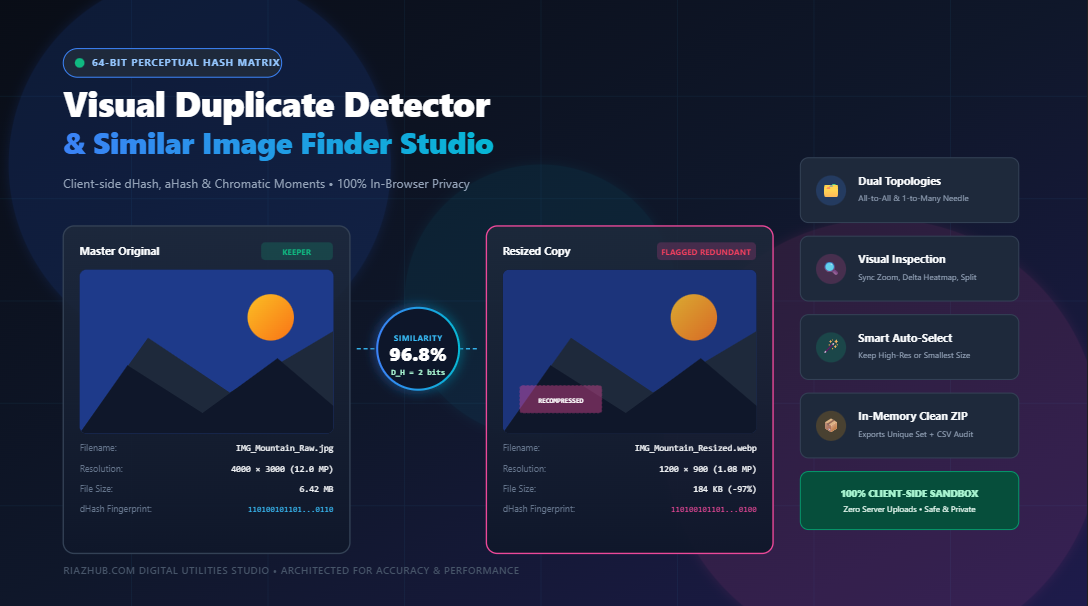
Universal Similar Image Finder & Visual Duplicate Detector Studio: The Complete Guide to Perceptual Hashing & In-Browser Deduplication
Whether you manage an extensive digital photo archive, oversee hundreds of e-commerce product catalogs, or curate media assets for a creative agency, duplicate images silently consume gigabytes of valuable storage. However, standard deduplication utilities often fail to identify photos that have been slightly resized, converted from PNG to WebP, compressed for the web, or taken during rapid camera burst sequences. To solve this challenge natively in the browser without uploading private files to third-party servers, RiazHub developed the Universal Similar Image Finder & Visual Duplicate Detector.
⚡ Quick Access to the Live Utility
Want to clean your photo library right now? You can launch the full, client-side utility directly in your browser without any software installation or cloud account:
👉 Open the Similar Image Finder & Visual Duplicate Detector Studio on RiazHub.com
1. The Duplicate Dilemma: Why Cryptographic Hashes Fail on Images
Traditional disk cleanup tools rely on cryptographic hash algorithms such as MD5, SHA-1, or SHA-256. These mathematical functions are engineered around the avalanche effect: if even a single bit in a file changes, the resulting hash checksum is completely scrambled and unrecognizably different.
In everyday photo workflows, images undergo minor transformations that do not alter what human eyes perceive:
- Format Re-encoding: Saving a 12 MB high-resolution PNG as a 400 KB WebP.
- Resolution Scaling: Downscaling a 4000×3000 camera snap to 1200×900 for a blog post.
- Lossy Compression: Social media or messenger compression artifacts that adjust quantization tables.
- Metadata Stripping: Removing EXIF GPS tags or camera timestamps.
- Burst Sequences: Capturing multiple near-identical frames of an action shot within fractions of a second.
Because MD5 and SHA-256 view these files as completely distinct binary sequences, standard deduplication tools report zero duplicates. This is where Perceptual Hashing (pHash) revolutionizes media management.
2. Under the Hood: The Mathematics of 64-Bit Perceptual Hashing
Unlike cryptographic hashing, perceptual hashing maps visual structures, spatial luminance, and gradient transitions into compact binary fingerprints. Two images that appear visually identical to the human eye will yield identical or near-identical hash strings, even if their underlying file sizes, formats, or pixel dimensions vary dramatically.
The Similar Image Finder on RiazHub.com incorporates a multi-topology perceptual hash matrix running entirely client-side:
A. 64-Bit Difference Hash (dHash) for Gradient Transitions
dHash operates by tracking relative brightness changes across adjacent horizontal pixels:
- Downsampling: The image is resized down to a small $9 \times 8$ grayscale matrix (72 pixels total) using bilinear interpolation.
- Gradient Calculation: For every row $y \in [0, 7]$ and column $x \in [0, 7]$, the algorithm compares each pixel against its right-hand neighbor:
bit = (P(x, y) > P(x + 1, y)) ? 1 : 0
- Bitstring Assembly: This produces an exact 64-bit unsigned binary vector.
Because dHash tracks relative gradients rather than absolute lighting values, it remains invariant to global brightness adjustments, contrast shifts, gamma corrections, and aspect-ratio modifications.
B. 64-Bit Average Hash (aHash) for Low-Frequency Luminance
aHash computes the macro-level luminance baseline:
- Downsamples the candidate image to an $8 \times 8$ grayscale matrix (64 pixels).
- Calculates the global mean luminance:
mean_luminance = (1 / 64) * ∑ Y[i]
- Sets bit $i$ to
1if the pixel value meets or exceeds the mean, and0otherwise.
C. Block-Mean RGB Chromatic Color Moment Clustering
Standard perceptual hashes operate on grayscale matrices to ensure speed and invariance. However, two images with identical geometries but completely distinct color palettes (such as day vs. night shots or saturated tinting) could theoretically produce matching hashes. To prevent false positives, the studio extracts 9 regional color moments across a $3 \times 3$ grid, allowing users to apply an adjustable Color Moment Bias (0% to 100%) to penalize chromatic divergence.
3. Hamming Distance: Comparing Thousands of Image Pairs in Milliseconds
Once every photo in your library is distilled into a 64-bit fingerprint, the studio evaluates similarity using the bitwise Hamming Distance:
Similarity_Percentage = (1 – (Hamming_Distance / 64)) * 100%
Because modern JavaScript engines optimize bitwise XOR and population counting, the studio can compare thousands of image pairs in memory within milliseconds.
| Hamming Distance | Similarity Match | Visual Relationship | Typical Scenario |
|---|---|---|---|
| 0 bits | 100.0% | Identical Content | Exact duplicate files, metadata stripped copies, or format conversions. |
| 1 – 4 bits | 93.8% – 98.4% | Near-Identical | Resized web thumbnails, lossy compression artifacts, light watermarks. |
| 5 – 8 bits | 87.5% – 92.2% | Burst / Pose Sequence | Camera burst mode snaps, micro-movements, slight color filters. |
| 9 – 14 bits | 78.1% – 85.9% | Loosely Similar | Similar composition, framing, or shared scene background. |
4. Dual Scan Topologies: Library Deduplication vs. Needle Search
Every photo organization challenge is unique. The Similar Image Finder & Visual Duplicate Detector offers two dedicated operational topologies:
- All-to-All Batch Library Deduplication: Ideal for organizing an entire folder of 500+ photos. The tool performs pairwise comparisons across every image, grouping matches into organized duplicate cluster cards.
- 1-to-Many Query Reference Match (Needle vs. Haystack): Have a specific reference photograph and want to find every copy, crop, or variant scattered across your disk? Upload your reference image into the designated needle target slot to instantly filter matching candidates across the ingested library.
5. Interactive Visual Comparison Workspace: Verify Before You Delete
One of the biggest anxieties when cleaning photo libraries is accidentally deleting the wrong shot. The RiazHub studio integrates a multi-tab inspection suite so you can verify candidates side-by-side before making pruning decisions:
1. Synchronized Pan & Zoom Inspection Stage
Inspect two suspected duplicates simultaneously. Scrolling your mouse wheel over either viewport zooms both images synchronously from $0.4\times$ to $6\times$. Dragging the cursor pans both images in lockstep, making it effortless to check fine details like facial expressions, focus sharpness, or noise levels.
2. False-Color Delta Difference Heatmap
The tool calculates a per-pixel absolute difference matrix ($|R_1 – R_2|, |G_1 – G_2|, |B_1 – B_2|$) between aligned canvases. Identical pixels are dimmed to neutral monochrome, while altered pixels, cropped borders, or watermark stamps are highlighted in neon magenta.
3. Split-Screen Swipe Divider
Using hardware-accelerated CSS clip-path, an interactive vertical swipe divider lets you drag between Image A and Image B at 60 FPS to spot subtle recompression artifacts or retouching changes.
6. Intelligent Smart Auto-Selection Rules
Manually reviewing hundreds of checkboxes is tedious. With one click, the tool automatically selects redundant copies according to your preferred preservation logic:
- 📉 Keep Highest Resolution: Compares total megapixels ($W \times H$) and marks smaller downscaled copies for deletion.
- 💾 Keep Smallest File Size: Keeps optimized lightweight versions and flags uncompressed copies to maximize disk recovery.
- ⏳ Keep Oldest Original: Inspects file timestamps to preserve the earliest master capture.
- ⏱️ Keep Newest Edit: Flags older originals and preserves the most recently modified revision.
7. Zero-Dependency In-Memory PKZIP Packaging & Pruning
Once duplicate copies have been flagged, you can either purge them from the active session or click Download Unique Clean ZIP.
Rather than requiring third-party cloud tools, the studio includes a native, client-side PKZIP archive builder written in pure JavaScript. It iterates through every keeper file, calculates standard CRC-32 checksums, and compiles a clean, uncorrupted .zip package directly in browser memory. It even generates a companion deduplication_audit_report.csv log file inside the archive for your records.
8. Privacy & Security: 100% In-Browser Client-Side Processing
In an era where personal photos and proprietary graphic assets are often ingested by cloud servers for AI training or analytics, RiazHub upholds a strict privacy-first architecture:
- Zero server uploads: Your photos never leave your device’s memory.
- No cloud storage or databases: All image data is decoded inside the browser via HTML5 Canvas.
- Safe for sensitive files: Suitable for private family albums, confidential business charts, and client photography.
Frequently Asked Questions (FAQ)
What image file formats are supported?
The studio supports all formats natively decodable by your web browser, including JPEG, PNG, WebP, AVIF, BMP, GIF, and modern SVG assets.
How many images can I scan at once?
Because the engine processes images in asynchronous non-blocking chunks, it easily handles libraries of 500+ images on standard laptops and desktops without freezing the user interface.
Can the tool detect images that have been cropped?
Slight crops and aspect ratio adjustments still maintain strong perceptual hash similarity (typically within 4 to 8 bits of Hamming distance). You can calibrate the sensitivity slider to capture wider compositional variations.
Does this tool modify or delete files directly on my hard drive?
Web browsers run in secure sandboxes that cannot delete files directly from your hard drive without permission. Instead, the tool lets you export a clean ZIP containing only the unique photos, download a CSV inventory audit, or copy the list of redundant filenames to remove them locally.
Ready to Organize Your Photos?
Experience the speed, precision, and privacy of perceptual image deduplication today.
Universal Similar Image Finder v2.5 Pro Studio
Detect exact duplicates, identify resized, re-compressed, or watermarked copies via 64-bit perceptual hashing, inspect visual differences, and clean your photo library in real time.
| Flag | Filename | Cluster # | Match % | Resolution | File Size | Recommendation | Action |
|---|---|---|---|---|---|---|---|
| No audit records generated. Run a scan first. | |||||||
Perceptual Hashing Mathematics, Hamming Distance & Clean Deduplication Guide
In contrast, Perceptual Hashing (pHash, dHash, aHash) translates visual frequencies and gradient structures into compact 64-bit fingerprints. Images that look visually similar to human eyes produce identical or near-identical binary bit sequences regardless of format, metadata changes, or compression.
2. For each row y ∈ [0, 7] and column x ∈ [0, 7]:
P(x, y) > P(x + 1, y) ⟹ bit = 1, otherwise bit = 0
3. Produces a compact 64-bit unsigned binary vector.
Similarity % = (1 - D_H / 64) × 100%
- Distance 0 (100%): Exact identical perceptual match.
- Distance 1 – 4 (94% – 98%): Minor compression artifacts, slight watermarking, format conversion (PNG to WebP).
- Distance 5 – 9 (86% – 92%): Burst camera shots, micro-movements, slight color grading.
- Distance 10+ (<84%): Distinct pictures with loosely similar layout composition.