
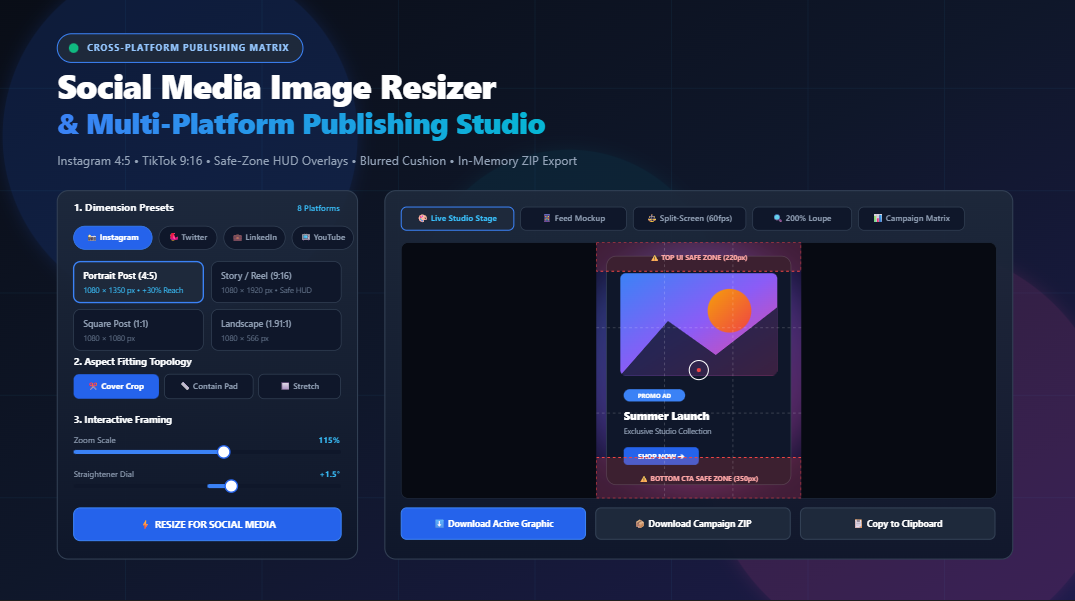
Universal Social Media Image Resizer & Multi-Platform Publishing Studio: The Complete Guide to Aspect Ratios, Safe-Zone Science, and In-Browser Batch Export
In the fast-paced world of digital marketing, creator economies, and brand publishing, visual assets make or break engagement. However, delivering compelling visual content today means grappling with a tangled web of platform dimension guidelines: Instagram favors portrait 4:5 feeds, TikTok and Stories demand vertical 9:16, Twitter/X rewards 16:9 widescreen, LinkedIn optimizes for 1.91:1, and YouTube requires pixel-perfect 16:9 thumbnails and responsive multi-device channel banners.
Until now, creators and marketing teams had to juggle clunky desktop photo software, pay expensive monthly subscriptions, or hand over proprietary ad creative files to external cloud compressors that degrade image sharpness and compromise privacy. With the release of RiazHub’s Universal Social Media Image Resizer & Multi-Platform Publishing Studio, anyone can adapt, frame, and export pristine social media graphics in seconds—completely free, 100% inside your browser, with zero server uploads.
🚀 Try the Live Tool Now
Transform your master graphics into Instagram, Facebook, Twitter, LinkedIn, and YouTube ready assets with live Safe-Zone HUD guides and instant ZIP bundling.
1. The Multi-Network Aspect Ratio Matrix
Every social network designs its user interface around specific aspect ratios to maximize mobile device usability. Uploading an incorrect resolution leads to awkward algorithmic cropping, blurred textures, or jarring black letterbox bars. The social media image resizer on RiazHub integrates a comprehensive database of platform standards:
| Platform | Placement / Preset | Target Resolution | Aspect Ratio | Best For |
|---|---|---|---|---|
| Portrait Post | 1080 × 1350 px |
4:5 Recommended | Maximum mobile feed engagement | |
| Square Post | 1080 × 1080 px |
1:1 | Traditional profile grids & carousels | |
| Story & Reel | 1080 × 1920 px |
9:16 HUD Safe Zone | Full-screen vertical immersive video & photo | |
| Landscape Post | 1080 × 566 px |
1.91:1 | Wide photographic panoramas | |
| Feed Post | 1200 × 630 px |
1.91:1 | News feed link previews & organic shares | |
| Page Cover Banner | 820 × 312 px |
2.63:1 | Business page desktop & mobile headers | |
| Twitter / X | In-Stream Tweet Post | 1200 × 675 px |
16:9 | Timeline cards & media attachments |
| Twitter / X | Header Banner | 1500 × 500 px |
3:1 | Profile banner branding |
| Feed Update | 1200 × 627 px |
1.91:1 | B2B thought leadership & sponsored updates | |
| Company Cover | 1128 × 191 px |
5.9:1 | Enterprise brand showcase | |
| YouTube | Video Thumbnail | 1280 × 720 px |
16:9 | Click-through rate optimization (under 2MB) |
| YouTube | Channel Banner | 2560 × 1440 px |
16:9 All-Device Safe | TV, Desktop, Tablet, and Mobile header |
| TikTok / Reels | Full HD Vertical | 1080 × 1920 px |
9:16 Action Rail | Short-form video covers and carousel slides |
| Standard Pin | 1000 × 1500 px |
2:3 | Vertical discovery boards & ecommerce pins |
2. Why 4:5 Vertical Posts Dominate Social Engagement
One of the most critical discoveries in algorithmic feed optimization is the disproportionate power of 4:5 portrait posts (1080 × 1350 px) over standard 1:1 squares or 16:9 landscape rectangles.
When a user scrolls Instagram or Facebook on a modern smartphone screen, vertical space is prime real estate. A 1080×1350 pixel image occupies approximately 30% to 33% more physical screen height than a 1080×1080 square. As a result:
- Longer Dwell Time: The viewer must scroll further to move past your post, increasing the view duration metric prioritized by discovery algorithms.
- Visual Dominance: Competing posts, comments, or distracting ads above and below are pushed off the screen, focusing total attention on your creative message.
- Higher Click-Through Rates (CTR): Brand calls-to-action, product photography, and text badges are larger, sharper, and significantly easier to read on mobile devices.
Using the browser-based social media image resizer on RiazHub, you can immediately convert any square or widescreen asset into a high-impact 4:5 portrait with a single click.
3. The Science of Platform Safe-Zone Overlays (HUD Science)
Have you ever published an Instagram Story, TikTok post, or YouTube Channel banner only to realize that crucial typography, your logo, or the product price tag was completely covered by the creator’s username, the “Swipe Up” handle, or the TikTok like/share buttons?
This phenomenon occurs because social media platforms superimpose native user interface (UI) HUD overlays directly on top of the media canvas:
- Instagram Stories & Reels (1080×1920): The top 220 pixels are occupied by the user account handle, story progress bars, and exit buttons. The bottom 350 pixels are obscured by caption text, audio tags, and message reply fields. Only the central zone is guaranteed 100% visible.
- TikTok Vertical Videos (1080×1920): Beyond the top and bottom margins, TikTok places a right-side interactive rail (heart, comment bubble, bookmark, share arrow) that encroaches 120 to 140 pixels inward from the right margin.
- YouTube Channel Banners (2560×1440): While smart TVs render the full 2560×1440 canvas, mobile devices and desktop screens crop the display into a central safe rectangle measuring exactly 1546 × 423 pixels. Placing text outside this central box guarantees it will be cut off on iPhones, Androids, and laptops.
- YouTube Video Thumbnails (1280×720): The bottom-right corner displays the video timestamp badge (e.g.,
14:22), requiring a 140×80 pixel exclusion zone to prevent vital text from being masked.
4. Multi-Topology Fitting Engine: Cover vs. Blurred Mirror Cushion
When adapting artwork designed for one aspect ratio into another, designers face a fundamental geometric challenge. How should an image behave when its source proportions do not match the target canvas?
RiazHub’s studio provides three distinct mathematical fitting topologies:
Topology A: Smart Center Cover (Fill & Crop)
The image scales uniformly until it completely fills the target dimensions without leaving empty gaps:
Scale = Max(Target_Width / Orig_Width, Target_Height / Orig_Height) × Zoom
Any overflowing margins are neatly cropped. With our interactive canvas workspace, you can click and drag the focal point to ensure the most important subject remains centered in the frame.
Topology B: Aspect Fit Contain with Blurred Mirror Cushion
If your graphic contains edge-to-edge typography, charts, or product packaging that cannot be cropped, Contain scales the entire image so 100% of it is visible inside the canvas.
Traditional photo editors leave ugly, dated black or white letterbox bars. RiazHub revolutionizes this by introducing the Procedural 35px Gaussian Blurred Mirror Cushion:
- The system draws a magnified, blurred duplicate of your master graphic in the background.
- It applies a subtle dark vignette to create an organic, atmospheric halo that naturally matches the colors and lighting of your original artwork.
- Your pristine, uncropped graphic sits cleanly centered in front, creating a modern, high-end studio aesthetic popular with premier media brands.
Topology C: Exact Bound Stretch
For technical diagrams, abstract textures, or geometric backdrops, Stretch maps the source artwork directly to the target width and height without maintaining original aspect ratios.
🎨 Experience Blurred Mirror Cushioning in Action
See how your landscape banners look when organically cushioned for Instagram Stories and Reels.
5. Interactive Framing, Straightening, and Quality Inspection
Standard online resizers treat image scaling as a rigid mathematical operation. RiazHub’s Universal Social Media Publishing Studio turns your browser into an interactive editing suite:
- Interactive Drag-to-Pan: Click and drag directly on the canvas (with full touch support for smartphones and iPads) to reposition the focal reticle in real time.
- Zoom & Scale Stepper: Smoothly scale your graphic from 50% to 300% to capture tight headshots or zoom out for generous breathing room.
- Fine Straightener Dial: Rotate the artwork from -15.0° to +15.0° in 0.5° increments to fix crooked horizon lines or create dynamic angled compositions.
- Rule-of-Thirds Grid: Toggle classic composition lines to place visual focal points along harmonious aesthetic intersections.
- 200% / 400% Zoom Loupe: Hover over your canvas to activate a high-magnification circular inspection lens, guaranteeing that small fonts and sharp logos remain crisp and free of anti-aliasing fuzziness.
6. Photorealistic Feed Mockups & 60 FPS Split-Screen Comparison
Never wonder how your graphic will look once it goes live. The studio features dedicated real-time preview tabs:
- Platform Feed Mockup: Places your rendered visual inside an authentic smartphone Instagram post, complete with user avatars, verified badges, like counters, and caption layouts.
- Split-Screen Comparison Slider: An interactive vertical divider powered by hardware-accelerated CSS
clip-pathallows you to swipe side-by-side between the unedited master upload and the newly framed social asset at a buttery-smooth 60 frames per second. - Campaign Asset Matrix: A comprehensive tabular breakdown listing all platform dimensions, aspect ratios, and estimated file sizes with individual download triggers.
7. 1-Click Multi-Platform Campaign Bundling (Zero-Dependency ZIP)
In a corporate marketing workflow or social media agency, releasing a single promotional campaign requires publishing across four or five networks simultaneously. Manually resizing, saving, and renaming images one-by-one is an agonizing waste of valuable time.
With RiazHub’s Campaign Batch Exporter:
- Upload your high-resolution master creative once.
- Select the platforms you want to bundle (e.g., Instagram Portrait, Instagram Story, Twitter Feed, LinkedIn Post, YouTube Thumbnail).
- Click “📦 Download Campaign ZIP”.
Our lightweight, zero-dependency in-memory PKZIP engine generates all resolutions simultaneously using offscreen HTML5 canvas instances and bundles them into an organized archive containing platform-specific folders (Instagram/, Twitter/, Facebook/) and a CAMPAIGN_MANIFEST.txt deployment summary.
8. Step-by-Step Publishing Tutorial (Under 60 Seconds)
Follow this quick walkthrough to produce social-ready creative in less than a minute:
- Open the Studio: Navigate to the RiazHub Social Media Image Resizer.
- Ingest Master Asset: Drag and drop your high-resolution JPG, PNG, or WebP graphic into the upload box, or paste directly from your clipboard with Ctrl+V. You can also click “🧪 Load Sample” to test the studio with our built-in high-DPI sample creative.
- Select Target Platform: Click a platform pill tab (e.g., 📸 Instagram) and pick your preset format (e.g., Portrait Post 1080×1350).
- Fine-Tune Framing: Select your fit mode (Cover or Contain with Blurred Mirror Cushion). Drag the canvas to center your focal point, and verify that important elements are safely within the red dashed Safe-Zone HUD rulers.
- Export or Copy: Click “⬇️ Download Active Graphic” for an instant WebP/PNG download, “📋 Copy to Clipboard” to paste directly into Slack or Canva, or “📦 Download Campaign ZIP” to generate an entire multi-platform campaign pack.
9. Frequently Asked Questions (FAQ)
A: Absolutely not. RiazHub’s studio operates on a 100% privacy-first, client-side architecture. All image decoding, canvas scaling, safe-zone rendering, and ZIP compression happen strictly within your web browser’s memory via HTML5 Canvas and JavaScript FileReader APIs. Zero data is ever sent to an external server.
A: For photographic posts with rich gradients, WebP (95% quality) provides the best combination of razor-sharp visual fidelity and tiny file sizes. For infographics, typography, or UI screenshots with sharp lines, choose PNG (Lossless). For legacy CMS compatibility, standard JPEG is also available.
A: Yes. The interface is fully responsive, supporting touch drag-to-pan, mobile file pickers, and fluid layouts across iPhones, iPads, and Android devices.
A: No. The tool is completely free with no user accounts, no subscriptions, and no watermarks placed on your exported images.
10. Conclusion: Elevate Your Social Media Presence Today
In an ecosystem where algorithmic feeds reward visual excellence and punish poor formatting, guessing your social media dimensions is no longer an option. By pairing automated platform presets with live Safe-Zone HUD protection, organic blurred mirror cushions, and instant in-memory campaign bundling, RiazHub empowers creators and marketing teams to produce agency-grade social assets in seconds.
Ready to take control of your multi-platform visual strategy? Try RiazHub’s Social Media Image Resizer & Multi-Platform Publishing Studio right now and publish with confidence.
⚡ Ready to Resize & Publish?
Access the complete cross-platform social media suite right in your browser. Free, secure, and instant.
Universal Social Media Image Resizer & Multi-Platform Publishing Studio
Adapt any photo, banner, or ad creative to Instagram, Facebook, Twitter/X, LinkedIn, YouTube, and TikTok standards with safe-zone HUD overlays and blurred cushion backdrops in real time.
Select platforms to bundle together in 1-click ZIP archive:
📐 The Science of 4:5 Portrait Engagement
On Instagram and Facebook mobile feeds, 4:5 vertical portrait posts (1080×1350 px) occupy up to 33% more vertical screen real estate than standard 1:1 squares, keeping users captivated longer and dramatically increasing click-through rates.
🛡️ Platform Safe-Zone Protection
Stories, Reels, and YouTube banners display system HUD overlays, creator handles, and reply inputs. Our live HUD visualizer guarantees titles, CTAs, and logos never get masked by native app UI buttons.
🌫️ Cover Crop vs. Blurred Mirror Cushion
When adapting a square or portrait artwork for widescreen feeds, standard letterbox bars look dated. Our procedural 35px Gaussian blurred mirror cushion generates a modern, organic color halo from your master graphic.
🔒 Zero-Server Privacy Guarantee
Your high-resolution assets, unreleased creative ad concepts, and proprietary client visuals never touch a server. All canvas operations, bicubic downsampling, and ZIP bundling happen 100% inside your browser memory.