
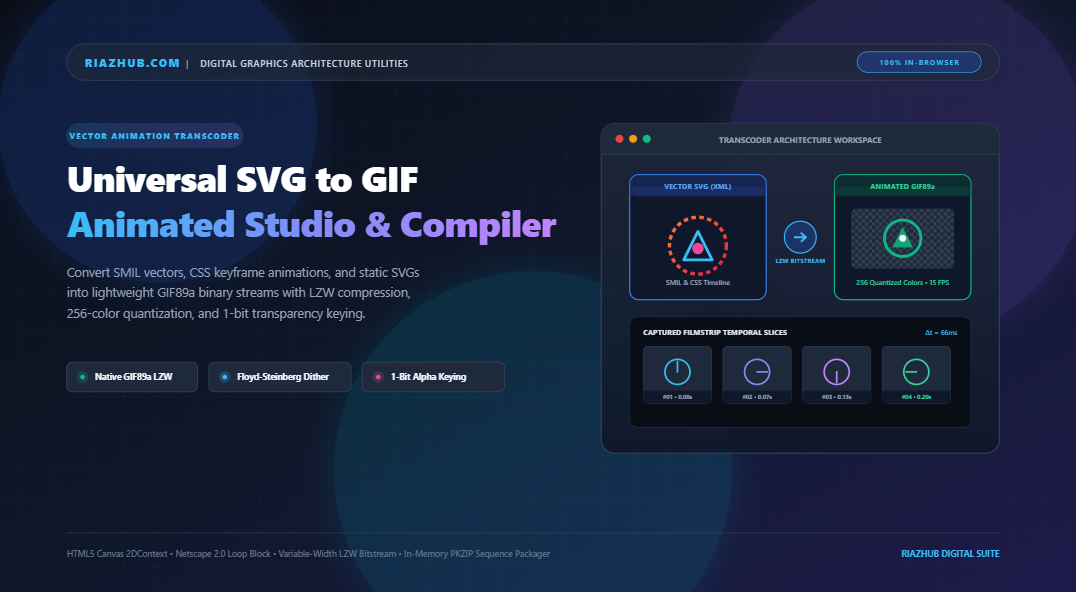
Universal SVG to GIF Animated Transcoder: The Ultimate Guide to In-Browser Vector-to-Raster Conversion
Whether you are designing animated email marketing signatures, building custom Slack or Discord reaction emojis, preparing animated GitHub repository badges, or deploying animated banners on ad networks that forbid inline XML execution, the universal standard remains the venerable GIF89a image format.
To solve this challenge with zero cloud leaks and zero installation overhead, you can use the free Universal SVG to GIF Animated Transcoder directly inside your browser. In this comprehensive technical guide, we examine the mathematics of temporal rasterization, binary LZW bitstream compression, color quantization, and Floyd-Steinberg error diffusion dithering that make high-speed in-browser vector-to-GIF compilation possible.
💡 Quick Takeaway: Unlike traditional server-side rendering pipelines that rely on bulky command-line tools like ImageMagick or headless Chromium instances, the SVG to GIF Transcoder on RiazHub executes entirely within your browser’s client-side memory using HTML5 Canvas 2DContext, typed binary arrays (Uint8Array, DataView), and a native pure JavaScript LZW compressor.
1. The Core Dilemma: Continuous Vector Space vs. Discrete Raster Timelines
To understand why converting an SVG to an animated GIF is technically intricate, one must contrast their fundamental data structures:
- Vector SVGs: SVGs exist in a continuous mathematical coordinate space. Elements like
<path d="..." />,<circle>, and<animateTransform>are evaluated dynamically by the browser’s rendering engine at 60 or 120 FPS based on floating-point timestamps. - GIF89a Graphics: GIFs are discrete, frame-based raster bitmaps. Each frame possesses fixed pixel dimensions ($W \times H$), an indexed color table limited to a maximum of 256 colors, and a fixed temporal inter-frame delay specified in centiseconds ($1/100\text{th}$ of a second).
Bridging this gap requires a process known as temporal discretization. Given an animation duration $T$ (e.g., $2.0\text{ seconds}$) and a target frame rate $F$ (e.g., $15\text{ frames per second}$):
Temporal Sampling Interval: Δt = T / N = 2.0 / 30 = 0.0667 s (66.7 ms)
GIF Delay Header: D_cs = round(100 / F) = round(100 / 15) = 7 centiseconds (70 ms)
The transcoder orchestrates this timeline sampling sequentially. For each interval $\Delta t$, the vector state is rendered onto an offscreen canvas bitmap, parsed into an array of RGBA color pixels, and funneled into the color quantization and LZW bitstream encoder. You can test this live by launching the in-browser SVG to GIF converter.
2. Anatomy of the GIF89a Binary Protocol
Many online converters hide behind server APIs because compiling a raw binary GIF requires strict compliance with the CompuServe GIF89a specification. The Universal SVG to GIF Transcoder Studio constructs this binary bitstream entirely in browser memory:
- Header & Logical Screen Descriptor (LSD): The first 6 bytes identify the format signature (
GIF89a:0x47, 0x49, 0x46, 0x38, 0x39, 0x61), followed by 16-bit little-endian integers indicating canvas width and height. - Netscape 2.0 Application Extension: By default, a standard GIF displays its sequence once and stops. To enable infinite looping, the encoder injects an 11-byte Netscape Application block (
NETSCAPE2.0) with sub-block0x01and a 2-byte loop count (0x0000for perpetual looping). - Graphic Control Extension (GCE): Preceding each individual image frame, a GCE block dictates the frame delay in centiseconds, the transparent color index flag, and the Disposal Method. Using Disposal Mode 2 (“Restore to Background”) is critical when dealing with transparent backdrops; otherwise, earlier frames leave permanent ghosting and trailing artifacts behind moving vector elements.
- Local Color Table (LCT) & LZW Compression: Each frame specifies an indexed local palette ($2 \dots 256$ colors) followed by variable-length Lempel-Ziv-Welch (LZW) compressed raster data packed into sequential 255-byte sub-blocks.
- GIF Trailer: The stream terminates with byte
0x3B(ASCII semi-colon).
3. Color Quantization & Floyd-Steinberg Error Diffusion
Because modern SVG artwork frequently leverages rich linear and radial gradients with thousands of discrete 24-bit RGB values, squeezing those gradients into a 256-color palette without visual degradation requires sophisticated clustering algorithms.
The studio implements Median-Cut and Popularity Color Partitioning. It scans the 24-bit color distribution of the vector raster, clusters the most frequent chromatic clusters, and constructs an optimal indexed palette:
| Palette Depth | Color Table Bits | File Size Impact | Recommended Use Case |
|---|---|---|---|
| 256 Colors | 8-bit (Full) | Standard (~100–300 KB) | Complex gradients, multi-colored vector logos, rich UI spinners |
| 128 Colors | 7-bit | ~25% Reduction | Web mascots, character animations, balanced file size |
| 64 Colors | 6-bit | ~45% Reduction | Simple flat-illustration animations, infographics |
| 32 Colors | 5-bit | ~65% Reduction | Duo-tone icons, dark-mode badges, Discord/Slack reactions |
| 16 Colors | 4-bit | ~80% Reduction | Monochromatic loaders, minimalist line art, ultra-lightweight embeds |
To eliminate the harsh color banding common in indexed palettes, the transcoder features a configurable Floyd-Steinberg Error Diffusion slider ($0\%\dots100\%$). For every non-transparent pixel, the mathematical residual difference between the original 24-bit color and the nearest palette color ($E = C_{\text{orig}} – C_{\text{palette}}$) is diffused into neighboring pixels:
Pixel(x-1, y+1) += Error × (3 / 16)
Pixel(x, y+1) += Error × (5 / 16)
Pixel(x+1, y+1) += Error × (1 / 16)
This error distribution creates silky-smooth color transitions that rival truecolor bitmaps while preserving tiny GIF file sizes. You can scrutinize this effect in real time using the built-in 200%/400% Zoom Loupe inside the SVG to GIF Studio.
4. Solving 1-Bit Transparency: Eliminating the Dark Halo Effect
A frequent frustration when converting SVG graphics to animated GIF is the appearance of ugly dark or jagged outlines around curves. This happens because PNG and SVG support 8-bit alpha channels (256 degrees of translucent anti-aliasing), whereas GIF89a supports only 1-bit binary transparency: a pixel is either completely opaque ($100\%$) or completely transparent ($0\%$).
When smooth vector curves anti-alias against a transparent canvas, edge pixels contain semi-transparent alphas (e.g., $15\%$, $35\%$, $60\%$). If an encoder indiscriminately maps these semi-translucent edge pixels to opaque black or dark gray, an unsightly halo forms.
The RiazHub SVG to GIF Transcoder incorporates a granular Alpha Cutoff Threshold Slider ($1\dots128$). Pixels with alpha values below the cutoff are mapped cleanly to transparent index 0, while pixels above the threshold are resolved against your selected matte backdrop. The interactive Split-Screen Before/After Divider and Backdrop Switcher (Checkerboard, Dark Slate, Pure White) allow you to verify edge sharpness before exporting.
5. Step-by-Step Walkthrough: Converting SVGs on RiazHub
Transcoding your vector assets into animated GIFs takes just a few clicks:
- Import Vector Source: Navigate to the Universal SVG to GIF Transcoder. Drag and drop your
.svgfile, click Select SVG, or paste raw XML markup via the Paste XML modal. You can also click Load Sample to test with preloaded animated loaders. - Select Motion Engine:
SMIL / CSS: Automatically honors native timeline elements (<animate>,<animateTransform>, and@keyframes).360° Spin: Procedurally rotates static or animated icons around their geometric center.Pulse / Scale: Generates a smooth breathing sine-wave oscillation ($0.85\times \dots 1.15\times$).Float / Wave: Applies an organic vertical floating motion.Static Single Frame: Captures a crisp, high-DPI static GIF snapshot.
- Calibrate Frame Rate & Duration: Set your frame rate ($5\dots30\text{ FPS}$) and animation duration ($0.5\dots10.0\text{ s}$). For high-speed UI spinners, $15\dots20\text{ FPS}$ with a $2.0\text{s}$ duration delivers optimal fluidity.
- Tune Palette & Transparency: Choose your palette depth ($16\dots256$ colors), adjust Floyd-Steinberg dithering, and verify that Retain 1-Bit Transparent Alpha Backdrop is enabled.
- Execute Transcoding: Click the primary
⚡ Convert SVG to Animated GIFbutton. Watch the real-time progress bar as frames are rasterized and compressed into an LZW bitstream. - Inspect & Export: Switch between the Live GIF Player, Filmstrip Sequence, Split-Screen Slider, and Palette HUD. Download your standalone
.giffile, copy it directly to your clipboard, or export an in-memory.zippackage containing the GIF, full-resolution PNG frames, and a complete JSON manifest!
6. Format Comparison: Why GIF Still Rules Universal Distribution
| Format | Color Support | Transparency | Email & Slack Support | Client-Side CPU Overhead |
|---|---|---|---|---|
| GIF89a | 256 colors per frame | 1-Bit Binary | 100% Universal | Extremely Low |
| Animated WebP | 24-bit Truecolor | 8-Bit Alpha | Limited (Blocked in many email clients) | Moderate |
| APNG | 24-bit Truecolor | 8-Bit Alpha | Partial (No support in older platforms) | Moderate |
| Inline SVG | Vector Infinite | Full Alpha | Zero in email signatures & ad banners | High (Constant DOM re-calculations) |
7. Frequently Asked Questions (FAQ)
Are my proprietary vector graphics uploaded to a remote server?
No. The Universal SVG to GIF Transcoder runs 100% client-side inside your browser using HTML5 Canvas and typed binary buffers. Your SVG files, XML markup, and rendered GIFs never leave your device.
Can I convert static SVGs that have no built-in animations?
Yes! By selecting one of the procedural motion engines (360° Spin, Pulse / Scale, or Float / Wave), the studio automatically generates smooth mathematical animations from any flat SVG icon or logo.
How can I minimize the file size of my generated GIF?
To produce GIFs under 50 KB, reduce the frame rate to 10–12 FPS, clamp the palette to 32 or 64 colors, lower the dither slider to 0%–20%, and keep the canvas dimensions around 256×256 px or 320×320 px.
What is included in the exported ZIP package?
The in-memory ZIP package includes the compiled animated .gif file, individual high-resolution .png frames extracted at every temporal step, and a detailed manifest.json recording frame rates, timestamps, dimensions, and color telemetry.
Universal SVG to GIF Converter & Animation Studio
Convert animated SMIL/CSS vector art or static SVG graphics into high-performance, looping GIF89a animations with granular frame rates, pure binary LZW compression, custom 256-color quantization, and 1-bit transparency keying entirely in your browser.
⚙️ Studio Calibration
⚡ SVG Temporal Discretization & Rasterization
Vector SVGs exist in continuous mathematical space. To compile a lightweight GIF89a file, this engine samples time slices at exact temporal intervals ($\Delta t = \frac{T}{N}$). SMIL native timelines, CSS transforms, or procedurally calculated rotational/scale matrix transforms snapshot directly into offscreen canvas bitmaps.
🎨 Color Quantization & Floyd-Steinberg Dithering
The GIF89a specification limits each graphic frame to a maximum of 256 colors. Our engine clusters 24-bit RGB space using optimal median-cut and popularity partitioning, then diffuses quantization residual error ($E \times \frac{7}{16}, \frac{3}{16}, \frac{5}{16}, \frac{1}{16}$) to prevent harsh color banding across vector gradients.
✨ 1-Bit Binary Alpha Keying vs. Smooth Anti-Aliasing
Unlike PNG or WebP, GIF files do not support variable 8-bit alpha channels; a pixel is either 100% opaque or 100% transparent. The configurable alpha cutoff slider prevents dark fringes and halos around smooth curved vector edges by tuning the exact matte boundary threshold.
🔒 100% Private Client-Side In-Browser Compiler
Zero external API calls, servers, or cloud dependencies. The entire pipeline—XML parsing, vector rasterization, color table quantization, binary LZW bit packing, Netscape loop header injection, and ZIP packaging—runs completely within your browser's memory.