
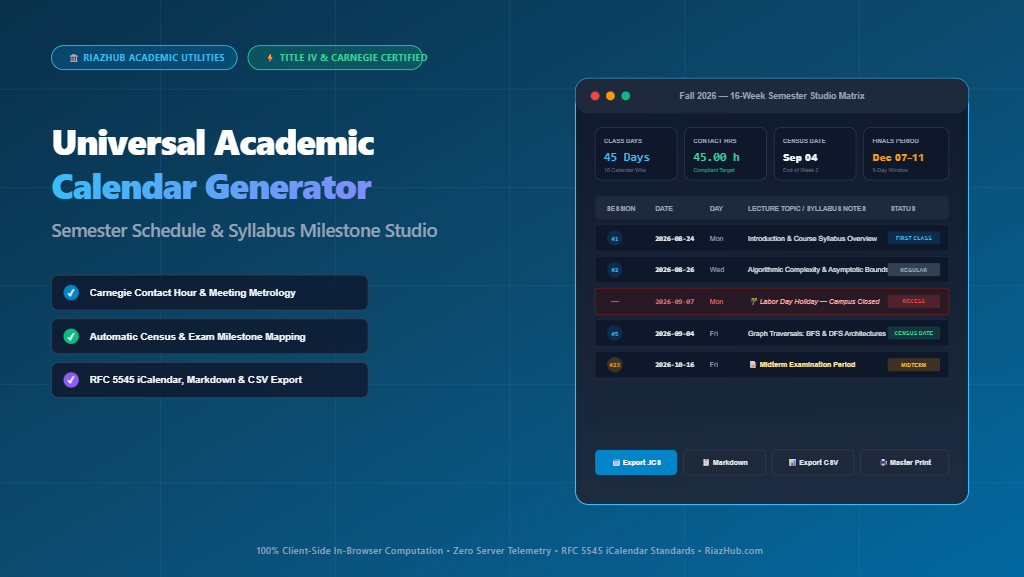
Mastering the Academic Calendar: How to Calculate Carnegie Contact Hours, Map Syllabus Milestones, and Automate Semester Schedules
Whether you are an associate dean drafting the institutional master calendar, a university registrar reconciling academic term boundaries, or a department professor building an accreditation-compliant syllabus, designing an academic calendar requires far more than picking start and end dates. Discover how to eliminate contact hour deficits, align Title IV federal credit rules, and leverage the Academic Calendar Generator & Syllabus Milestone Studio for instantaneous precision.
1. The High-Stakes Physics of Higher Education Scheduling
In contemporary postsecondary education, an academic calendar is not merely an administrative schedule it is a legal, operational, and regulatory contract between an educational institution, its accrediting commission, and the federal government.
Every time a student enrolls in a 3-credit course, institutional compliance mandates that the university deliver a specified number of instructional contact minutes. If campus closures, bank holidays, reading days, or weather emergencies shave off too many lecture sessions, the institution risks falling out of compliance with Title IV federal financial aid eligibility (34 CFR 600.2) and regional accreditation guidelines from agencies such as SACSCOC, WSCUC, HLC, MSCHE, NECHE, and NWCCU.
Historically, scheduling officers and faculty members manually reconciled these parameters using spreadsheets or desktop calendars, painstakingly crossing out federal holidays and counting weeks on paper. Today, using the browser-based Universal Academic Calendar Generator, academic professionals can model complex term structures, compute exact meeting yields, and generate syllabus matrices in seconds.
2. Deconstructing the Carnegie Unit & Title IV Metrology
The architectural foundation of North American collegiate scheduling is the Carnegie Unit, first established in 1906 by the Carnegie Foundation for the Advancement of Teaching. Under modern federal regulations (34 CFR § 600.2), one academic semester credit hour is rigorously defined as:
“Not less than one hour of classroom or direct faculty instruction and a minimum of two hours of out-of-class student work each week for approximately fifteen weeks for one semester or trimester hour of credit, or ten to twelve weeks for one quarter hour of credit, or the equivalent amount of work over a different amount of time.”
• Target Contact Hours = 3 Credits × 15 Weeks = 45 Contact Hours
• Classroom Minutes Delivered = 45 × 50 minutes = 2,250 Instructional Minutes
• Independent Preparation = 2 Hours × 45 = 90 Outside Study Hours
• Total Academic Student Effort = 45 + 90 = 135 Total Clock Hours
The 50-Minute “Academic Hour” Standard
A widespread question among newly appointed course directors is why university classes scheduled for “one hour” typically run for 50 minutes (e.g., MWF 09:00 AM to 09:50 AM). Under federal higher education standards, a contact hour is defined as a minimum of 50 minutes of direct instruction. This 10-minute passing interval is institutionally recognized to allow students to commute between lecture halls, laboratories, and campus facilities.
When you run calculations inside the Syllabus Milestone Studio, the metrology engine automatically factors in these 50-minute increments, 75-minute TR blocks, or 150-minute graduate evening seminars to highlight any contact hour surplus or deficit relative to Carnegie standards.
3. Institutional Term Typologies Compared
Colleges and universities utilize diverse structural frameworks depending on their academic calendar system, pedagogical model, and student demographics:
| Framework Typology | Standard Duration | Contact Hours / 3 Credits | Typical Meeting Recurrence | Accreditation Ratio |
|---|---|---|---|---|
| Traditional Semester | 16 Weeks (15 Wks Instruction + 1 Wk Finals) | 45.00 – 48.00 hrs | MWF (50 min) or TR (75 min) | 1.00 Semester Base |
| Accelerated Term | 15 Weeks Direct Instruction | 45.00 hrs | TR (75 min) or MW (75 min) | Title IV Baseline Minimum |
| Quarter / Trimester System | 10 Weeks | 30.00 – 33.33 hrs | MWF (50 min) or Daily | 1 Semester Credit = 1.5 Quarter Credits |
| Modular Bi-Term | 8 Weeks (Accelerated Half-Term) | 45.00 hrs | Mon–Thu (85 min) or Sat (340 min) | Condensed Double-Paced Delivery |
| Summer Session | 6 Weeks Intensive | 45.00 hrs | MTWR (110–115 min) | Accelerated Summer Session Pacing |
| Winter / J-Term | 3 to 4 Weeks Immersion | 45.00 hrs | Daily (180–225 min) | High-Intensity Concentrated Study |
To model any of these configurations, you can click the pre-configured buttons in the Academic Calendar Generator, which auto-populates exact dates, adjusts holiday vaults, and recalibrates weekly recurrence rules.
4. Solving the “Monday Holiday Deficit”
One of the most persistent mathematical head-scratchers for collegiate academic schedulers is the Monday Holiday Deficit. Because the vast majority of official institutional and federal holidays fall on Mondays including Labor Day, Martin Luther King Jr. Day, and Memorial Day courses scheduled on Monday-Wednesday-Friday (MWF) or Monday-only evening patterns systematically lose up to three class meetings compared to their Tuesday-Thursday (TR) counterparts.
- Designated Replacement Days: Scheduling a “Monday Schedule Day” on a selected Tuesday or Wednesday after a holiday break.
- Asynchronous LMS Learning Modules: Assigning documented online lectures or reading milestones to preserve Title IV contact equivalence.
- Extended Reading & Review Days: Adding targeted study sessions prior to finals week.
The Universal Academic Calendar Generator & Syllabus Milestone Studio includes an interactive Holiday Vault that dynamically excludes holiday dates from session numbering, recalculates contact hours, and displays a prominent Title IV Deficit Warning badge if your schedule drops below the required 45-hour threshold.
5. Critical Milestones Every Course Syllabus Must Map
A high-caliber academic syllabus is not simply a list of textbook chapters; it is a chronological timeline that anchors student commitments to institutional governance dates. Key milestones calculated by the generator include:
- Term Start & First Class Meeting: Establishes attendance reporting required for federal financial aid verification and initial student rosters.
- Census Date (Add/Drop Deadline): Generally situated at the end of Week 2 (~12% of total class sessions). This represents the absolute freeze date for tuition refunds, official full-time equivalent (FTE) headcount reporting, and state funding calculations.
- Midterm Examination Window: Calculated precisely at the 50% point of active instruction. Crucial for early-warning academic intervention, midterm deficiency reporting, and student athletic eligibility evaluations.
- Course Withdrawal Floor (W-Grade Deadline): Typically set at the 60% to 65% mark of the semester (e.g., Week 10 in a 16-week term). Prior to this date, students may withdraw with a transcript grade of “W” without affecting their grade point average.
- Reading Days (“Dead Days”): Dedicated days without class meetings or scheduled extracurricular events placed immediately before final examinations to facilitate independent synthesis and exam preparation.
- Final Examination Period: Designated 5-day assessment block where standard class hours shift to extended 2-hour or 2.5-hour comprehensive examination slots.
6. Step-by-Step: Generating an Audit-Proof Schedule
Building a complete semester syllabus schedule with the online studio takes fewer than 60 seconds:
- Select Term Profile & Dates: Enter your Course Title (e.g., Fall 2026 — CS 101 Introduction to Algorithms) and pick your Term Start and End dates, or choose one of the 1-click presets like Fall 16-Week or Spring 15-Week.
- Configure Recurrence Pattern: Click the recurrence pill matching your section (MWF 50m, TR 75m, MW 75m, Wednesday Evening 150m, or Custom days).
- Review the Holiday Vault: Toggle built-in holidays (Labor Day, Thanksgiving, MLK Day, Spring Break) or insert custom institutional blackout dates such as Faculty In-Service days.
- Populate Syllabus Topics: In the Syllabus Course Schedule Matrix tab, type lecture titles, assigned readings, or homework deadlines directly into each session cell. Your entries automatically persist in your browser’s private local storage.
- Verify Carnegie Compliance: Check the Carnegie Compliance Audit tab to verify that total contact minutes, direct contact hours, and student homework effort ratios satisfy institutional accreditation thresholds.
- Export & Share: Download a universal RFC 5545
.icscalendar feed, copy the formatted Markdown or HTML table directly into your Canvas or Blackboard syllabus, or generate a 1200×630 specification card for campus circulation.
7. Multi-Format Exporters for Registrars & LMS Platforms
A major friction point in syllabus design is re-typing dates across multiple digital environments. The Academic Calendar Generator bridges this gap by providing universal 1-click exporters:
- Universal RFC 5545 iCalendar (.ics) Feed: Fully formatted VCALENDAR/VEVENT file containing start and end timestamps, session numbers, and lecture topics. Compatible with Google Calendar, Microsoft Outlook, and Apple Calendar.
- LMS Syllabus Markdown: Generates a clean GitHub/Canvas-compliant Markdown table ready to paste into syllabus pages with zero formatting cleanup.
- Raw HTML Table Code: Clean, semantic HTML table markup tailored for rich-text editors in Blackboard Learn, D2L Brightspace, and Moodle.
- Registrar CSV Matrix: Comma-separated value spreadsheet containing session indices, dates, weekdays, milestone flags, and notes for student information systems (SIS).
- Social & Administrative Dossier Card (PNG): High-resolution 1200×630 canvas certificate summarizing instructional days, contact hours, and key milestone dates in four academic palettes (Cyber Azure, Collegiate Emerald, Deep Obsidian, and Ivory University).
8. Frequently Asked Questions (FAQ)
Does the generator upload my course notes or dates to external servers?
No. The Universal Academic Calendar Generator & Syllabus Milestone Studio is built entirely on native client-side web technologies. Every mathematical date calculation, canvas render, and iCalendar serialization happens locally in your web browser. No course syllabus data, university dates, or IP addresses are transmitted to or stored on external servers.
How does the tool handle daylight saving time transitions?
Because calculations use native browser Date objects and UTC-safe string serializations, calendar entries automatically account for regional standard time and daylight saving time adjustments when synced into calendar clients like Google Calendar or Outlook.
Can I use this for K-12 school district calendars?
Yes. By selecting the Daily (MTWRF) recurrence pattern, school district administrators and teachers can track required 180-day state instructional minimums, configure teacher preparation blackout dates, and map quarterly grading periods.
Conclusion
Whether preparing for an upcoming institutional accreditation audit or creating a clear, stress-free course roadmap for your students, having precise scheduling metrics is essential. Eliminate manual date-counting and ensure complete Carnegie unit compliance today using the free, in-browser Universal Academic Calendar Generator, Semester Schedule & Syllabus Milestone Studio on RiazHub.com.
Universal Academic Calendar Generator & Syllabus Studio
Synthesize higher education semester schedules, compute Carnegie contact hour standards, track Title IV instructional compliance, configure class meeting patterns, and export universal RFC 5545 iCalendar (.ics) feeds.
| # | Date | Day | Topic / Lecture Notes (Click to Edit) | Milestone Status |
|---|
- Census / Add-Drop Deadline: At approximately 12% of term completion (typically the 10th to 14th calendar day).
- Midterm Assessment Window: At exactly 50% of the active instructional calendar.
- Course Withdrawal Deadline: At approximately 60% to 65% of the active term duration.
- Finals Examination Period: The final 5 designated instructional dates following the reading day.