
The Definitive Guide to Data Transfer Rates, Network Bandwidth & Real-World File Download Times
Few discrepancies in modern consumer technology generate as much confusion, frustration, and tech-support calls as internet bandwidth ratings. You upgrade your home internet connection to a blazing-fast “100 Megabit” plan, eagerly purchase a new 50 Gigabyte video game, and start downloading. Instead of downloading 100 Megabytes every second as advertised, your browser or game launcher displays a throughput rate hovering near 11 to 12 MB/s.
Did your Internet Service Provider (ISP) mislead you? Is your Wi-Fi router malfunctioning? Or is there a fundamental mathematical and architectural distinction between how telecom networks transmit data and how computer operating systems store files?
To audit, simulate, and verify your actual line throughput instantly across 28+ measurement systems, you can test your connection with the interactive RiazHub Universal Data Transfer Rate Converter & Bandwidth Simulator. In this engineering guide, we break down the physics, metrology, and packet protocols governing network throughput.
1. The Fundamental 8:1 Bit-to-Byte Ratio
The root cause of the “missing speed” lies in the essential atomic units of digital computing: Bits versus Bytes.
- Bit (b – lowercase): A binary digit (either a 0 or a 1). A bit is the fundamental unit of serial communication in transit across physical copper wires, fiber-optic light pulses, or radio waves.
- Byte (B – uppercase): A group of 8 contiguous bits. A Byte is the fundamental addressable storage unit used by computer operating systems, memory chips, and file systems.
Theoretical Download Speed (MB/s) = Advertised Line Speed (Mbps) ÷ 8
Because there are 8 bits in every byte, you must divide any advertised telecommunications speed by 8 to identify your maximum theoretical file download velocity:
- 100 Mbps Line:
100 ÷ 8 = 12.50 MB/stheoretical maximum - 300 Mbps 5G / Fiber:
300 ÷ 8 = 37.50 MB/stheoretical maximum - 1,000 Mbps (1 Gbps) Gigabit Fiber:
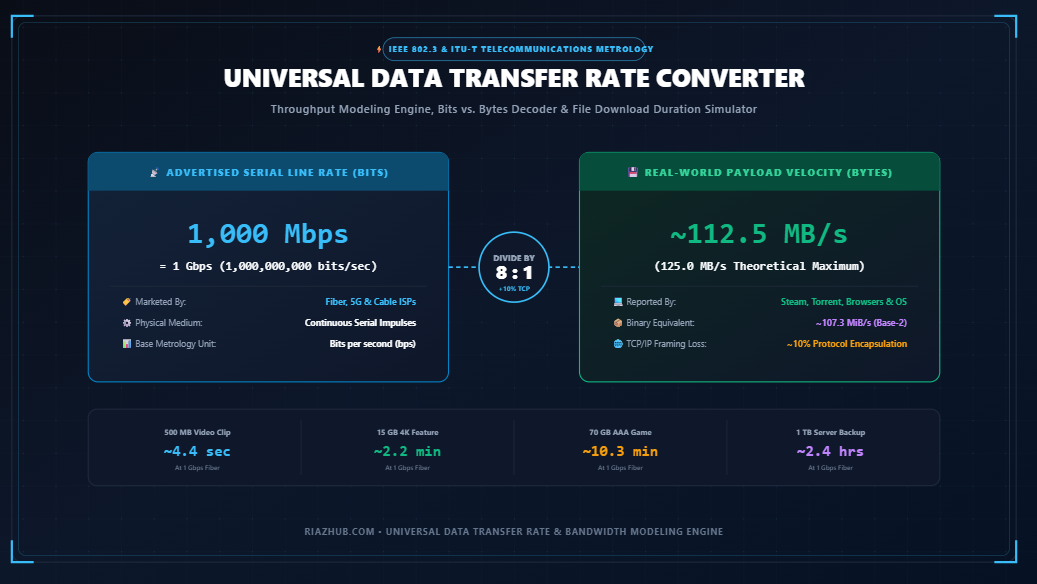
1,000 ÷ 8 = 125.00 MB/stheoretical maximum - 10,000 Mbps (10 Gbps) Enterprise Fabric:
10,000 ÷ 8 = 1,250.00 MB/s (1.25 GB/s)theoretical maximum
You can instantly model any custom line rate across decimal bits, decimal bytes, and binary units using the in-browser Data Transfer Rate Converter.
2. Why ISPs Advertise in Bits (Mbps) Rather than Bytes (MB/s)
It is easy to assume that ISPs advertise in Megabits per second solely for marketing leverage (after all, “100 Mbps” sounds far more impressive to a consumer than “12.5 MB/s”). While marketing departments certainly appreciate the 8x multiplier, the convention is rooted in over a century of telecommunications standards defined by the IEEE (Institute of Electrical and Electronics Engineers) and the ITU-T (International Telecommunication Union).
Networking hardware transmits data serially as individual electrical pulses or photon modulations over a single channel. Network switches, optical transceivers, and modems do not care whether eight bits form an ASCII character, a pixel in a JPEG image, or part of a machine-code instruction. The physical layer (Layer 1 of the OSI model) simply clocks bits per second. Consequently, networking metrology has always measured channel capacity in bps (bits per second).
3. Decimal (MB/s) vs. Binary (MiB/s) in Steam and Operating Systems
Even after dividing by 8, another layer of confusion frequently arises when downloading files on gaming platforms like Steam, BitTorrent clients, or Linux terminal utilities (such as wget or curl). On a 100 Mbps connection, you might notice Steam reporting your download rate as 11.92 MiB/s instead of 12.50 MB/s.
This difference stems from the divergence between SI Decimal (Base-10) and IEC Binary (Base-2) prefixes:
| Prefix Standard | Measurement Unit | Base Multiplier | Total Bytes per Second | Where Applied |
|---|---|---|---|---|
| Decimal (SI) | Megabytes per second (MB/s) | 10⁶ (1,000,000) | 1,000,000 B/s | macOS, Storage Drives, Speedtests |
| Binary (IEC) | Mebibytes per second (MiB/s) | 2²⁰ (1,048,576) | 1,048,576 B/s | Windows File Explorer, Steam, Torrents |
Because 1 Mebibyte requires 1,048,576 bytes (rather than 1,000,000 bytes), the reported binary speed appears approximately 4.86% lower even though the physical volume of data flowing through your cable modem is identical. You can compare binary vs. decimal transfer rates side-by-side inside the interactive Throughput & Network Bandwidth Modeling Tool.
4. The Hidden Protocol Tax: TCP/IP Encapsulation Overhead
In theoretical physics, data travels without resistance. In real-world computer networks, data must be packaged, labeled, routed, and verified to ensure it arrives without corruption. This process is known as packet encapsulation.
When you download a file, your computer does not receive a continuous stream of pure application data. The data is sliced into discrete packets conforming to the Maximum Transmission Unit (MTU), which is typically 1,500 bytes on standard Ethernet connections. Every single packet carries mandatory protocol metadata:
- Ethernet Frame Header & Trailer (Layer 2): Preamble, MAC destination/source addresses, and 4-byte CRC checksum (typically 18 to 22 bytes per frame).
- IPv4 / IPv6 Header (Layer 3): Source and destination IP addresses, packet time-to-live (TTL), and routing flags (20 bytes for IPv4, 40 bytes for IPv6).
- TCP Header (Layer 4): Source and destination port numbers, sequence synchronization numbers, and flow control windows (typically 20 to 32 bytes).
- TCP Acknowledgment Packets (ACK): Small return packets sent back to the host server confirming receipt. If packets are dropped due to network congestion, TCP automatically retransmits the missing fragments.
⚠️ The Protocol Overhead Penalty: ~5% to 10%
Due to Ethernet framing, IP headers, TCP overhead, and handshake synchronization, approximately 5% to 10% of your gross line capacity is consumed by protocol management. On a 100 Mbps broadband connection, your net application payload throughput will realistically peak between 11.25 MB/s and 11.80 MB/s, even under ideal laboratory conditions.
5. The Mathematical Formula for Real-World Download Times
To accurately project the transfer duration of any digital asset, network engineers apply the standard throughput duration equation factoring packet encapsulation efficiency:
Effective Bandwidth = Nominal Speed × (1 – Protocol Overhead %)
Worked Example: Downloading a 70 GB Game on a 100 Mbps Connection
Let us calculate the exact time required to download a modern 70 Gigabyte game on a standard 100 Mbps broadband link with a realistic 10% TCP/IP overhead:
- Convert File Size to Bits:
70 GB = 70 × 1,000,000,000 Bytes = 70,000,000,000 Bytes
Total Bits = 70,000,000,000 × 8 = 560,000,000,000 bits - Calculate Effective Line Rate:
Nominal Speed = 100,000,000 bps (100 Mbps)
Effective Speed = 100,000,000 × (1 - 0.10) = 90,000,000 bps (90 Mbps)
Effective Byte Speed = 90,000,000 ÷ 8 = 11,250,000 Bytes/s (~11.25 MB/s) - Calculate Total Duration:
Time = 560,000,000,000 ÷ 90,000,000 = 6,222.22 seconds
6,222.22 seconds ÷ 3,600 ≈ 1.728 hours = 1 Hour, 43 Minutes, 42 Seconds
If you mistakenly calculated duration using raw 100 MB/s, you would have expected the game to finish in 11.6 minutes—a massive 9x miscalculation! You can verify download times across all file sizes instantly using the real-world File Download Time Simulator.
6. Comprehensive Download Time Matrix Across Standard File Sizes
Below is a comparative reference benchmark calculating real-world download durations for common digital file payloads across popular internet service tiers, calibrated for realistic 10% TCP/IP protocol overhead:
| Internet Tier | Realistic Speed | 500 MB Clip | 5 GB HD Movie | 25 GB ISO | 70 GB AAA Game | 1 TB Backup |
|---|---|---|---|---|---|---|
| 10 Mbps (DSL) | ~1.13 MB/s | ~7.4 min | ~1.2 hours | ~6.1 hours | ~17.2 hours | ~10.2 days |
| 30 Mbps (4G LTE) | ~3.38 MB/s | ~2.5 min | ~24.7 min | ~2.0 hours | ~5.7 hours | ~3.4 days |
| 100 Mbps (Broadband) | ~11.25 MB/s | ~44 sec | ~7.4 min | ~37.0 min | ~1.7 hours | ~24.7 hours |
| 300 Mbps (5G / Fiber) | ~33.75 MB/s | ~14.8 sec | ~2.5 min | ~12.3 min | ~34.5 min | ~8.2 hours |
| 1 Gbps (Gigabit FTTH) | ~112.50 MB/s | ~4.4 sec | ~44.4 sec | ~3.7 min | ~10.3 min | ~2.4 hours |
| 10 Gbps (Enterprise) | ~1,125.00 MB/s | Instant | ~4.4 sec | ~22.2 sec | ~1.0 min | ~14.8 min |
7. Hardware Interface & Telecommunications Standard Reference
Bandwidth limitations are not confined to your internet line. Often, the bottleneck in a data transfer pipeline is the physical interconnect bus on your device:
- Dial-up Modem V.90 (56 Kbps): 56,000 bits per second (POTS copper telephone lines). Downloading a 70 GB game at 56K would take approximately 115.7 days of continuous transmission.
- T1 / DS1 Carrier (1.544 Mbps): Standard North American telecommunications digital trunk consisting of 24 multiplexed DS0 voice channels.
- USB 2.0 High-Speed (480 Mbps): 60 MB/s theoretical throughput, realistically transferring around 35 to 40 MB/s due to USB host-controller polling overhead.
- Gigabit Ethernet (1,000 Mbps): 1000BASE-T standard utilizing 4-pair Cat5e/Cat6 copper cabling up to 100 meters.
- USB 3.2 Gen 1 (5 Gbps): 500 MB/s theoretical transfer rate (625 MB/s raw with 8b/10b encoding).
- Thunderbolt 4 / USB4 (40 Gbps): High-speed bi-directional interface enabling 40 Gbps PCIe and DisplayPort encapsulation.
- PCIe 4.0 x16 (31.5 GB/s): Dedicated motherboard graphics and NVMe bus capable of transferring ~252 Gbps in parallel.
- 400GbE Enterprise Fabric (400 Gbps): High-density datacenter optical standard (QSFP-DD) routing cloud data backbone connections.
To inspect physical interface utilization and check how your active throughput compares against hardware buses, consult the RiazHub Data Transfer Rate & Download ETA Calculator.
8. Symmetrical vs. Asymmetrical Internet: Why Uploads Stall Your Line
Most residential internet connections (particularly Cable DOCSIS and DSL) are asymmetrical. An ISP may provide 500 Mbps download bandwidth, but only 20 Mbps upload bandwidth. While this asymmetric architecture suits consumer streaming and web browsing, it has a hidden side-effect on large downloads.
As discussed in the protocol section, TCP requires your computer to continuously send return ACK (acknowledgment) packets back to the download server confirming that each packet arrived safely. If another user in your household is uploading a large video to YouTube or running cloud backups, your narrow upload pipeline becomes completely congested. When upload queues saturate, return ACK packets are delayed or dropped. The remote server assumes your connection is experiencing packet loss and automatically throttles your download speed down to a fraction of its normal velocity.
In contrast, symmetrical fiber connections (FTTH) deliver identical upload and download capacities (e.g., 1,000 Mbps down and 1,000 Mbps up), guaranteeing that return ACK traffic never chokes your incoming downloads.
9. 5 Practical Reasons Your Real-World Downloads Stutter
If your real-world download speed is lagging substantially behind the 8:1 theoretical calculation, check for the following five common bottlenecks:
- Remote Server Bandwidth Caps: Regardless of whether you have a 1 Gbps fiber uplink, if the download server hosting your file only allocates 20 MB/s per client connection, your download will strictly cap at 20 MB/s.
- Wi-Fi Signal Degradation & Interference: Wireless signals (especially 2.4 GHz) suffer from wall attenuation, microwave interference, and channel overlap. Switching to a direct Cat6 Ethernet cable instantly eliminates wireless packet drops.
- Storage Drive Write Bottlenecks: If you are downloading to an older mechanical Hard Disk Drive (HDD) or an overloaded QLC SSD that has exhausted its SLC cache, the drive may not be able to write data as fast as your network delivers it. In this scenario, your download client will periodically pause data ingestion to allow the storage controller to flush its buffer.
- CPU Decompression Bottlenecks: Modern game launchers (like Steam or Epic Games) download highly compressed archives. Your CPU must decompress and patch game archives on the fly. If your CPU reaches 100% utilization during download, the client will temporarily halt the network stream until decompression catches up.
- Bufferbloat: When high traffic fills the memory buffers on inexpensive consumer routers, network latency spikes dramatically, causing packet timeouts and sudden speed collapses.
💡 Summary: The Golden Rule of Bandwidth
Always remember the simple golden rule of telecommunications: Divide your advertised Mbps speed by 8 to find your absolute theoretical peak in Megabytes per second, and then subtract roughly 10% for TCP/IP protocol overhead to identify your realistic download rate.
Whenever you need to verify an ISP speed claim, plan a large server migration, or calculate the exact ETA for high-capacity archives, bookmark the RiazHub Universal Data Transfer Rate Converter, Network Bandwidth & File Download Time Simulator for fast, private, 100% client-side precision calculations.
Universal Data Transfer Rate Converter & Bandwidth Simulator
Convert decimal bits, decimal bytes, and IEC binary rates across 28+ telecommunications standards. Simulate real-world file download times calibrated for TCP/IP protocol overhead.
🔍 The 8:1 Ratio: Why Your 100 Mbps Line Downloads at 12.5 MB/s
Internet Service Providers (ISPs) advertise serial pipeline bandwidth in Megabits per second (Mbps) using a lower-case b. Meanwhile, operating systems, browsers, and Steam report transfer velocity in Megabytes per second (MB/s) or Mebibytes (MiB/s) using an upper-case B. Because 1 Byte = 8 bits, your maximum theoretical download speed in MB/s is always exactly one-eighth of your advertised Mbps speed.
| File Size Payload | Theoretical Duration (0% Overhead) | Realistic Duration (10% TCP Overhead) | Congested / Wi-Fi (20% Overhead) |
|---|
Telecommunications companies and ISPs market network speed in Megabits per second (Mbps) because networking hardware transmits data as a continuous serial stream of binary electrical or optical impulses (individual bits). 1 Byte consists of 8 individual bits.
Operating systems, hard drives, SSDs, and file managers measure stored data and file sizes in Megabytes (MB). Consequently, an advertised "100 Mbps" connection cannot transfer 100 Megabytes per second; its theoretical peak is 100 ÷ 8 = 12.5 Megabytes per second (MB/s).
When files travel across the Internet, they are encapsulated into discrete network packets conforming to the OSI layered architecture. Every packet carries mandatory protocol metadata headers:
- Ethernet Framing: Preamble, MAC addresses, and CRC checksums (typically 18-22 bytes per frame).
- IPv4 / IPv6 Headers: IP addresses and routing data (20 bytes for IPv4, 40 bytes for IPv6).
- TCP Headers: Port numbers, sequence synchronization, and window sizing (20 to 60 bytes).
- Acknowledgment Packets (ACK): Return packets confirming successful receipt to prevent packet loss.
These essential protocol mechanisms consume between 3% and 10% of total raw line throughput. On a clean 100 Mbps connection, application payload throughput typically peaks at approximately 90 to 92 Mbps (~11.25 to 11.5 MB/s).
In standard SI metric notation, 1 Megabyte (MB) = 1,000,000 Bytes (10⁶). However, computer architecture operates on powers of two, established by the International Electrotechnical Commission (IEC): 1 Mebibyte (MiB) = 1,048,576 Bytes (2²⁰).
When downloading games on platforms like Steam, torrent clients, or Linux terminal tools (wget/curl), speeds are frequently reported in binary MiB/s. A transfer rate of 12.5 MB/s will display as approximately 11.92 MiB/s. Both figures represent the exact same physical throughput.
Symmetrical Connections (e.g., Fiber FTTH): Offer identical download and upload speeds (e.g., 1,000 Mbps download and 1,000 Mbps upload). Ideal for video conferencing, live streaming, cloud backups, and remote server administration.
Asymmetrical Connections (e.g., DOCSIS Cable & DSL): Prioritize download bandwidth at the expense of upload bandwidth (e.g., 500 Mbps download with only 20 Mbps upload). While sufficient for media consumption, large uploads or backups will take significantly longer to complete.
This utility operates 100% locally within your web browser using modern ECMAScript standards and the HTML5 Canvas 2D API. No IP addresses, bandwidth speeds, server specifications, or network parameters are ever transmitted to any external server or third-party tracking endpoint.