
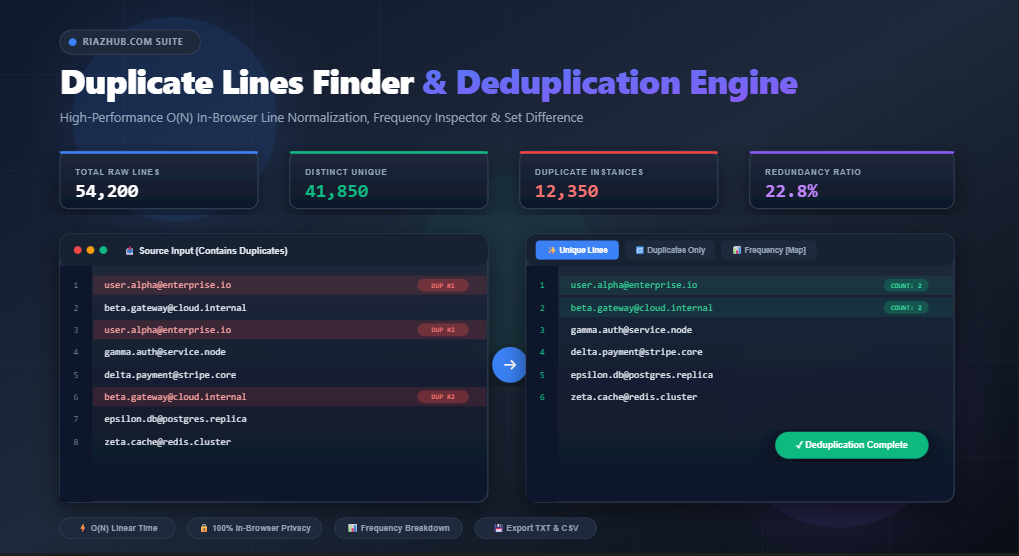
Universal Duplicate Lines Finder & Deduplication Suite: The Complete Guide to Real-Time Data Cleansing, Set Difference & Occurrence Auditing
1. Introduction: The High Cost of Duplicate Data in Modern Systems
In data engineering, digital marketing, database administration, and software development, redundant and duplicate lines represent one of the most persistent sources of operational inefficiency. Whether dealing with dirty customer relationship management (CRM) contact lists, concatenated Apache web server logs, SEO keyword dumps, or product catalog CSVs, duplicate data causes skewed analytics, wasted advertising budgets, inflated infrastructure costs, and database unique constraint violations.
Traditional methods of deduplicating lines—such as pasting datasets into heavy desktop spreadsheet software (like Microsoft Excel or Google Sheets) or writing ad-hoc shell scripts (sort | uniq)—are often cumbersome, slow, or inaccessible when working across different operating systems. Furthermore, uploading sensitive customer emails, financial SKU records, or proprietary database IDs to untrusted third-party web servers introduces major privacy and compliance risks under regulations like GDPR and CCPA.
To address these challenges, the Universal Duplicate Lines Finder & Deduplication Suite provides an ultra-fast, 100% in-browser utility engine that enables developers, data analysts, and marketers to isolate, inspect, sort, and deduplicate datasets of up to 50,000+ lines in sub-second execution times with complete client-side security.
2. Set Theory & Deduplication Taxonomy: Defining Unique vs. Distinct vs. Duplicate
When discussing line filtering, practitioners frequently conflate terms like “unique,” “distinct,” and “duplicate.” In mathematical set theory and database relational algebra, these terms have precise definitions that determine the output of a data cleaning operation. The Duplicate Lines Finder on RiazHub cleanly categorizes results into four dedicated analytical views:
2.1 Unique Lines (Deduplicated Result / Set Union)
In standard data processing, Deduplication refers to reducing a multiset (a collection that allows repeated elements) into a proper set where every element appears exactly once. If the line john@example.com appears 5 times in your input, the deduplicated output will contain john@example.com exactly once.
Mathematically, given an input list $L = [x_1, x_2, \dots, x_n]$, the Unique Lines operation returns the set:
S = { x | x ∈ L }This is the standard mode used when preparing email broadcast recipients or building distinct keyword index tables.
2.2 Duplicate Lines Only (Entries with Frequency ≥ 2)
The Duplicates Only view isolates all entries that occur two or more times in the source data. Instead of returning the redundant repeated rows, it outputs one representative instance of each duplicate key.
This view is essential for anomaly detection, auditing fraudulent duplicate registrations, finding duplicate URLs in site sitemaps, or identifying frequent recurring exceptions in application error logs.
2.3 Strictly Unique Lines (Absolute Frequency = 1)
Strictly Unique (also known as the non-repeating complement) extracts only those entries that appear exactly once across the entire input dataset. Any line that appeared 2 or more times is completely discarded.
Mathematically, if $f(x)$ represents the occurrence count of element $x$ in list $L$:
StrictlyUnique(L) = { x ∈ L | f(x) = 1 }This mode is vital for reconciling two conflicting datasets, identifying single-touch visitors, or isolating one-off anomalies that did not repeat.
2.4 Occurrence Frequency Counting & Relative Redundancy
Beyond simple boolean inclusion/exclusion, understanding the distribution of line frequencies reveals deep patterns in datasets. The Frequency Inspector Table in the RiazHub Deduplication Tool generates a real-time matrix calculating:
- Line Content: The representative raw text string.
- Absolute Occurrence Count ($f$): How many times the string was encountered (e.g.,
14x). - Relative Frequency Percentage ($P$): The proportion of the total dataset represented by this entry:
P = (f / Total Lines) × 100% - Total Dataset Redundancy Ratio: The overall proportion of redundant lines in the input:
Redundancy % = ((Total Filtered Lines - Distinct Unique Lines) / Total Filtered Lines) × 100%
3. Algorithmic Complexity: Hash Maps O(N) vs. Nested Iteration O(N²)
3.1 The Quadratic Bottleneck in Browser Text Processing
Naïve implementations of duplicate finders iterate through an array of lines and check every item against all subsequent items using nested loops (Array.prototype.indexOf or Array.prototype.includes). This results in an exponential time complexity of $\mathcal{O}(N^2)$.
While quadratic execution is unnoticeable for lists of 100 lines ($10,000$ operations), it causes complete browser freezes and unresponsive script crashes when processing datasets exceeding 10,000 lines ($100,000,000$ operations).
3.2 Hash Table Indexing with Native JavaScript Map and Set
The Universal Duplicate Lines Finder utilizes ECMAScript 6 native Map and Set hash data structures to achieve linear time complexity $\mathcal{O}(N)$.
During tokenization, each line is mapped to a normalized hash key. Key lookups and insertions in JavaScript Hash Maps execute in near-constant time $\mathcal{O}(1)$. Consequently, processing a 50,000-line dataset requires only 50,000 operations, completing in under 15 milliseconds in modern V8/SpiderMonkey engines.
| Dataset Size ($N$) | Nested Loop $\mathcal{O}(N^2)$ Operations | RiazHub Hash Map $\mathcal{O}(N)$ Operations | Performance Gain |
|---|---|---|---|
| 1,000 Lines | 1,000,000 | 1,000 | 1,000× Faster |
| 10,000 Lines | 100,000,000 | 10,000 | 10,000× Faster |
| 50,000 Lines | 2,500,000,000 (Browser Crash) | 50,000 (15ms) | 50,000× Faster |
4. Normalization Rules & Matching Criteria
Real-world datasets rarely contain perfectly uniform lines. Discrepancies in casing, accidental trailing spaces, Windows vs. Unix line breaks, and punctuation often prevent raw string equality checks from catching duplicate records. The online deduplication engine on RiazHub provides five granular normalization filters:
4.1 Case-Insensitive Matching
When enabled (default), text comparison keys are converted to lowercase. For instance, Alpha@Domain.com, alpha@domain.com, and ALPHA@DOMAIN.COM are correctly recognized as three occurrences of the same line.
4.2 Leading & Trailing Whitespace Normalization
Extra spaces or invisible tab characters frequently hitchhike when copying data from HTML tables or PDF documents. Enabling whitespace trimming strips leading and trailing whitespace before computing the hash key, ensuring keyword matches keyword.
4.3 Blank Line Filtering
Empty carriage returns and whitespace-only rows are automatically filtered out when “Ignore Blank / Empty Lines” is active, keeping output datasets dense and clean.
4.4 Punctuation & Unicode Symbol Stripping
When auditing raw keywords or customer names, differences in commas, semicolons, quotes, or dashes can obscure duplicates. This option applies unicode regex normalization (/[^\p{L}\p{N}\s]/gu) to compare the alphanumeric core of each line.
4.5 First Occurrence vs. Last Occurrence Preservation
When deduplicating a list where items have subtle formatting variations (such as casing or comments), users can choose whether the output should retain the First Encountered Instance or the Last Encountered Instance in the sequence.
5. 6 Real-World Enterprise Cleansing Workflows
5.1 Email Marketing & CRM Newsletter List Cleansing
Marketing platforms (Mailchimp, Klaviyo, HubSpot, Brevo) bill according to subscriber counts. Uploading duplicate or dirty subscriber lists directly inflates marketing SaaS costs and risks sending duplicate marketing campaigns to subscribers. Using the Duplicate Lines Finder to clean lists prior to upload guarantees 100% unique recipient rosters.
5.2 SEO Keyword Research & Search Query De-duping
When combining keyword exports from Ahrefs, Semrush, Google Search Console, and Moz, the resulting consolidated CSV files often contain tens of thousands of duplicate keyword variants. Deduplicating these lists in real time accelerates search volume clustering and content gap analysis.
5.3 Database SQL Migrations & Primary Key Uniqueness Auditing
Before executing bulk INSERT or ALTER TABLE ADD CONSTRAINT UNIQUE queries in PostgreSQL or MySQL, developers can paste ID columns into the tool. If duplicate instances exist, the Duplicates Only tab will instantly pinpoint the exact colliding keys before the migration script fails in production.
5.4 DevOps Server Log Error Triage & Incident Clustering
During production outages, Nginx and Kubernetes logs generate thousands of lines of repeating stack traces. By switching to the Frequency Breakdown Table, SREs and DevOps engineers can identify which specific error messages are firing most frequently.
5.5 Google Ads & Meta Ads Negative Keyword Management
PPC advertisers managing extensive negative keyword lists can eliminate redundant entries and clean up punctuation errors, staying well below account-level keyword limits.
5.6 E-Commerce SKU Catalog & Inventory Reconciliation
Online merchants merging supplier catalogs (Shopify, WooCommerce, Amazon Seller Central) can quickly check for barcode/SKU collisions to prevent inventory overwrite errors.
6. Step-by-Step Tutorial: How to Use the RiazHub Deduplication Suite
- Access the Tool: Open the Universal Duplicate Lines Finder & Deduplication Suite in your web browser.
- Load or Paste Input Data: Paste your list directly into the Source Input monospace editor, or drag and drop a
.txt,.csv,.log, or.tsvfile into the drop zone. - Configure Matching Rules: Toggle Case-Insensitive Matching, Trim Whitespace, Ignore Blank Lines, or Punctuation Stripping based on your cleansing requirements.
- Select Your View Mode:
- Click ✨ Unique Lines for the clean, deduplicated roster.
- Click 🔁 Duplicates Only to inspect repeated items.
- Click ⭐ Strictly Unique to view entries that appeared only once.
- Click 📊 Frequency Table to analyze exact occurrence counts and percentages.
- Copy or Export: Click 📋 Copy Result to copy output to your clipboard, or use 💾 Export to download a formatted
.txtor.csvfile.
7. Zero-Telemetry & In-Browser Privacy Architecture
Data privacy is paramount when auditing customer emails, phone numbers, database keys, or proprietary lists. Unlike legacy online conversion tools that send your text to an external server backend for processing, the Universal Duplicate Lines Finder on RiazHub executes 100% client-side inside your browser engine.
No text rows, email addresses, database credentials, or search terms are ever transmitted over the network or saved to cloud servers. The tool functions completely offline once the webpage is loaded, ensuring full compliance with corporate security protocols and data sovereignty regulations.
8. Frequently Asked Questions (FAQ)
Q1: What is the maximum number of lines this tool can process?
Because the tool uses $\mathcal{O}(N)$ Hash Map indexing in native browser memory, it effortlessly processes 50,000+ lines in under a second on modern desktop browsers without memory leaks or UI freezing.
Q2: What is the difference between “Unique Lines” and “Strictly Unique Lines”?
Unique Lines (Deduplicated): Returns every distinct item once, keeping a single copy of lines that were duplicated.
Strictly Unique Lines: Returns only entries that occurred exactly 1 time in the source. If an entry appeared 2 or more times, it is excluded completely from the strictly unique output.
Q3: Can I export frequency counts alongside the lines?
Yes! You can toggle the “Append Counts” switch to output lines with annotations (e.g., product-sku-102 [4x]) or use the Frequency Table CSV Export to download a multi-column dataset containing line text, occurrence frequencies, and percentage ratios.
Q4: Does this tool preserve original line ordering?
Yes. By default, the engine maintains insertion order, outputting unique lines according to their first occurrence in the input list. You can also click the 🔠 Sort Active A-Z button to sort output alphabetically.
9. Conclusion & Start Cleansing Your Datasets Online
Cleaning large datasets, removing redundant entries, and auditing line frequencies are foundational tasks in modern digital workflows. With its linear-time processing engine, customizable matching rules, multi-tab analytical views, and complete client-side privacy, the Universal Duplicate Lines Finder & Deduplication Suite is the ultimate browser-based utility for developers, marketers, and data analysts.
Universal Duplicate Lines Finder & Deduplication Suite
Identify duplicate lines, inspect occurrence frequencies, extract strictly unique records, and clean large datasets in real time with zero server latency.
| # | Line Content | Frequency | Action |
|---|---|---|---|
| No data loaded yet. Paste or load a list to inspect frequencies. | |||
Guide to Line Deduplication & Occurrence Auditing
O(N²) time complexity that locks up browsers on files larger than a few thousand rows. This tool uses ECMAScript 6 native Map and Set hash tables to index keys in linear O(N) time. This ensures sub-second deduplication even when auditing 50,000+ lines of raw data.
Duplicate Lines Only: Returns only entries that appeared 2 or more times in your input dataset.
Strictly Unique Lines: Returns only entries that occurred exactly ONCE across the entire input, filtering out any line that had duplicates anywhere in the source.