
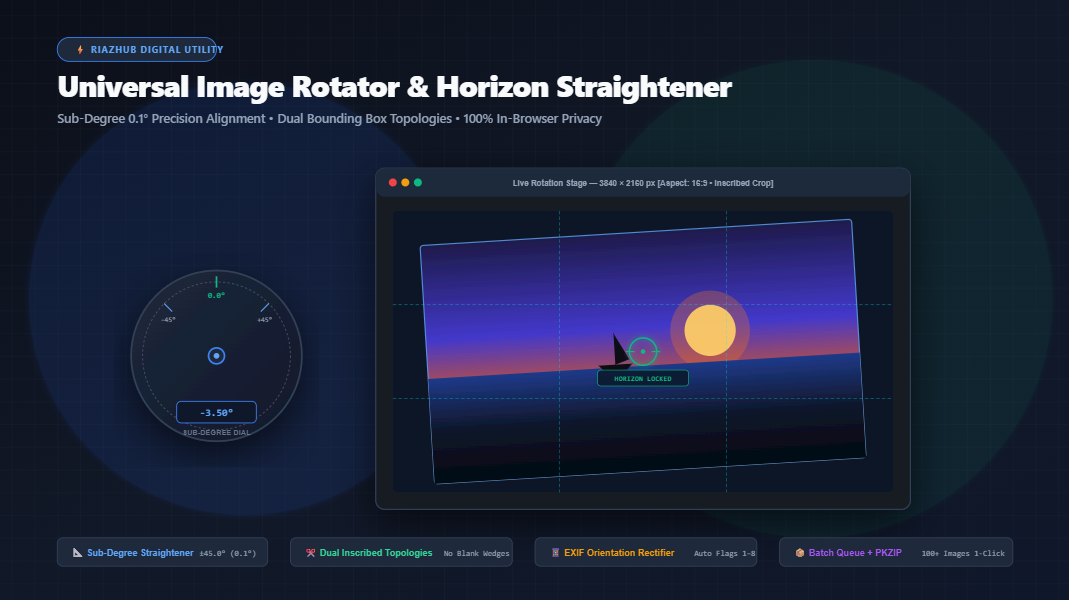
How to Straighten Crooked Horizons & Rotate Photos with Sub-Degree Precision
Nothing diminishes an otherwise breathtaking landscape photo or professional document scan faster than a crooked horizon line or an awkward sideways smartphone angle. Traditional image editing tools often force you to choose between lossy quality destruction or awkward black corner wedges. In this comprehensive guide, we explore the computational geometry behind Euclidean canvas rotations, the mathematics of inscribed maximal rectangular cropping, and how you can achieve pixel-perfect results directly in your browser using the online Image Rotator & Horizon Straightener on RiazHub.
1. The Problem with Standard Image Rotators
Whether capturing a coastal sunset with your DSLR or scanning a multi-page contract using a flatbed scanner, real-world camera alignment is rarely 100% level. Handheld camera shake, uneven tripod placement, or skewed document feeders regularly introduce subtle angular misalignments between -3.0° and +4.5°.
Unfortunately, most basic operating system viewers and online utilities handle image rotation poorly:
- Coarse 90° Only: They restrict rotation strictly to 90° or 180° increments, leaving fine horizon tilts impossible to fix without expensive desktop suites like Photoshop or Lightroom.
- Destructive Corner Cropping: Arbitrary angle rotations truncate corner pixels because the bounding canvas does not dynamically expand to encompass the rotated polygon.
- Server-Side Privacy Leaks: Most free web rotators transmit your high-resolution personal images, financial records, or medical scans to third-party cloud servers where they are queued, processed, and stored.
- Lossy Re-Encoding: Applying a simple 90° CW turn repeatedly applies lossy JPEG compression artifacts, degrading crisp typography and sharp edges.
To solve these hurdles, RiazHub’s Universal Image Rotator Studio executes 100% within your client browser using high-performance HTML5 Canvas and mathematical bounding box calculations.
2. Mathematical Foundations: Bounding Box Expansion vs. Inscribed Auto-Crop
When a 2D rectangular image matrix of original width W and height H is rotated around its central pivot by an arbitrary angle θ (theta in radians), the geometry of the bounding canvas must be recalibrated.
Topology A: Bounding Box Expansion (Zero Corner Loss)
If your goal is to preserve every single corner pixel of the original artwork, the enclosing canvas must expand to accommodate the outermost corners of the rotated rectangle. The new bounding width W_new and height H_new are computed using trigonometric projections:
W_new = Math.round(Math.abs(W * Math.cos(θ)) + Math.abs(H * Math.sin(θ)));
H_new = Math.round(Math.abs(W * Math.sin(θ)) + Math.abs(H * Math.cos(θ)));
Because the new rectangle is larger than the original area, triangular corner wedges appear outside the tilted artwork. In the free Image Rotator and Horizon Straightener utility, you can matte these backdrop wedges with:
- Transparent Alpha Checkered Canvas: Perfect for lossless PNG and WebP graphics used in website overlays.
- Solid Studio Colors: Crisp Pure White (#FFF), Off-White (#F3F4F6), Dark Slate (#1E293B), or any custom hex color.
- Procedural Blurred Edge Cushion: A modern aesthetic technique that duplicates and blurs the perimeter edges by 25 pixels, creating a seamless background fill.
Topology B: Inscribed Maximal Rectangular Crop (Zero Blank Wedges)
In landscape photography and portraiture, you typically want a leveled horizon without having any angled blank wedges visible around the borders. Achieving this requires computing the maximum internal sub-rectangle that fits inside the rotated boundaries while maintaining the original aspect ratio r = W / H.
| Original Aspect Ratio Condition | Cropped Width Formula (W_crop) | Cropped Height Formula (H_crop) |
|---|---|---|
| Portrait / Square (W ≤ H) | W / (|cos θ| + r · |sin θ|) |
W_crop / r |
| Landscape (W > H) | H_crop · r |
H / (r⁻¹ · |sin θ| + |cos θ|) |
When you select the Inscribed Auto-Crop option inside the tool, the engine computes these sub-pixel dimensions instantaneously at 60 FPS, eliminating empty corner wedges automatically with zero manual guessing.
When photographing open water, the human eye can detect a horizon tilt as small as 0.3 degrees. Always enable the Horizon Leveling Centerline overlay in the tool to match the ocean’s water plane exactly with the calibrated green crosshair.
3. Automated EXIF Smartphone Camera Orientation Rectification
Have you ever taken a vertical portrait photo on an iPhone or Android device, only for it to appear sideways or upside down when uploaded to WordPress, social platforms, or desktop folders?
This happens because smartphones frequently leave the raw pixel array in horizontal landscape format and write a metadata flag called EXIF Tag 0x0112 (Orientation values 1 through 8):
Tag 1: Upright 0° (Normal)Tag 3: Inverted 180°Tag 6: Rotated 90° CW (standard smartphone portrait)Tag 8: Rotated 270° CW (90° CCW)Tags 2, 4, 5, 7: Mirrored horizontal/vertical orientations
When you load photos into launch the Browser-Based Image Rotator tool, its built-in binary parser scans the JPEG APP1 markers, identifies the exact orientation tag, and applies an initial Euclidean normalization transformation. As a result, your photos open in their true physical orientation from the very first second.
4. Key Studio Features at a Glance
Here is a breakdown of what makes this studio uniquely powerful compared to standard web tools:
| Capability | Standard Online Rotators | RiazHub Universal Rotator Studio |
|---|---|---|
| Rotation Granularity | Coarse 90° / 180° only | Sub-degree ±45.0° (0.1° sensitivity) + 90° quick steps |
| Boundary Topologies | Hard corner truncation or forced black bars | Dual Modes: Expand Canvas vs. Inscribed Maximal Crop |
| Data Privacy | Files sent to remote cloud servers | 100% In-Browser Local Memory (Zero Uploads) |
| Diagnostics HUD | None (Static preview) | Rule-of-Thirds Grid, Horizon Line, Split Slider & 400% Loupe |
| Batch Queue | Single file only | 100+ images with in-memory PKZIP archive export |
| Output Formats | Compressed JPEG only | Lossless PNG (Alpha), High-Res WebP, and Custom JPEG |
5. Step-by-Step Guide: Straightening a Crooked Photo in 30 Seconds
- Load Your Source Artwork: Open RiazHub’s Universal Image Rotator Studio and drag and drop your photo into the upload dropzone. You can also paste directly from your clipboard (
Ctrl+V/Cmd+V) or click “Load Sample Horizon” to practice. - Align the Horizon Line: Switch to the Horizon Leveler HUD tab or check the “Horizon Leveling Line” box. Adjust the fine slider or drag the virtual protractor compass dial until the water plane or architectural horizontal matches the glowing green reticle line.
- Select Your Boundary Topology:
- Choose “Inscribed Crop” if you want a clean image with zero empty wedges.
- Choose “Expand Bounds” if you need to keep 100% of the original content with transparent or solid colored matting.
- Inspect with Split-Screen & Loupe: Drag the interactive Before/After comparison divider to inspect the transformation, or activate the 200%/400% Zoom Loupe to verify sub-pixel edge sharpness.
- Export & Download: Choose between lossless WebP, PNG, or JPEG, set your desired compression quality, and click “Download Rotated Image” or “Copy to Clipboard”.
6. Frequently Asked Questions (FAQ)
Conclusion
Straightening crooked horizons and rectifying skewed smartphone scans no longer requires heavy desktop software or compromised cloud utilities. By combining sub-degree rotation accuracy, dual spatial boundary topologies, and complete client-side security, you can produce publication-grade imagery with effortless speed.
Try it yourself right now on RiazHub’s Universal Image Rotator & Horizon Straightener.
Universal Image Rotator & Horizon Straightener
Rotate photos by 90°, 180°, or exact fractional degrees (-45.0° to +45.0°). Leveled beach horizons, deskewed document scans, horizontal/vertical mirror flips, and lossless client-side export.
When an image of dimensions W × H is rotated by an arbitrary angle θ, two distinct spatial topologies are possible:
-
Bounding Box Expansion (Zero Corner Cropping): Expands the canvas surface area to
W_new = |W cos θ| + |H sin θ|andH_new = |W sin θ| + |H cos θ|. Every single original pixel is retained, and triangular corner wedges are rendered with your chosen matte backdrop (transparent alpha, solid studio color, or blurred edge cushion). -
Inscribed Maximal Rectangular Crop (Zero Blank Wedges): Calculates the maximum internal rectangle maintaining the original aspect ratio
r = W / Hthat fits entirely inside the angled perimeter, automatically eliminating all empty border wedges without manual cropping.
Modern smartphones (iPhones, Samsung Galaxy, Google Pixel) record camera sensor orientation inside the raw image binary via EXIF Tag 0x0112 (values 1 through 8) instead of physically rotating pixel matrices. Certain browsers, web apps, or operating systems display these photos sideways or upside down.
This studio reads the raw binary EXIF tags upon loading, maps tags 1 through 8 to correct Euclidean rotations and flips, and permanently renders them into upright pixel coordinates before any user transformations are applied.
All canvas transformations, trigonometric matrix interpolations, sub-pixel anti-aliasing, and ZIP archiving take place exclusively inside your browser's memory using HTML5 Canvas (2DContext) and pure native JavaScript. Zero photos or personal documents are ever uploaded to any external server or cloud service.