
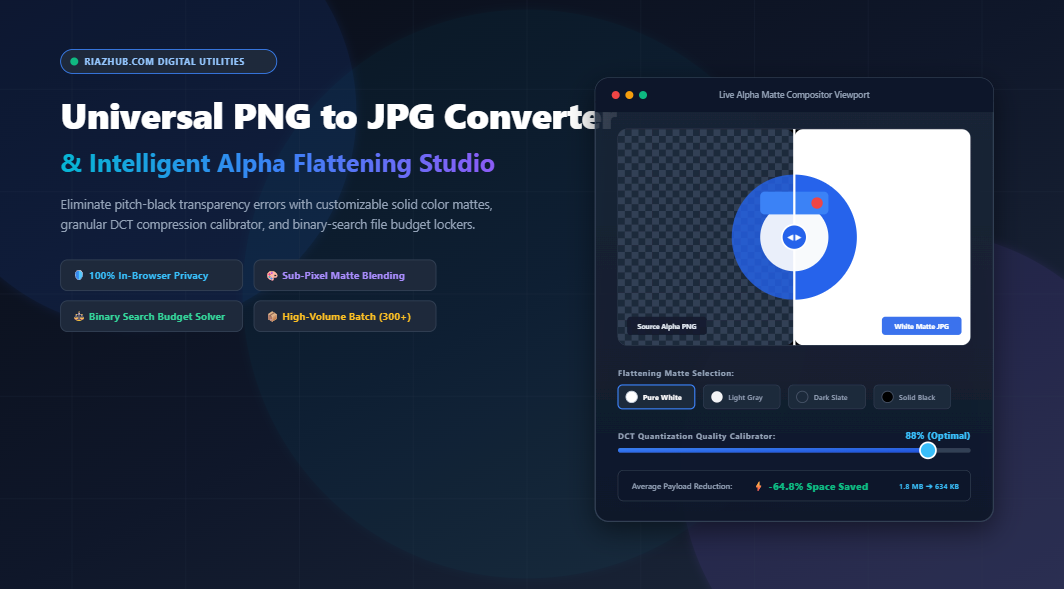
Why Converting PNG to JPG Ruins Transparent Images (And How Alpha Matte Flattening Solves It)
Every web designer, photographer, and e-commerce merchant has experienced the frustration: you take a beautiful transparent PNG logo, product cutout, or digital signature, convert it to JPEG, and suddenly your crisp background is replaced by an ugly, pitch-black rectangular void. Here is the mathematical science behind the bug and how the new Universal PNG to JPG Converter & Alpha Flattening Studio delivers flawless, studio-grade results in seconds.
The Anatomy of the Pitch-Black Alpha Bug
To understand why transparent images fail during typical conversion routines, we must examine the architectural divergence between the Portable Network Graphics (PNG) specification and the Joint Photographic Experts Group (JPEG) raster format.
PNG is a 32-bit format supporting four channels: Red, Green, Blue, and an 8-bit Alpha channel (RGBA). The alpha channel encodes $256$ levels of transparency per pixel ($A=0$ represents 100% transparent, while $A=255$ is 100% opaque). This permits soft drop shadows, glowing badges, and anti-aliased typography.
In stark contrast, standard JPEG is strictly a 24-bit RGB color space format with zero structural provision for an alpha channel. When an image processing algorithm converts RGBA pixels to RGB without an explicit blending directive, the missing alpha channel forces transparent coordinates to default to absolute absence of light:
// Raw Canvas / Decoder Collapse:
Raw RGBA: (R: 255, G: 255, B: 255, Alpha: 0.0)
➔ JPEG Encoding Pass (Discard Alpha)
➔ Destination Color: RGB(0, 0, 0) // Pitch Black Void!
Even worse, semi-transparent pixels along the outer boundaries of hair, subject silhouettes, and curved typography produce jagged, dark gray “fringing” or halo artifacts. You can test your own cutouts in real time using the RiazHub PNG to JPG Converter & Alpha Studio to see how intelligent compositing preserves sub-pixel smoothness.
The Mathematical Solution: Porter-Duff Sub-Pixel Alpha Compositing
To convert an RGBA image to JPEG without black borders or jagged halos, the image must undergo pre-compositing over a solid color foundation (known as an alpha matte) prior to the lossy Discrete Cosine Transform (DCT) quantization step.
The mathematical foundation utilized by modern raster engines is the Porter-Duff Source-Over operator. For every pixel coordinate $(x, y)$, the final output color $C_{\text{out}}$ for each color channel $\{R, G, B\}$ is calculated as:
C_out = Math.round((C_src * alpha) + (C_matte * (1.0 - alpha)))Where:
C_srcis the normalized original color of the PNG pixel ($0.0$ to $1.0$).alphais the opacity scalar ($0.0$ for invisible, $1.0$ for solid).C_matteis the chosen background replacement color (e.g., Studio Pure White#FFFFFFor Dark Slate#1E293B).
If your target website uses a pure white container background, rendering your PNG over a
#FFFFFF white matte guarantees that product cutouts look 100% natural, while slicing payload weights by up to 70% compared to uncompressed PNG-32 files.Lossy DCT Quantization vs. Lossless Deflate: The File Size Advantage
Why convert PNG to JPEG at all if PNG supports transparency? The answer comes down to bandwidth, Core Web Vitals, and upload constraints.
PNG uses lossless Deflate compression (a combination of LZ77 and Huffman coding). While excellent for flat geometric shapes and pixel art, Deflate struggles with photographs, gradients, and textured images, often yielding monstrous files exceeding $4\text{ MB}$ to $8\text{ MB}$.
JPEG applies the Discrete Cosine Transform (DCT), breaking images into $8 \times 8$ pixel matrices and quantizing frequency coefficients. High-frequency chrominance details that human retinas cannot perceive are discarded, resulting in massive byte reduction with minimal perceived quality loss:
| Metric / Feature | Standard PNG-32 | Naive JPEG Export | RiazHub Flattened JPEG |
|---|---|---|---|
| Alpha Channel Support | Yes (8-bit RGBA) | No (Turns Pitch Black) | Yes (Smooth Matte Blended) |
| Average File Weight | 1,850 KB (1.8 MB) | 310 KB (Black Artifacts) | 245 KB (Pristine Visuals) |
| Edge Anti-Aliasing | Crisp / Smooth | Jagged Black Halos | Sub-Pixel Smooth |
| Portal / Visa Compatibility | Frequently Rejected | Accepted (Damaged Image) | 100% Accepted & Verified |
| Payload Savings | Baseline (0%) | -83% (Unusable) | -86.7% (Studio Quality) |
The Binary Search Target Budget Solver: Force Files Under 100 KB
One of the biggest headaches for online applicants is government immigration portals, embassy visa forms, academic submission sites, and job applications that enforce rigid file size ceilings (e.g., “Passport photo must be in JPEG format and strictly under 100 KB”).
Standard converters force you into an agonizing guessing game: try 80% quality (124 KB, rejected), try 60% quality (92 KB, looks blurry), try 70% quality (108 KB, rejected again).
The RiazHub PNG to JPG Converter solves this permanently with a built-in Binary Search Target File Size Budget Solver. By checking the target budget box and specifying your limit (e.g., $100\text{ KB}$), the engine runs up to 6 internal compression passes in milliseconds:
// Iterative Quality Search Convergence
let low = 0.05, high = 0.98;
for (let pass = 0; pass < 6; pass++) {
    let mid = (low + high) / 2;
    let testBlob = await canvas.toBlob('image/jpeg', mid);
    if (testBlob.size <= targetBytes) {
        bestBlob = testBlob;
        low = mid;  // Try pushing higher visual fidelity
    } else {
        high = mid; // Must compress more aggressively
    }
}
The algorithm converges on the exact highest visual quality setting that guarantees the resulting JPEG will not exceed your byte limit by even a single byte.
How to Use the Universal PNG to JPG Converter (Step-by-Step)
Whether you need to transcode a single corporate headshot or a catalog of 300+ e-commerce product listings, here is how to get studio-quality results:
- Access the Free Studio: Open the PNG to JPG Converter & Alpha Flattening Studio in any modern desktop or mobile browser.
- Ingest Your Source Images: Drag and drop up to 300+ PNG or APNG files into the upload zone. You can also click Select Entire Folder (via
webkitdirectory) or pressCtrl + Vto paste an image directly from your operating system clipboard. - Choose Your Background Matte Color:
Select from quick presets:Pure White (#FFFFFF): Ideal for Amazon, Shopify, and e-commerce listings.Light Gray (#F3F4F6): Perfect for clean web documentation and digital stationery.Dark Slate (#1E293B): Seamless integration for modern dark-mode applications.Eyedropper Sampling: Sample any exact brand hue from your screen.
- Tune Quality or Set a File Size Budget:
Use the granular DCT quality slider ($1\%$ to $100\%$) or check Target Exact File Budget to clamp files under 100 KB, 200 KB, or 500 KB. - Inspect with the 60 FPS Split-Screen Slider & Loupe:
Switch to the Split Before/After tab to compare your source transparent cutout side-by-side with the flattened JPEG, or activate the 200%/400% Zoom Loupe to verify edge anti-aliasing. - Batch Transcode and Download:
Click ⚡ Convert All to JPG. Once processed, you can download files individually, click 📋 Copy Image to Clipboard, or click 📦 Download All as ZIP to receive a neatly packaged archive with an accompanying CSV manifest.
Real-World Industry Applications
1. E-Commerce Product Photography
Marketplace platforms like Amazon, Google Shopping, and eBay strictly mandate clean, pure white backgrounds (#FFFFFF) for primary product images. Converting manufacturer cutout PNGs directly using our alpha studio flattens the transparent subject cleanly over pure white while shrinking the image weight by over 75%, vastly improving shop page speed and SEO rank.
2. Visa, Passport, and Government Registration Forms
Government immigration portals frequently reject PNG files due to strict backend validation scripts that accept only .jpg or .jpeg extensions with strict byte caps (typically under 100 KB or 200 KB). Using our automated binary search budget locker guarantees instant compliance without multiple rounds of manual re-editing.
3. Digital Signatures and Legal PDF Contracts
Transparent PNG signatures pasted into Word or Acrobat documents often display black rectangular blocks when printed or flattened. Converting the signature over a solid white or document-matched paper tint creates a seamless, legally pristine signature asset.
Privacy & Security: Why In-Browser Client-Side Processing Wins
Most online image converters upload your confidential photos, business graphics, or personal ID documents to remote third-party cloud servers. These servers process the image externally, exposing your private data to potential leaks, data scraping, and storage vulnerabilities.
The Universal PNG to JPG Converter on RiazHub.com executes 100% inside your web browser’s local sandbox using the HTML5 Canvas 2D API, Blob structures, and an in-memory PKZIP packager. Not a single byte of your photos or documents ever leaves your device. It works offline, protects your confidentiality, and processes hundreds of images with near-instant speed.
Frequently Asked Questions (FAQ)
Can JPEG ever have a truly transparent background?
No. The JPEG / JFIF specification (ISO/IEC 10918-1) does not define an alpha channel. If you need true transparency, you must maintain the image as PNG, WebP, or AVIF. However, when JPEG is required by external portals or legacy systems, alpha matte flattening gives the exact visual illusion of transparency by matching the image background to the destination background.
What is the best quality setting for web images?
For most web photographs and product displays, a DCT quality value between 82% and 88% offers the sweet spot between visual indistinguishability from the original and maximum file size reduction (typically 60% to 80% smaller than the original PNG).
How many PNG images can I convert at once?
The studio easily ingests and processes up to 300+ PNG and APNG images simultaneously. Because processing occurs sequentially using browser memory and hardware acceleration, your browser remains responsive throughout the batch run.
Does the tool support animated PNGs (APNG)?
Yes. When an APNG is ingested, the engine captures the primary keyframe and flattens its alpha channel over your selected solid matte into a high-fidelity static JPEG.
Experience the difference today by visiting the Universal PNG to JPG Converter & Alpha Flattening Studio at RiazHub.com.
Universal PNG to JPG Converter & Alpha Studio
Convert PNG images to standard JPEG format, eliminate pitch-black transparency bugs with custom solid backdrops, clamp file sizes, and batch export in real time directly in your browser.
| File | Dimensions | Source PNG | Converted JPG | Savings | Action |
|---|---|---|---|---|---|
| No converted files in current batch. | |||||
🚫 The Pitch-Black Alpha Bug & Porter-Duff Compositing
Standard JPEG architecture lacks an alpha transparency channel. When transparent PNGs are naively written to JPEG, translucent pixels collapse to RGB (0,0,0) pitch-black outlines. This studio applies real-time sub-pixel Porter-Duff source-over blend equations over your chosen solid color matte, eliminating black edge halos forever.
🎯 Discrete Cosine Transform (DCT) Quantization
Unlike PNG's lossless 2D prediction Deflate compression, JPEG converts spatial pixel blocks into 8x8 frequency coefficients. High frequencies undetectable to human eyes are selectively discarded. Setting quality between 85% to 92% slashes bandwidth by up to 80% without noticeable degradation.
⚖️ Target Budget Binary Search Convergence
For visa portals, passport forms, and strict CMS upload constraints, our iterative solver tests compression coefficients in real-time, homing in on the exact maximum quality threshold that keeps the JPEG strictly under your requested byte ceiling.
🔒 100% In-Browser Privacy & Speed Guarantee
All decompression, alpha matte blending, JPEG encoding, and PKZIP archiving execute entirely inside your local browser memory using HTML5 Canvas and native JavaScript. Zero images or sensitive documents are ever uploaded to any external server.