
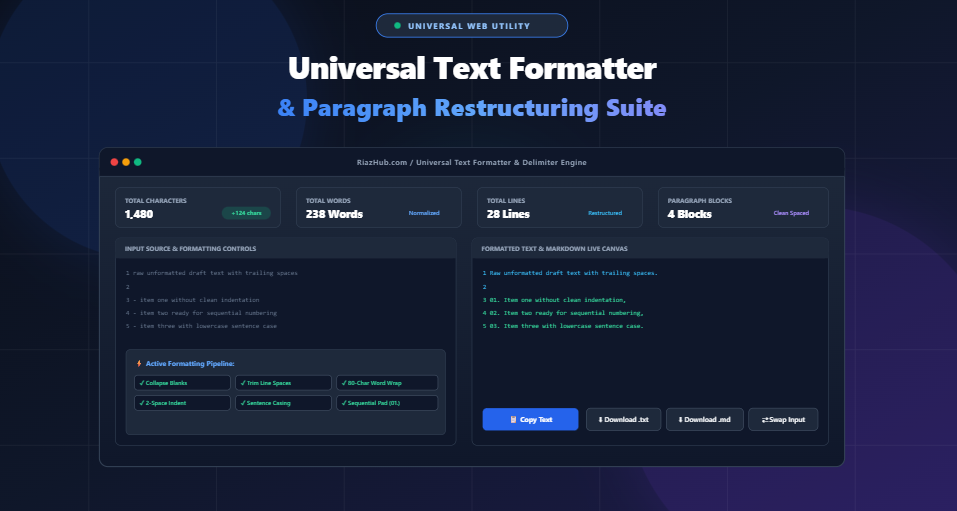
Universal Text Formatter & Paragraph Restructuring Suite: Clean, Indent, Wrap, and Delimit Copy in Real Time
Whether you are copying raw notes from a PDF, scraping product descriptions from web pages, preparing data arrays for database queries, or drafting clean Markdown documentation for GitHub, messy, unformatted text is an everyday frustration. Double blank lines, irregular leading spaces, missing list prefixes, unformatted letter casing, and jagged line wrapping consume valuable hours when fixed by hand.
To solve these productivity bottlenecks without risking data leakage, we built the Universal Text Formatter & Paragraph Restructuring Suite on RiazHub.com. This high-performance utility runs 100% inside your browser sandbox, allowing you to restructure messy copy, convert casing, wrap lines at arbitrary character limits, add sequential numbered lists, and inject custom delimiters in sub-millisecond real-time execution.
⚡ Ready to Format & Restructure Your Text Instantly?
No downloads, no subscriptions, and zero server transmission. Try the full suite right now on RiazHub.
Why Text Becomes Messy: The Core Formatting Challenges
Digital text comes from hundreds of disparate sources—word processors, spreadsheet cells, email clients, terminal CLI pipes, and PDF documents. When moved between applications, plain text often inherits structural anomalies:
- Erratic Line Breaks & Phantom Returns: Copying text out of narrow PDF columns or legacy email bodies frequently injects hard line breaks in the middle of sentences, breaking the natural paragraph flow.
- Inconsistent Indentations: Mixing 2 spaces, 4 spaces, and tab characters (
\t) causes source code, YAML configurations, and Python scripts to fail syntax validation. - Trailing Whitespace & Duplicate Spaces: Invisible spaces at the end of lines clutter Git diffs and trigger linting errors in collaborative repositories.
- Unformatted Casing: Headlines pasted from chat channels or OCR tools often arrive in ALL CAPS or haphazard lower case, requiring manual retyping.
- Missing Delimiters for Code & SQL: Converting a raw vertical list of strings into a formatted SQL
IN ('item1', 'item2', ...)clause or JSON array is tedious when performed line by line.
Key Capabilities of the Universal Text Restructuring Suite
📄 Line & Paragraph Restructuring
Collapse consecutive empty lines into single blanks, strip all empty lines, break sentences onto new lines after punctuation (. ? !), or join lines into a single continuous stream.
⌨️ Smart Indentation Engine
Instantly apply 2-space, 4-space, tab, or custom string indentations across all lines while trimming unwanted leading and trailing whitespace.
📐 Word-Safe Hard Line Wrapping
Wrap long text cleanly at 72, 80, or custom character widths without truncating or splitting words in half—ideal for terminal displays and plain-text emails.
🔠 Intelligent Casing Transformations
Convert text to AP Style Title Case (respecting minor words like “in”, “of”, “and”), Sentence case, Capitalize Every Word, UPPERCASE, or lowercase.
🔢 Sequential Prefix & Suffix Augmentation
Automatically prepend sequential counters (1. , 01. , 02. ), Markdown bullets (- ), code comments (// , # ), or enclose items in quotes and commas for SQL and JSON.
👁️ Live Dual-View Markdown Canvas
Toggle between a synchronized Plain Text Monospace Editor with live line gutters and an instant HTML Markdown rendering engine.
1-Click Quick Preset Profiles
To accelerate common formatting jobs, the Universal Text Formatter comes equipped with 5 dedicated 1-click preset profiles:
| Preset Profile | Automated Operations | Best Use Case |
|---|---|---|
| Clean Paragraphs | Trim line edges, collapse blank lines, apply Sentence case, collapse multi-spaces | Blog articles, academic drafts, email newsletters, and editorial copy |
| Bulleted Markdown List | Remove blank lines, prefix with - , trim whitespace |
README.md files, task lists, Notion documentation, and meeting notes |
| Numbered Code List | Sequential zero-padded numbering (01. , 02. ), trim line edges |
Step-by-step technical guides, tutorial steps, and changelogs |
| SQL / Array Inserter | Wrap lines in single quotes '...', append comma ,, apply 2-space indent |
SQL WHERE id IN (...) queries, JavaScript and Python arrays |
| Terminal 80-Char Wrap | Word-safe hard wrapping at 80 characters, collapse extra blank lines | Git commit messages, terminal READMEs, and Unix shell outputs |
Real-World Examples & Before/After Transformations
1. Turning Raw Lists into SQL Query Clauses
Developers frequently need to turn customer emails or item SKUs into an SQL array. Using the RiazHub Text Formatter tool, you can apply prefix ' and suffix ', in a single second:
apple
banana
cherry// After: Formatted SQL Array with 2-Space Indent
‘apple’,
‘banana’,
‘cherry’,
2. Generating Clean AP-Style Title Case Headlines
Proper title casing requires knowing which words to capitalize and which minor prepositions or articles to keep lowercase. The suite’s AP Style Title Case algorithm automatically normalizes words such as “and”, “in”, “of”, “to”, and “for”:
HOW TO REPAIR MOJIBAKE AND CORRUPTED UTF-8 TEXT IN A WORDPRESS ENVIRONMENT// After: Clean AP Title Case
How to Repair Mojibake and Corrupted UTF-8 Text in a WordPress Environment
3. Terminal and Plain-Text Email Line Wrapping
Reading unbroken 300-character single-line paragraphs on wide monitors creates visual strain. The hard-wrap engine splits sentences at word boundaries at your specified line length (e.g. 72 or 80 characters):
The quick brown fox jumps over the lazy dog repeatedly across a very long uninterrupted sentence that keeps going without any line breaks whatsoever.// After: 80-Character Word-Safe Hard Wrap
The quick brown fox jumps over the lazy dog repeatedly across a very long
uninterrupted sentence that keeps going without any line breaks whatsoever.
🚀 Try the Interactive Text Restructuring Studio
Paste your copy, select your custom indentation or prefixes, and download formatted .txt or .md documents instantly.
100% Privacy: Why Client-Side Processing Matters
Many online text manipulation websites send your pasted inputs to backend servers for processing. This poses serious confidentiality and privacy risks when formatting:
- Proprietary Code & API Keys: Accidental submission of internal scripts or configuration tokens.
- Unpublished Essays & Drafts: Leaking embargoed articles, client proposals, or research manuscripts.
- Personal Identifiable Information (PII): Email lists, customer rosters, or financial spreadsheets.
The Universal Text Formatter on RiazHub.com executes 100% in your browser sandbox using pure vanilla JavaScript. No external APIs, cookies, or remote analytics intercept your content. You can even disconnect your internet connection, and the suite will continue to run at full speed offline.
Step-by-Step Guide: How to Format Your Text in Seconds
- Input Your Text: Paste your copy into the Source Input box, click Sample Text to test the engine, or drag and drop any
.txt,.md,.csv, or.jsonfile into the dropzone. - Choose a Preset or Custom Rules: Click one of the 5 quick preset buttons or expand the accordions to configure custom indentations, prefixes/suffixes, hard line wrapping, or casing algorithms.
- Inspect Live Metrics: Observe the 4-card overview grid for real-time character deltas, word counts, total line counts, and paragraph blocks.
- Switch Views: Toggle between the Plain Text Output editor (with synchronized line numbers) and the Markdown Preview canvas to verify formatting.
- Copy or Export: Click Copy Formatted Text for one-click clipboard copying or download the clean output directly as a
.txtor.mdfile.
Frequently Asked Questions (FAQ)
Sentence case capitalizes only the first letter of each sentence and proper nouns after punctuation (. ? !). Title Case capitalizes the major words in a heading while keeping minor articles, conjunctions, and short prepositions (e.g., “a”, “an”, “the”, “in”, “on”, “of”, “and”) lowercase unless they begin the line.
No. The tool uses a word-safe wrapping algorithm that only breaks lines at existing space boundaries, ensuring words are never truncated or hyphenated awkwardly.
Yes. Both the input and output editors feature dynamic dir="auto" detection and bidirectional flexbox layout rules, making it completely safe for Arabic, Urdu, Persian, and Hebrew text.
Because all processing executes natively in your browser’s V8/SpiderMonkey JavaScript engine, you can format documents containing tens of thousands of lines in milliseconds without server timeouts.
✨ Experience Effortless Text Formatting Today
Save hours of manual editing with the ultimate client-side paragraph and delimiter suite.
Universal Text Formatter
Format paragraphs, adjust indentations, wrap lines, add prefixes/suffixes, convert casing, and clean messy text structures in real time.
Source Input
Formatting Rules & Modifiers
. ? !)
Text Formatting, Typography & Indentation Guide
Best Practices for Line Wrapping
Hard-wrapping at 72 to 80 characters is the golden standard for terminal applications, clean plain-text emails, and Git commit logs. It prevents uneven text overflows on small screens and legacy email readers while preserving typographic readability.
2-Space vs. 4-Space vs. Tab Indentations
2 Spaces are standard in HTML, JavaScript, YAML, and CSS configurations. 4 Spaces are preferred in Python, Java, and Markdown nested lists. Using tab characters allows individual readers to configure their own visual tab width in their editors.
Prefixes, Markdown Quotes & Commenting
Adding line prefixes like Markdown quotes (> ), bullet tokens (- ), or code comment delimiters (// , # ) allows instant conversion of raw notes into formatted documentation or annotated code blocks in seconds.
100% In-Browser Privacy Guarantee
All parsing, string transformations, regular expressions, and file exports run exclusively in your local browser sandbox. No user drafts, confidential code snippets, or texts are ever sent to an external server.