
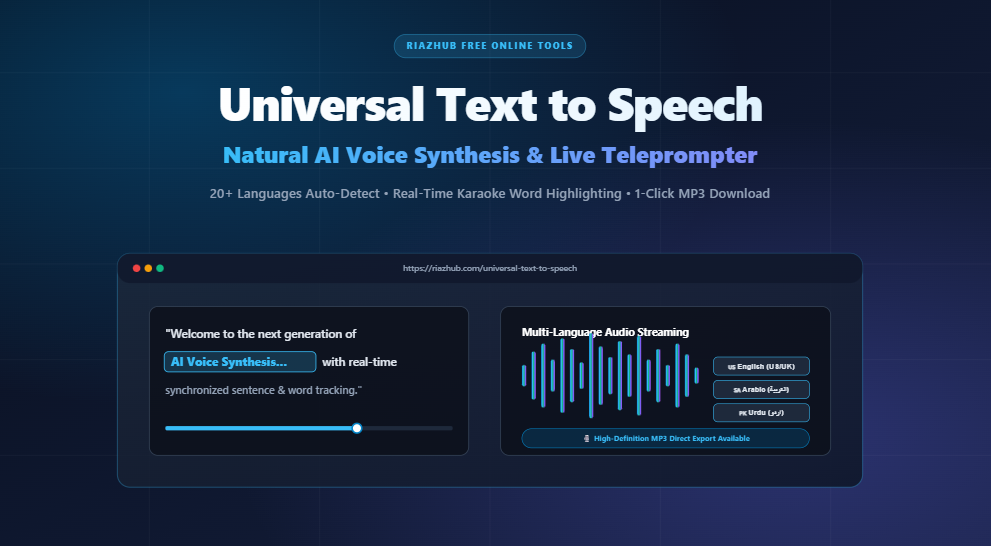
Universal Text to Speech Online: Free AI Voice Reader with Live Teleprompter & Instant MP3 Download
Transform any written text, document, or script into natural, human-like voice speech in seconds. Discover how the free Universal Text to Speech on RiazHub provides real-time word tracking, auto-detection across 20+ languages, and one-click audio downloads with zero registration required.
🎙️ Try the Online Tool Now
Ready to listen to your text immediately or generate custom voiceovers? Launch the full-featured, zero-install Universal Text to Speech Tool in your browser right now.
What is Universal Text to Speech?
In today’s fast-paced digital world, consuming content through audio has become a necessity. Whether you are a student listening to study notes, a content creator producing voiceovers for YouTube or TikTok, a language learner practicing native pronunciation, or a professional proofreading long documents, having a fast and reliable voice reader is essential.
The RiazHub Universal Text to Speech web utility is a modern, privacy-focused application engineered to convert any written text into natural, lifelike spoken voice directly inside your web browser. Unlike traditional TTS software that forces you to sign up, download heavy software, or pay monthly subscriptions, this online tool is 100% free, unlimited, and accessible on desktop, tablet, and mobile devices.
Key Highlights of the Universal Text to Speech Tool
The tool combines advanced client-side Web Speech APIs with a high-fidelity cloud audio streaming fallback, ensuring flawless pronunciation across international languages and writing systems. Here are the core features that set it apart:
🌐 Intelligent 20+ Language Auto-Detection
Paste text in English, Arabic (العربية), Urdu (اردو), Spanish, French, German, Hindi, Japanese, Chinese, Russian, and more. The engine instantly detects the language, grammar, and script, automatically tuning the voice and text direction (RTL/LTR).
Switch to the interactive Teleprompter Mode to follow your text sentence-by-sentence with active karaoke-style word highlighting. Click any sentence on screen to immediately jump and replay from that point.
Quickly toggle between curated voice styles, including Natural 1.0x, Female Voice, Male Voice, Deep Narrator, and Speed Reader 1.25x, or fine-tune exact pitch, speed rate, and volume sliders.
Need offline audio for your podcast, video tutorial, or presentation? Use the built-in audio download engine to save the synthesized voice directly as an MP3 audio file to your device with zero watermarks.
Your privacy is respected. Scripts and documents are processed locally within your browser without storing your sensitive text on remote servers.
Track real-time word count, character metrics, and estimated spoken duration dynamically as you write, edit, or paste your content.
How to Convert Text to Speech in 4 Simple Steps
Converting text into voice on the Universal Text to Speech application takes only a few clicks:
- Enter or Paste Your Text:
Type directly into the text editor, click 📋 Paste, drag-and-drop a text file into the upload zone, or click 💡 Sample to test preset scripts. - Choose Your Voice & Customize Audio:
Select an automatic persona pill or adjust the Speed (Rate), Pitch, and Volume sliders. You can also pick a specific installed system voice or filter by language. - Click Play to Listen with Teleprompter:
Press the hero ▶ Speak / Play button. The app transitions seamlessly into the teleprompter view, highlighting each active sentence and word in real time. - Download Audio or Export Settings:
Click 🎙️ Download Audio to download the audio recording as an audio file, or click 💾 Save Script to export your text as a.txtfile.
Popular Use Cases for Universal Text to Speech
The versatility of https://riazhub.com/universal-text-to-speech makes it a favorite tool for a diverse range of creators and professionals:
- Content Creators & YouTubers: Generate clear, professional voiceovers for video explainers, social media reels, and presentations without costly microphone gear.
- Students & Researchers: Listen to long research papers, essays, and study guides while commuting, exercising, or multitasking to boost retention.
- Language Students: Check exact pronunciation, intonation, and rhythm in foreign languages including Arabic, Urdu, French, Spanish, German, and Japanese.
- Writers & Editors: Proofread manuscripts and articles by ear to immediately catch awkward phrasing, typos, run-on sentences, and grammatical mistakes.
- Accessibility & Assistive Reading: Assist individuals with visual impairments, dyslexia, or reading fatigue with adjustable font sizes and high-contrast word tracking.
Why Choose RiazHub Universal Text to Speech?
| Feature | RiazHub Universal TTS | Standard Online Converters |
|---|---|---|
| Cost & Limits | 100% Free & Unlimited | Freemium / Word-count limits |
| Registration Required? | No Sign-up / No Login | Mandatory Account Creation |
| Live Teleprompter | Yes (Word & Sentence Tracking) | Basic Audio Player Only |
| Multi-Language Support | 20+ Languages with Auto-Detect | Limited to English / Selected tiers |
| Audio Download | Direct MP3 Audio Export | Paid upgrade required |
| Privacy & Data Security | In-Browser Local Processing | Scripts saved on 3rd-party servers |
Frequently Asked Questions (FAQ)
Is RiazHub Universal Text to Speech really free to use?
Yes, the Universal Text to Speech utility is completely free to use with no hidden fees, paid tiers, or credit card requirements.
Can I use the generated audio for commercial purposes?
Yes. The audio synthesized from your custom text belongs to you. You can freely use your downloaded voice recordings in your YouTube videos, podcasts, presentations, audiobooks, and commercial marketing materials.
Does it support right-to-left (RTL) languages like Arabic and Urdu?
Yes. The tool features built-in directional awareness. When you paste or type in Arabic, Urdu, Persian, or Pashto, the editor and the teleprompter automatically switch to Right-to-Left (RTL) format with proper font rendering and Tashkeel/Harakat support.
Can I use this tool on my smartphone or tablet?
Absolutely. The application is built with a responsive, modern interface that works seamlessly on iOS (iPhone/iPad), Android smartphones, Windows, Mac, and Linux web browsers.
Start Converting Your Text to Natural Voice Today
Experience the ease of modern speech synthesis. Whether you need a quick document reader, a speech training aid, or a full audio generator, get started right away for free.
Universal Text to Speech & Voice Reader
Convert written articles, essays, and documents into authentic spoken audio in all global languages (Arabic, Urdu, Hindi, English, Pashto, Persian, Spanish, etc.) with real-time teleprompter word tracking and direct audio export.
Text will appear here with dynamic sentence highlighting and word synchronization when you press Play / Speak.
🎛️ Voice & Playback Station
50+ Global Voices📚 Global Voice Synthesis Engine Architecture
Universal Multi-Language Voice Synthesis ▼
Our utility integrates all global voices across Arabic (العربية 🇸🇦), Urdu (اردو 🇵🇰), Hindi (हिन्दी 🇮🇳), Pashto (پښتو 🇦🇫), Persian (فارسی 🇮🇷), English, Spanish, French, German, and 120+ global languages with guaranteed browser playback.
High-Precision Arabic Tashkeel & Urdu Script Detection ▼
The script analyzer inspects character distributions and vocabulary markers. When Arabic text with diacritics is entered, it detects Arabic (العربية 🇸🇦), and when Urdu text is entered, it detects Urdu (اردو 🇵🇰).
Lossless URL & Domain Name Protection ▼
The advanced sentence tokenizer protects domain names (like RiazHub.com, Google.com) and URLs from being cut after dots, ensuring sentences are never broken prematurely.
Direct Audio Export Guarantee ▼
Spoken Voice Export: Clicking the Download Audio button exports the synthesized speech audio file directly to your device.