
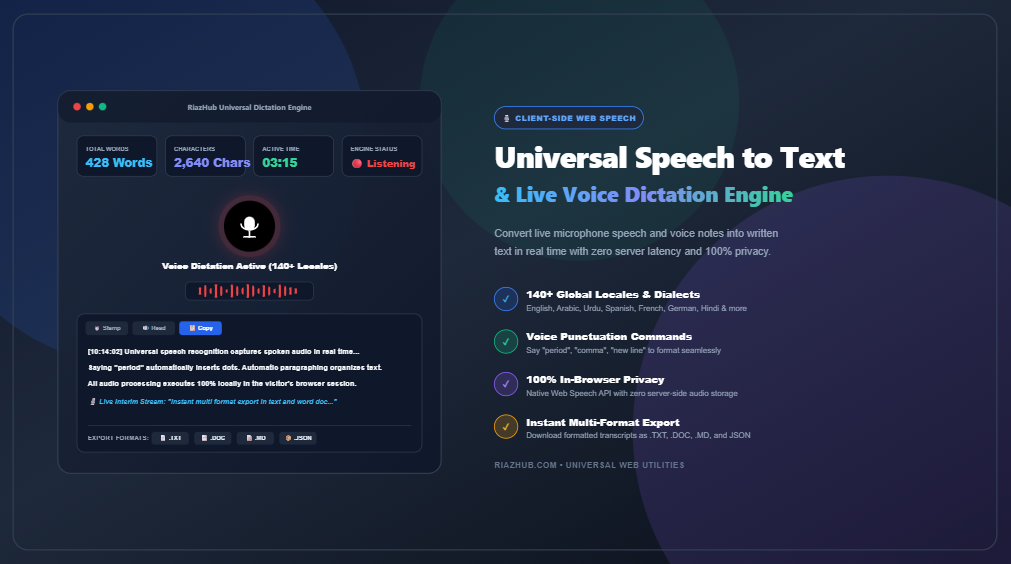
In an era of rapid digital communication, typing speed often becomes the primary bottleneck between thought and written documentation. Whether you are drafting lengthy articles, capturing lecture notes, recording meeting minutes, or simply composing ideas on the fly, voice dictation provides a hands-free, high-speed alternative to manual keyboard input. The Universal Speech to Text & Live Voice Dictation Engine on RiazHub enables instantaneous, client-side speech recognition across 140+ international language locales without transmitting private voice recordings to third-party servers.
💡 Did You Know? The average typing speed is approximately 40 words per minute (WPM), whereas natural conversational speech flows at 130 to 160 WPM. Utilizing the RiazHub Live Voice Dictation Tool can more than triple your content creation velocity.
How Browser-Based Speech Recognition Works
Modern browsers implement the native Web Speech API (specifically window.SpeechRecognition and window.webkitSpeechRecognition), which interfaces directly with your operating system’s audio capture hardware and native speech parsing engine.
When you activate dictation in the Speech to Text Utility, the engine establishes an audio input stream from your microphone. It processes acoustic waveforms and streams real-time tokens in two distinct states:
- Interim Results: Real-time provisional speech hypotheses streamed instantly as words leave your mouth, allowing you to visually verify ongoing transcription.
- Finalized Transcript: Context-adjusted, grammatically stabilized sentences locked into the canvas once natural vocal pauses occur.
Key Advantages of 100% Client-Side Voice Dictation
Traditional cloud transcription services often require uploading raw audio files or streaming unencrypted voice feeds to remote cloud endpoints. This introduces significant latency, privacy vulnerabilities, and potential compliance issues. By contrast, the RiazHub Voice Notes Engine executes entirely within your browser session:
- Complete Privacy Guarantee: Zero audio clips, transcribed sentences, or personal voice notes are stored or monitored on any server.
- Instant Zero-Latency Feedback: Words appear on the live transcript canvas synchronously as you speak.
- Zero Software Installations: Works directly in standard browsers such as Google Chrome, Microsoft Edge, Brave, and Safari on desktop and mobile.
- Bidirectional RTL & LTR Support: Automatic text direction handling for Right-to-Left languages like Arabic, Urdu, Persian, and Hebrew.
Mastering Spoken Voice Punctuation Commands
To produce polished, publication-ready documents entirely by voice, the Universal Speech to Text Tool includes an intelligent punctuation engine. When enabled, speaking punctuation command triggers automatically converts spoken words into corresponding typographic marks:
| Language | Spoken Voice Trigger | Typographic Output |
|---|---|---|
| English | "period" or "full stop" |
. |
| English | "comma" |
, |
| English | "question mark" |
? |
| English | "exclamation mark" |
! |
| English | "new line" / "new paragraph" |
Line break (\n) / Paragraph (\n\n) |
| Arabic (العربية) | "نقطة" / "فاصلة" / "علامة استفهام" |
. / ، / ؟ |
| Urdu (اردو) | "ختم" / "کوما" / "سوالیہ نشان" |
۔ / ، / ؟ |
Global Dialect Support: 140+ Locales
Speech recognition accuracy relies heavily on matching your exact regional accent. The Speech to Text Engine on RiazHub features an extensive catalog of over 140 localized dialects with an instant search filter:
- English Locales: United States (
en-US), United Kingdom (en-GB), Australia (en-AU), Canada (en-CA), India (en-IN), South Africa (en-ZA), New Zealand, Ireland, Singapore, Nigeria, and Pakistan. - Arabic Dialects: Saudi Arabia (
ar-SA), UAE (ar-AE), Egypt (ar-EG), Morocco (ar-MA), Algeria, Iraq, Kuwait, Qatar, Oman, Jordan, Lebanon, and Palestine. - South Asian Languages: Urdu (
ur-PK,ur-IN), Hindi (hi-IN), Bengali (bn-BD,bn-IN), Punjabi, Gujarati, Marathi, Tamil, Telugu, Kannada, Malayalam, and Sinhala. - European & Romance: Spanish (21 regional dialects), French (9 regional dialects), German, Italian, Portuguese (Brazil & Portugal), Russian, Ukrainian, Dutch, Polish, Swedish, and Turkish.
- East & Southeast Asian: Mandarin Chinese (Simplified & Traditional), Cantonese, Japanese, Korean, Vietnamese, Thai, Indonesian, and Tagalog.
Pro Tips to Maximize Dictation Accuracy (99%+)
To ensure optimal voice-to-text clarity and eliminate misrecognized words when using the Live Dictation Tool, consider these best practices:
- Use a Directional Microphone: Built-in computer microphones pick up ambient keyboard clicks, fan noise, and room reverb. An external USB headset or clip-on lapel mic significantly improves signal-to-noise ratio.
- Maintain a Consistent Distance: Keep the microphone positioned 3 to 5 inches from your mouth and slightly off-axis to avoid plosive breath pops (“p” and “b” sounds).
- Speak at a Conversational Cadence: Modern speech recognition algorithms evaluate semantic context across entire word clusters rather than isolated phonemes. Avoid unnaturally slow, robotic pronunciation; speak in fluid, clear sentences.
- Enable Continuous Dictation Mode: Ensure the continuous toggle is active in the dictation settings panel so the engine does not automatically time out during thinking pauses.
Instant 1-Click Formatting & Multi-Format Export
Once you conclude your voice dictation session, the integrated editing toolbar allows rapid cleanup and transformation of your transcript:
- Clean Spaces: Strips redundant double spaces and trailing whitespace instantly.
- Paragraph Formatting: Automatically segments long streams of speech into readable 3-sentence paragraphs.
- Case Adjustments: Convert text to Sentence case, Capitalize Words, UPPERCASE, or lowercase with a single click.
- Text-to-Speech (TTS) Verification: Listen back to your transcribed dictation using the built-in voice synthesizer to catch subtle nuances.
- Multi-Format Download: Export your completed work immediately as plain text (
.txt), Microsoft Word format (.doc), Markdown (.md), or structured metadata (.json).
Conclusion
Voice dictation represents a monumental leap in daily personal and professional productivity. By eliminating manual typing strain and capturing stream-of-consciousness ideas instantaneously, speech-to-text empowers creators, professionals, and students alike. Visit the Universal Speech to Text & Live Voice Dictation Engine on RiazHub today and transform the way you write.
Universal Speech to Text & Voice Dictation
Convert live speech and voice notes into written text in real time with 140+ language dialects, voice punctuation commands, live audio equalizer visualization, and instant multi-format export.
Live Transcript Canvas
💡 Voice Dictation, Web Speech API & Security Guide
100% Client-Side Privacy Guarantee ▾
RiazHub's Universal Speech to Text engine operates strictly client-side within your web browser. Audio from your microphone is processed using the browser's native Web Speech API (SpeechRecognition). No audio recordings, sound bites, transcribed notes, or dictation files are ever saved, stored, or transferred to any remote servers. Your private thoughts and dictations stay completely secure on your own local device.
Pro Tips for Achieving 99%+ Dictation Accuracy ▾
- Use a dedicated microphone: An external USB microphone or wired headset drastically outperforms built-in laptop microphones by isolating your voice from ambient room echo.
- Maintain an even distance and pace: Position the microphone 3 to 6 inches from your mouth and speak clearly at a natural, conversational tempo.
- Select your native locale: Ensure the language selector matches your exact geographical dialect (e.g., choose English (United Kingdom) or Arabic (Saudi Arabia) rather than generic defaults).
- Grant persistent browser microphone permission: When prompted by Chrome or Edge, click "Allow" on the microphone prompt so the tool can stream recognition smoothly.
Multi-Lingual Voice Punctuation Commands (English, Arabic, Urdu) ▾
When the Voice Punctuation Commands toggle is enabled, saying standard punctuation words will automatically insert the respective characters into your text:
English Commands
- "Period" or "Full stop" ➔
. - "Comma" ➔
, - "Question mark" ➔
? - "Exclamation mark" ➔
! - "New line" ➔
Enter / Line break - "New paragraph" ➔
Double Line break
الأوامر باللغة العربية
- "نقطة" ➔
. - "فاصلة" ➔
, - "علامة استفهام" ➔
? - "علامة تعجب" ➔
! - "سطر جديد" ➔
سطر جديد - "فقرة جديدة" ➔
فقرة جديدة
اردو میں بول کر اوقاف
- "ختم" / "فل اسٹاپ" ➔
. - "کوما" / "وقفہ" ➔
, - "سوالیہ نشان" ➔
? - "نئی لائن" ➔
نئی سطر - "نیا پیراگراف" ➔
نیا پیرا
Troubleshooting Microphone & Permission Issues ▾
If clicking "Start Listening" displays an error or fails to respond:
- Verify that your browser has permission to access your microphone. In Chrome, click the tune/padlock icon next to the address bar URL and ensure Microphone is set to Allow.
- Ensure your site is served over a secure connection (HTTPS), as modern browsers strictly require HTTPS for microphone access.
- Check that no other application (e.g., Zoom, Teams, Skype) has exclusive access to your microphone hardware.