
Mastering Website Speed & Core Web Vitals: The Definitive Engineering Guide to Sub-Second Latency and Grade A+ Performance
In modern web architecture, speed is no longer just a technical metric it is the foundational prerequisite for organic visibility, user trust, and conversion revenue. Whether you manage a high-traffic WordPress content publishing platform, an e-commerce storefront, or an enterprise SaaS application, page latency directly dictates how Google ranks your URLs and whether your visitors stay or bounce.
According to Google Search Central’s official ranking systems, Core Web Vitals (CWV) are evaluated at the 75th percentile of real-user visits. If your website takes more than 2.5 seconds to paint its largest visual element or hesitates by even 300 milliseconds when a user taps a mobile menu, your organic search rankings will suffer against faster competitors.
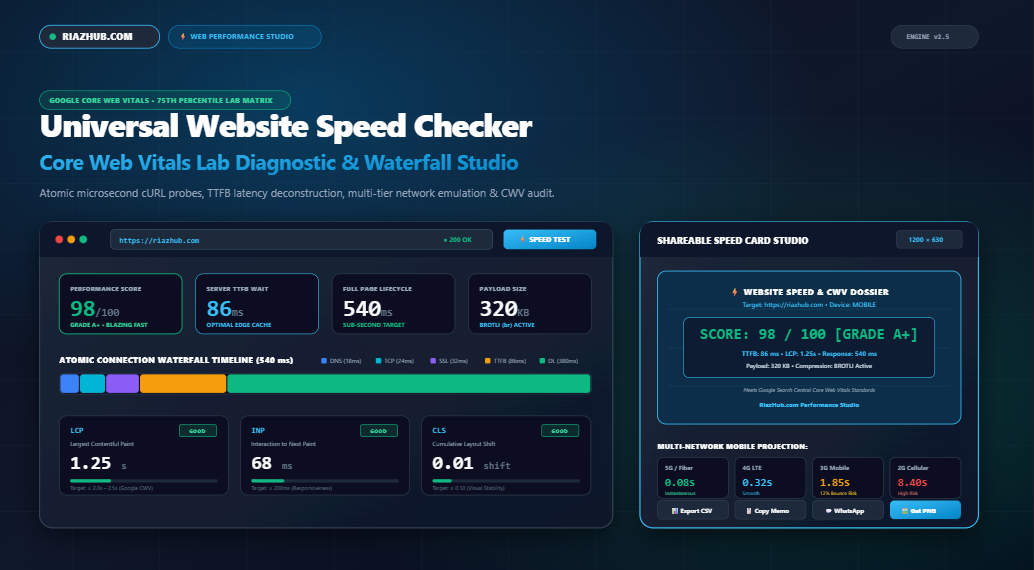
To benchmark your site against Google’s exact 75th-percentile thresholds in real time, you can run a free, privacy-first diagnostic using the RiazHub Website Speed Checker & Core Web Vitals Lab Studio. This browser-based suite deconstructs connection waterfalled latencies, evaluates server Time to First Byte (TTFB), and generates verifiable performance dossiers with zero external tracking overhead.
Test Your Website Speed & Core Web Vitals Now
Perform microsecond-accurate atomic cURL latency probing, inspect DNS/TCP/SSL handshake durations, audit LCP, INP, and CLS thresholds, and project download times across 4G and 3G networks.
1. The Google Core Web Vitals Revolution: Why Lab Speed Alone Is Not Enough
For years, developers relied on basic page-load metrics such as window.onload or total file size. However, a web page could technically finish loading in 1.2 seconds while shifting text violently across the screen, frustrating the reader. Conversely, an interactive web application could continue streaming background data for 5 seconds while feeling instantaneous to the user.
Recognizing this disparity, Google created the Core Web Vitals framework to measure the true experiential quality of a web page across three critical vectors:
- Loading Performance (LCP): How quickly does the primary content appear on the user’s viewport?
- Interactivity & Responsiveness (INP): How quickly does the browser process and paint a frame after a user taps, clicks, or presses a key?
- Visual Stability (CLS): Does the layout jump unexpectedly as fonts, banners, and third-party ad tags load?
2. Deconstructing the 5 Crucial Speed & CWV Metrics
To achieve a pristine Grade A+ (90–100) score on performance diagnostics, you must optimize each stage of the loading lifecycle. Here is how Google defines and scores each vital:
| Metric Code | Full Metric Name | Good (Fast) | Needs Improvement | Poor (Sluggish) |
|---|---|---|---|---|
| LCP | Largest Contentful Paint | ≤ 2.0s – 2.5s | 2.1s – 4.0s | > 4.0s |
| INP | Interaction to Next Paint | ≤ 200 ms | 201 ms – 500 ms | > 500 ms |
| CLS | Cumulative Layout Shift | ≤ 0.10 | 0.11 – 0.25 | > 0.25 |
| FCP | First Contentful Paint | ≤ 1.8 s | 1.9s – 3.0s | > 3.0s |
| TTFB | Time to First Byte | ≤ 800 ms (Cache ≤200ms) | 801 ms – 1800 ms | > 1800 ms |
Notice that while Time to First Byte (TTFB) is not strictly an isolated Core Web Vital, it is the foundational bottleneck of all subsequent metrics. If your origin server takes 1.5 seconds just to think and return its first HTML byte, achieving an LCP under 2.0 seconds is mathematically impossible.
You can evaluate your exact server wait time and TTFB instantly using the RiazHub Website Speed Checker. The tool measures server TTFB with microsecond accuracy and verifies whether your edge caching layers (Cloudflare, Fastly, or Redis) are actively hitting.
3. The Anatomy of an HTTP Request: Reading the Waterfall Latency Breakdown
When a user navigates to your URL, the browser does not simply download HTML instantly. Every single web request goes through five distinct, sequential phases. Inefficient architecture at any single step will stall the entire pipeline:
- DNS Lookup Phase: The browser translates the human-readable domain name (e.g.,
riazhub.com) into an IP address. Slow authoritative name servers add 80ms to 250ms of pure latency before connection even starts. Using Anycast DNS (such as Cloudflare or Route 53) reduces DNS resolution to under 25ms. - TCP 3-Way Handshake: The client and server exchange SYN, SYN-ACK, and ACK packets to establish a reliable transmission socket. The speed of this phase depends entirely on physical distance and Round Trip Time (RTT).
- SSL/TLS Handshake: The server presents its cryptographic certificate, negotiates cipher suites, and establishes encrypted keys. With modern TLS 1.3, this negotiation takes only a single round-trip (1-RTT) or zero round-trips (0-RTT Session Resumption).
- Server Wait Phase (TTFB): The web server executes PHP or Node scripts, queries the MySQL or PostgreSQL database, constructs the DOM, and prepares the response. Without full-page static caching, dynamic CMS database queries represent the single greatest source of website sluggishness.
- Content Download Phase: The server streams the compressed payload over the wire. This duration is dictated by payload weight (KB) and the client’s network bandwidth.
The Waterfall Connection Timeline Simulator deconstructs these five stages into an interactive visual bar, allowing performance engineers to identify exactly whether their bottleneck lies in DNS propagation, TLS negotiation, server database queries, or uncompressed asset transfers.
4. The Mobile Network Gap: Why Desktop Tests Lie
A common mistake made by web developers is testing their websites solely on desktop computers connected to high-speed fiber or office gigabit internet. Under fiber conditions (100+ Mbps with 5ms ping), even bloated 4MB web pages feel deceptively fast.
However, over 60% of global web traffic originates from mobile devices on cellular networks (4G LTE and average 3G). Cellular connections suffer from high packet latency (100ms to 300ms RTT) and constrained radio bandwidth. Under 3G conditions, downloading an uncompressed 2MB hero image can take upwards of 10 seconds, triggering an immediate bounce.
Google’s consumer behavior telemetry confirms that as mobile page load times increase from 1 second to 3 seconds, the probability of an immediate visitor bounce increases by 32%. When load times stretch to 5 seconds, bounce probability skyrockets by 90%.
To see how your website performs under varying cellular conditions, open the Core Web Vitals Lab Diagnostic Matrix, navigate to the Network Simulation Tab, and compare your projected download completion times across High-Speed Fiber (100 Mbps), 4G LTE (15 Mbps), Average 3G (1.6 Mbps), and Constrained 2G.
Generate Your 1200×630 Social Speed Dossier Card
Need to share verifiable website speed certificates with clients, stakeholders, or engineering teams? Use our built-in canvas studio to generate high-DPI social performance cards in Cyber Azure, High-Velocity Emerald, Deep Obsidian, or Crimson Boost themes.
5. Actionable Web Performance Optimization (WPO) Roadmap: 6 Fixes for Grade A+ Speed
If your website speed audit reveals slow server wait times, poor LCP ratings, or bloated payloads, implement these six prioritized engineering fixes:
1. Deploy Full-Page Edge Caching (Target: TTFB < 150ms)
Dynamic WordPress queries demand significant server memory and CPU cycles. By implementing an edge page cache through Cloudflare (Cache Everything rule or Automatic Platform Optimization), LiteSpeed Cache, or Redis Object Cache, HTML documents are served directly from RAM at edge CDN locations near your visitors, reducing TTFB from 1,400ms to under 100ms.
2. Convert Legacy JPEG/PNG Assets to Next-Gen WebP and AVIF
Images account for more than 60% of average web payload weight. Converting images to modern formats like WebP or AVIF slashes file sizes by 40% to 70% with zero perceptual quality degradation. Additionally, always specify explicit width and height attributes on <img> tags to eliminate Cumulative Layout Shift (CLS).
3. Enable Modern Brotli (br) Compression
While standard Gzip compression has been the web standard for decades, Brotli compression achieves an additional 15% to 25% density reduction on HTML, CSS, and JavaScript files. Ensure your web server (Nginx, Apache, or OpenLiteSpeed) has Brotli compression enabled for all text mime-types.
4. Eliminate Render-Blocking Resources
When a browser encounters a synchronous <script src="..."> tag in the HTML <head>, it halts HTML parsing entirely while downloading and executing the script. Add defer or async attributes to non-essential JavaScript, and inline your critical above-the-fold CSS.
5. Preconnect to Critical Third-Party Origins
If your website loads external resources such as Google Fonts, CDN stylesheets, or payment gateways, establish early socket handshakes by inserting resource hints in your document head:
<link rel="preconnect" href="https://fonts.googleapis.com">
<link rel="preconnect" href="https://fonts.gstatic.com" crossorigin>
<link rel="dns-prefetch" href="https://cdn.riazhub.com">
6. Audit and Prune Third-Party JavaScript Tags
Every tracking tag, marketing pixel, customer chat widget, and analytics snippet adds CPU overhead on mobile processors. Audit your Google Tag Manager containers and remove redundant scripts to keep your Interaction to Next Paint (INP) under the strict 200ms threshold.
6. Synthetic Lab Tests vs. Real-User Field Data (CrUX): What’s the Difference?
When auditing web performance, engineers encounter two primary categories of performance data:
- Synthetic Lab Diagnostics: Tools like the RiazHub Website Speed Checker or Lighthouse execute real-time, isolated network requests from dedicated servers. Lab tests provide instant, reproducible telemetry and microsecond waterfall breakdowns, making them ideal for debugging changes before deploying to production.
- Real-User Field Telemetry (Chrome UX Report / CrUX): Google collects anonymized performance measurements from real Chrome users as they browse the web across different devices and cell towers. Field data represents a 28-day rolling average and serves as the actual scoring basis for Google Search ranking algorithms.
The optimal workflow is to use synthetic lab audits to diagnose and eliminate bottlenecks immediately, ensuring that your rolling 28-day CrUX field telemetry steadily converges into the Good (90–100) bracket.
7. Frequently Asked Questions (FAQ)
How does Time to First Byte (TTFB) directly affect Largest Contentful Paint (LCP)?
LCP measures the time it takes for your primary visual element (hero image, banner, or headline) to render. Because the browser cannot even start discovering or downloading that hero image until the HTML document arrives, your TTFB forms the literal foundation of LCP. If your TTFB takes 1,400ms, your LCP can never be faster than 1,400ms.
What is the difference between Gzip and Brotli compression?
Brotli is a newer compression algorithm developed by Google that utilizes a pre-defined static dictionary of common web patterns. As a result, Brotli compresses HTML, CSS, and JS files 15% to 25% smaller than traditional Gzip, reducing network transit times on mobile cellular connections.
Is the RiazHub Website Speed Checker safe to run on production websites?
Yes, 100%. The RiazHub Speed Checker Engine executes standard, non-destructive HTTP GET/HEAD requests. It adheres strictly to server-safe SSRF guidelines, prevents internal loopback scanning, and utilizes a transient caching buffer to prevent upstream rate-limit flooding.
Can I export and print speed audit reports for clients?
Absolutely. The tool includes 1-click CSV spreadsheet exports, plain-text technical memos, WhatsApp share formatting, a dedicated @media print PDF layout, and a high-resolution 1200×630 social performance card generator.
Conclusion: Take Control of Your Website Speed Today
In a web landscape where milliseconds translate directly into search engine visibility and conversion rates, leaving your performance to guesswork is unacceptable. By regularly monitoring server TTFB, analyzing connection waterfall phases, and tuning Core Web Vitals to meet the 75th-percentile standard, you guarantee an elite experience for your audience.
Ready to discover where your web performance stands?
Run a comprehensive website speed and Core Web Vitals audit right now on RiazHub.com and take the first step toward sub-second load times.
Universal Website Speed Checker & Core Web Vitals Lab
Deconstruct server Time to First Byte (TTFB), audit modern Google Core Web Vitals thresholds, simulate connection waterfalled latencies across global mobile networks, and generate verifiable performance dossier cards.
| Connection Phase | Duration | Share (%) | Diagnostic Assessment |
|---|---|---|---|
| DNS Resolution | 24 ms | 3.1% | Fast DNS propagation (Anycast / Cloudflare) |
| TCP 3-Way Handshake | 32 ms | 4.1% | Low round-trip latency (RTT) to server edge |
| SSL/TLS Negotiation | 48 ms | 6.2% | Modern TLS 1.3 0-RTT session resumption active |
| Server Wait (TTFB) | 142 ms | 18.2% | Optimal server page caching (Sub-200ms) |
| Content Transfer Download | 534 ms | 68.4% | Transferred 485 KB payload smoothly |
| Full Request Lifecycle | 780 ms | 100% | Sub-second target achieved |
Prioritized Web Performance Optimization (WPO) Roadmap
Automated recommendations based on current latency metrics and server headers.
Simulated Real-World Download Durations
Projects download completion times based on current payload (485 KB) across varying mobile network tiers.
Core Web Vitals Engineering & WPO Science Guide
Google officially incorporates Core Web Vitals into its Page Experience ranking signals. Sites meeting the 75th percentile of real-world visits (LCP ≤ 2.5s, INP ≤ 200ms, CLS ≤ 0.1) earn ranking advantages in competitive SERPs. Fast pages directly minimize bounce rates and maximize user conversion velocity.
Time to First Byte measures the latency between client request dispatch and receiving the very first byte of response data. If your server TTFB takes 1,500ms due to uncached WordPress database queries or slow hosting, achieving an LCP under 2.0s becomes mathematically impossible. Effective edge page caching (Cloudflare, Redis, WP Rocket) drops TTFB under 150ms.
Lab tests (such as our atomic cURL probe and Lighthouse) measure speed under controlled, synthetic conditions. In contrast, CrUX field data aggregates actual 28-day performance across thousands of real Chrome visitors navigating on different devices, network latencies, and geographical locations. Lab diagnostics allow instant debugging before changes hit production field users.
Brotli compression outperforms standard Gzip by 15% to 25% for text assets (HTML, CSS, JavaScript). By compressing files more densely, Brotli reduces over-the-wire download time significantly on cellular 4G and 3G networks, accelerating browser parsing and DOM rendering.