
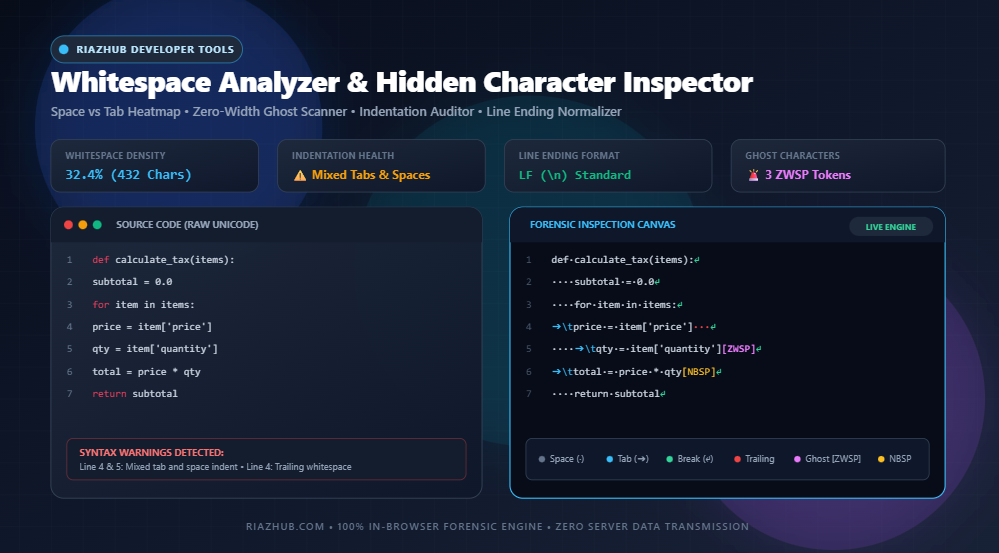
Mastering Code Hygiene: How to Detect Invisible Zero-Width Characters, Audit Mixed Tabs & Spaces, and Fix Line Endings in Modern Development
Every software developer, technical writer, and DevOps engineer has encountered the perplexing phantom bug: a code snippet copied from a chat app throws an unexplained SyntaxError: Invalid or unexpected token; a Python script halts with a fatal TabError; or a Git commit shows hundreds of modified lines due to mismatched Windows CRLF and Unix LF line breaks. What looks like harmless blank space on screen is often a chaotic mixture of invisible Unicode glyphs, mixed indentation depths, and trailing tokens. In this comprehensive technical guide, we dissect the typography of whitespace and demonstrate how to audit, visualize, and sanitize hidden characters in real time using the browser-based Universal Whitespace Analyzer & Hidden Character Forensic Inspector on RiazHub.com.
1. The Invisible Cost of Hidden Whitespace in Software Systems
In human typography, whitespace provides visual breathing room and establishes hierarchy. In computing, however, whitespace is not empty space—it is composed of strict, deterministic byte sequences interpreted by compilers, interpreters, database query planners, and version control systems.
When text transitions across communication channels—such as copying snippets from Slack, Microsoft Teams, Discord, Stack Overflow, PDF documentation, or collaborative cloud editors—invisible characters hitch a ride. These include Zero-Width Spaces (ZWSP, U+200B), Non-Breaking Spaces (NBSP, U+00A0), and Byte Order Marks (BOM, U+FEFF). Because modern text editors render them as identical transparent gaps or completely invisible zeroes, finding the source of a broken pipeline can consume hours of tedious debugging.
By running suspicious payloads through the RiazHub Whitespace Analyzer, engineers can illuminate every invisible byte with high-contrast forensic glyphs, assess indentation health, and purge anomalies in a single click.
2. The Whitespace Spectrum: Decoding Visible vs. Invisible Unicode Codepoints
The Unicode standard defines dozens of characters categorized under general whitespace, formatting controls, and invisible joiners. Understanding the differences between these codepoints is essential for maintaining code hygiene and database integrity:
| Character Name | Unicode Codepoint | UTF-8 Bytes | Visual Glyph | Typical Origin & Primary Risk |
|---|---|---|---|---|
| Standard Space | U+0020 |
0x20 |
· (Dot) |
Normal keyboard spacebar. Standard word and token delimiter. |
| Horizontal Tab | U+0009 |
0x09 |
➔\t (Arrow) |
Tab key. Used for indentation; visual width varies across editors (2, 4, 8 spaces). |
| Non-Breaking Space (NBSP) | U+00A0 |
0xC2 0xA0 |
⍽ (Badge) |
HTML , macOS Option+Space. Breaks Python, JavaScript, and shell scripts. |
| Line Feed (LF) | U+000A |
0x0A |
↵ (Return) |
Unix, Linux, and macOS newline standard. Standard for cloud containers. |
| Carriage Return + LF (CRLF) | U+000D U+000A |
0x0D 0x0A |
␍↵ (DOS Break) |
Windows DOS newline standard. Causes massive Git diff churn if mixed with LF. |
| Zero-Width Space (ZWSP) | U+200B |
0xE2 0x80 0x8B |
[ZWSP] |
Rich-text web copy-pasting, word-break markup. Breaks variable parsing and JSON keys. |
| Zero-Width Non-Joiner (ZWNJ) | U+200C |
0xE2 0x80 0x8C |
[ZWNJ] |
Complex typography (Persian, Arabic, Indic scripts). Invisible token contaminant in ASCII code. |
| Byte Order Mark (BOM) | U+FEFF |
0xEF 0xBB 0xBF |
[BOM] |
Windows Notepad UTF-8 file signatures. Causes “headers already sent” errors in PHP. |
| En Space & Em Space | U+2002 / U+2003 |
0xE2 0x80 0x82/83 |
[EN] / [EM] |
Desktop publishing software (InDesign, Word). Inadvertently copied from PDFs. |
When these disparate characters blend into your source code, spotting them with the naked eye is impossible. Using the Whitespace Forensic Inspector allows you to immediately see exact character counts, category breakdowns, and percentage shares in a live census matrix.
3. Ghost in the Machine: Why Zero-Width Characters Break Compilers and SQL Engines
Zero-width characters have legitimate typographic uses in internationalized text, such as indicating where a word may break without displaying a hyphen. However, when injected into source code or database queries, they act like digital landmines:
A. Invisible Identifier Pollution in JavaScript & Python
Consider this seemingly normal JavaScript code snippet:
const userID = 4092;
console.log(userID); // ReferenceError: userID is not definedTo any human reviewer, the variable userID in the declaration appears identical to the variable in the console.log statement. Yet the script throws an immediate ReferenceError. Why? Because a hidden zero-width space (\u200B) sits nestled between user and ID in the declaration: user\u200BID. To the V8 JavaScript engine, these are two completely distinct symbol tokens.
B. SQL Query Parsing Failures & Security Filter Bypasses
In database engineering, hidden zero-width spaces can bypass poorly written Web Application Firewall (WAF) regex rules while still causing backend SQL interpreters to fail:
SELECT * FROM users WHERE username = 'admin'; -- Query fails or breaks index lookupsSimilarly, threat actors have historically leveraged zero-width spaces for homograph obfuscation and watermarking attacks, embedding tracking payloads inside text that security scanners fail to detect. Running untrusted input through the Universal Whitespace Analyzer instantly identifies any zero-width or bidirectional overrides (`\u200E`, `\u200F`) present in the string.
C. The PHP “Headers Already Sent” Nightmare
One of the most notorious bugs in PHP development stems from the UTF-8 Byte Order Mark (BOM, U+FEFF). When a configuration file (such as WordPress’s wp-config.php) is edited in a generic text editor that prepends a 3-byte UTF-8 BOM (`0xEF 0xBB 0xBF`), PHP treats those bytes as raw output sent to the browser before executing header functions. The result? A fatal Warning: Cannot modify header information - headers already sent error.
4. The Great Indentation Divide: Soft Tabs vs. Hard Tabs and Mixed Indentation
The debate between tabs and spaces is legendary in developer culture. While developers may hold personal stylistic preferences, mixing them within the same file or code block is an objective code defect that creates serious runtime failures.
A. Python PEP 8 Enforcement
In Python, whitespace is syntactically significant. Python 2 permitted sloppy mixtures of tabs and spaces, often guessing indentation levels with erratic behavior. Python 3 eliminated this leniency entirely: mixing tabs and spaces in Python 3 triggers an immediate fatal crash:
TabError: inconsistent use of tabs and spaces in indentationPEP 8 explicitly mandates 4 spaces per indentation level and forbids tabs. When multiple contributors work on a repository with differing editor configurations, invisible tab characters slip in, breaking automated build and test pipelines.
B. YAML & Makefiles: Polar Opposites
Different configuration runtimes enforce opposing indentation laws:
- YAML Specifications: Strictly forbid tabs for indentation. Using a tab character instead of spaces in Kubernetes manifests, GitHub Actions workflows, or Docker Compose files results in an immediate parsing error:
yaml.scanner.ScannerError: while scanning for the next token, found character '\t' that cannot start any token. - Unix Makefiles: Exactly the opposite! The command recipe following a Makefile target must begin with a literal hard tab (
\t). If you indent with 4 or 8 spaces, GNU Make fails withMakefile:2: *** missing separator. Stop..
The RiazHub Whitespace Analyzer includes dedicated audit presets for Python PEP 8 and Git sanitization, allowing developers to convert leading spaces to tabs or vice versa in a single click.
5. Line Ending Semantics: Unix LF (\n) vs. Windows CRLF (\r\n)
Line terminations originate from mechanical typewriter hardware:
- Line Feed (LF,
\n,0x0A): Advanced the paper cylinder by one row without altering horizontal carriage position. Adopted by Unix, Linux, and macOS. - Carriage Return (CR,
\r,0x0D): Returned the printing carriage to the leftmost margin. - CRLF (
\r\n,0x0D 0x0A): Executed both movements sequentially. Standardized by CP/M, MS-DOS, and modern Windows operating systems.
The Git Diff Catastrophe
When developers collaborate across Windows and macOS/Linux environments without standardized line endings, Git version control can become chaotic. If a Windows developer commits a file with CRLF into an LF repository, Git may flag every single line in the file as modified. This generates massive, unreviewable pull request diffs, breaks git blame annotations, and causes false merge conflicts.
Furthermore, running a shell script on Linux that contains Windows CRLF line breaks will fail with mysterious errors like /bin/bash^M: bad interpreter: No such file or directory. The RiazHub Whitespace Analyzer detects CRLF/LF discrepancies instantly and provides a 1-click button to normalize all line endings to Unix LF.
6. Trailing Whitespace: Why Linters Flag End-of-Line Spacing
Trailing whitespace refers to redundant spaces or tabs lingering between the final printable character on a line and its terminating newline. Modern linters (ESLint, Prettier, Flake8, RuboCop, Rustfmt) strictly flag trailing spaces because:
- Git Diff Pollution: Adding or removing trailing spaces creates meaningless visual noise in pull requests.
- Markdown Typography Breakage: In Markdown, two trailing spaces specify an explicit line break (
<br>). Accidental trailing whitespace unpredictably fragments rendered paragraphs. - String Concatenation Glitches: In multi-line template literals and SQL queries, trailing spaces can unintentionally alter string lengths and comparisons.
The Whitespace Forensic Tool highlights all trailing spaces in bright red on the visual canvas and includes a quick Trim All Trailing Whitespace action to clean entire documents in milliseconds.
7. How to Audit and Sanitize Your Code with RiazHub’s Tool
Cleaning corrupted text with the Universal Whitespace Analyzer is straightforward:
- Load Source Code: Paste your snippet into the monospace input stage or drag and drop any source file (
.py,.js,.php,.json,.md,.txt). - Inspect Key Metric Cards: The 4-card header overview immediately tells you total whitespace count, indentation style health, line ending standard, and the number of invisible ghost characters.
- Explore the Visual Forensic Canvas: Examine high-contrast glyphs for spaces (
·), tabs (➔\t), line breaks (↵), non-breaking spaces (⍽), and zero-width spaces ([ZWSP]). - Review the Census & Line Diagnostics Tabs: Check the exact occurrence counts of every Unicode codepoint and review the line-by-line list of flagged issues.
- Apply 1-Click Sanitizers:
- Convert mixed indentation to 4 spaces, 2 spaces, or hard tabs.
- Trim all trailing whitespace.
- Purge all zero-width characters.
- Normalize line endings to standard Unix
LF.
- Export Clean Code: Click Copy Clean Text, download the sanitized
.txtfile, or export a detailed audit report as a.jsonpayload for automated CI/CD logging.
8. 100% Client-Side Privacy Guarantee
Security is paramount when handling proprietary algorithms, private API keys, database connection strings, or internal system logs. The RiazHub Whitespace Analyzer & Hidden Character Forensic Inspector executes 100% inside your local browser runtime.
No text is ever transmitted across the internet, logged on remote servers, or stored in cloud databases. All string transformations, Unicode regular expression scans, and file generation processes execute purely via client-side JavaScript.
9. Frequently Asked Questions (FAQ)
How do zero-width characters get into my code in the first place?
Zero-width spaces are commonly injected when copying code from communication apps (Slack, Microsoft Teams, Skype, Discord), rich-text web articles, Google Docs, or formatted emails. These applications insert invisible formatting marks that carry over into your code editor upon pasting.
Can this tool fix indentation errors in Python scripts?
Yes! The tool automatically analyzes indentation hierarchy, flags mixed tabs and spaces, and provides a 1-click fixer to standardize all indentation to pure 4-space blocks (PEP 8 compliant) or hard tabs.
What is the difference between a Non-Breaking Space and a Standard Space?
A standard space (U+0020) is a standard word delimiter. A non-breaking space (U+00A0) prevents automatic line breaks across adjacent words in typography. While visually identical, programming compilers treat NBSP as an invalid character, causing mysterious syntax errors.
Does this tool support large log files and data exports?
Yes. Because all string operations run in-browser using optimized native JavaScript iterators, files containing thousands of lines process smoothly in sub-second time.
Universal Whitespace Analyzer & Hidden Character Inspector
Audit whitespace composition, detect mixed indentation, reveal invisible zero-width characters, analyze line endings (LF/CRLF), and inspect whitespace density in real time.
| Character Name | Codepoint | Category | Occurrences | Share of Total |
|---|---|---|---|---|
| No characters analyzed yet. Paste text to inspect. | ||||
Whitespace Standards, Unicode Typography & Code Hygiene Guide
Comprehensive reference on indentation semantics, invisible zero-width exploits, line-ending standards, and runtime execution safety.
The choice between tabs and spaces impacts compiler predictability, code accessibility, and version control hygiene:
- Python (PEP 8): Strictly enforces 4 spaces per indentation level. Mixing tabs and spaces in Python 3 triggers an immediate
TabError: inconsistent use of tabs and spaces in indentation. - Go Language: Officially standardizes on hard tabs (
\t) viagofmtfor indentation, allowing individual developers to render tab widths according to their visual accessibility preferences. - YAML & Makefiles: YAML specifications strictly forbid tabs for structural indentation (spaces only), while Unix Makefiles require literal hard tabs for rule command recipes.
Invisible Unicode characters—such as Zero-Width Space (U+200B), Zero-Width Non-Joiner (U+200C), and Byte Order Marks (U+FEFF)—are visually imperceptible in normal text editors but carry distinct byte sequences in memory:
- Parser & Compiler Crashes: A zero-width space placed inside a variable name, JSON key, or SQL identifier breaks tokenization, causing baffling
SyntaxError: Invalid or unexpected tokenerrors. - Homograph Attacks & Hidden Watermarking: Malicious actors and web scraping scrapers embed zero-width sequences to conceal payload identifiers, bypass string length filters, or watermark proprietary text.
- Copy-Paste Contamination: Copying formatted code from chat clients (Slack, Microsoft Teams, Discord) or rich web articles frequently injects unintended non-breaking spaces (
U+00A0) and zero-width joiners.
Line termination schemes originate from mechanical typewriter carriage operations:
- Unix / Linux / macOS (LF): Terminates lines with a single Line Feed (
\n,U+000A). This is the universal standard for modern web development, Docker containers, and cloud deployments. - Windows (CRLF): Terminates lines with Carriage Return + Line Feed (
\r\n,U+000D U+000A). - Git core.autocrlf Dangers: Inconsistent line endings pollute Git commit histories with "fake diffs" where every line appears modified. Standardizing on
LFand configuring a.gitattributesfile with* text=auto eol=lfprevents cross-platform merge conflicts.
Trailing whitespace refers to superfluous spaces or tabs lingering between the final visible character of a line and its newline character. Linters (ESLint, Flake8, Prettier) reject trailing spaces because:
- They inflate Git diff noise when multiple developers touch adjacent lines.
- In Markdown syntax, two trailing spaces signify an intentional line break (
<br>); accidental trailing spaces inadvertently alter rendered document typography. - Certain shell script interpreters and string-concatenation routines treat trailing spaces as active syntax, introducing subtle logic bugs.
Your source code, configuration files, server logs, and sensitive business documents never leave your browser. All tokenization, Unicode regex character matrix auditing, and file downloads are executed purely in client-side Vanilla JavaScript on your device.