
Mastering Lexical Analysis: How to Use the Word Frequency Counter & N-Gram Lexical Density Studio
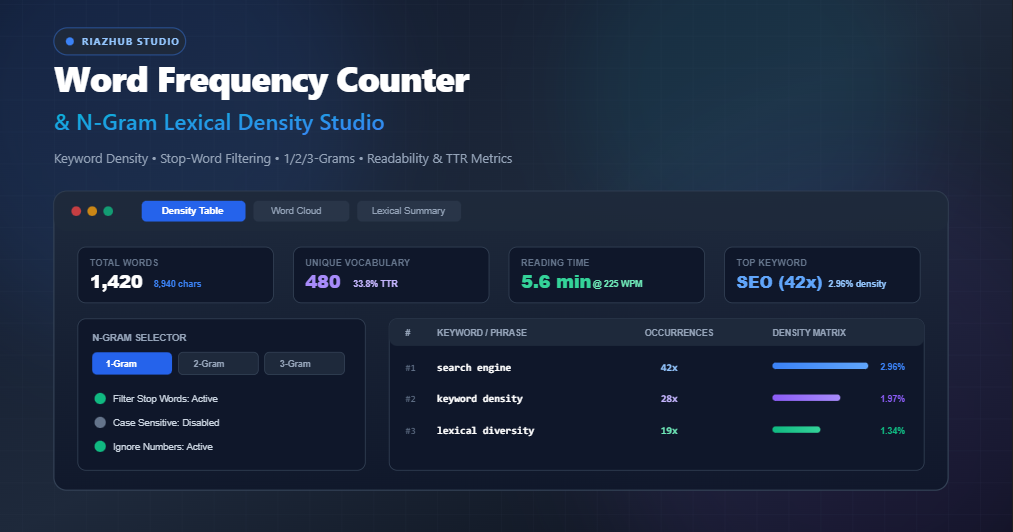
To solve this challenge, digital creators, SEO strategists, and researchers rely on the Word Frequency Counter & N-Gram Lexical Density Studio on RiazHub.com. This in-depth guide examines the science of word frequency analysis, n-gram lexical density, Type-Token Ratio (TTR), and how to leverage this browser-based studio to refine your written content.
Quick Access: Launch the interactive, privacy-first Word Frequency Counter & N-Gram Lexical Density Studio to analyze articles, essays, and transcriptions in real time without sending text to external servers.
1. What Is Word Frequency and Keyword Density Analysis?
Word frequency measures how often specific individual words or recurring phrases appear across a body of text. When expressed as a proportion of total words, this metric becomes keyword density:
Keyword Density (%) = (Count of Target Term / Total Word Count) × 100
Historically, early webmasters attempted to manipulate search engine rank through brute-force repetition—a practice known as keyword stuffing. Today, Google’s Helpful Content System and RankBrain algorithms penalize unnaturally repetitive phrasing.
Using the Word Frequency Counter, writers can quickly audit their copy to ensure primary keywords maintain an optimal density of 1.0% to 2.5%, ensuring solid topical relevance without risking algorithmic penalties.
2. Beyond Single Words: The Critical Power of N-Gram Phrase Analysis
Examining unigrams (isolated single words) reveals only part of the linguistic picture. In semantic search, entities and ideas are expressed in multi-word constructs known as N-Grams:
- 1-Gram (Unigrams): Individual words such as “marketing”, “optimization”, or “cloud”.
- 2-Gram (Bigrams): Two-word phrases such as “digital marketing”, “keyword density”, or “cloud computing”.
- 3-Gram (Trigrams): Three-word semantic entities such as “search engine optimization” or “type token ratio”.
The RiazHub Lexical Density Studio features a dedicated N-Gram Phrase Mode Selector. Switching between unigrams, bigrams, and trigrams allows you to verify that key entity phrases appear consistently throughout your introduction, subheadings, and conclusion.
| N-Gram Type | Example Phrase | Editorial & SEO Application |
|---|---|---|
| 1-Gram (Single Word) | “WordPress” | Vocabulary census, stop-word elimination, vocabulary richness. |
| 2-Gram (Bigram) | “Lexical density” | Target keyword combinations, entity identification, phrase consistency. |
| 3-Gram (Trigram) | “Word frequency counter” | Long-tail search intent, exact-match phrase matching, thematic context. |
3. Lexical Diversity & Type-Token Ratio (TTR) Explained
In computational linguistics, Type-Token Ratio (TTR) serves as the benchmark metric for vocabulary richness. The total number of words in an article represents the tokens, while the count of distinct, unique vocabulary represents the types:
TTR (%) = (Unique Vocabulary Count / Total Words Count) × 100
When you run your text through the N-Gram Lexical Density Studio, the KPI grid displays your real-time TTR score:
- High TTR (45% – 65%+): Indicates an expansive, varied vocabulary with minimal repetition. Characteristic of academic research papers, analytical essays, and literary nonfiction.
- Balanced TTR (35% – 45%): Ideal for technical tutorials, professional blog posts, and educational guides. It balances clear repetition of core concepts with engaging linguistic variety.
- Low TTR (Below 30%): Suggests repetitive phrasing or over-reliance on limited terminology. Useful as an alert to introduce synonyms and rephrase redundant passages.
4. Built-in Stop-Word Pruning and NLP Filtering
Raw frequency counts can be misleading because grammatical filler words (such as “the”, “and”, “of”, “to”, and “in”) naturally dominate any passage.
The Word Frequency Counter provides advanced filtering toggles designed for fine-tuned lexical inspection:
- Filter Stop Words: Prunes over 150 standard English grammatical conjunctions, prepositions, and pronouns so that core thematic terms surface immediately.
- Case-Sensitive Matching: Enables case distinctions when inspecting proper nouns, brand names, or programming identifiers (e.g., distinguishing “Apple” from “apple”).
- Ignore Numbers & Digits: Strips standalone numerical figures from the frequency tally for pure textual focus.
- Minimum Character Length Slider: Filters out ultra-short abbreviations or stray characters (adjustable from 1 to 10 characters).
- Custom Excluded Words List: Allows you to supply your own comma-separated list of terms to remove from calculation (e.g., brand disclaimers or boilerplate notices).
5. Key Features of the RiazHub Lexical Density Studio
1. Interactive Keyword Density Matrix
The interactive table displays ranks, keyword phrases, occurrence counts, and density percentages alongside dynamic visual bar charts. You can sort by rank, alphabetical order, or frequency with a single click, and use the real-time search filter to locate specific keywords instantly.
2. Interactive Visual Word Cloud
Instead of static graphics, the tool generates an HTML-driven weighted visual word cloud. High-frequency keywords are scaled dynamically up to 2.2rem with accessible, vibrant color palettes. Clicking any word in the cloud highlights that term in the frequency table.
3. Reading and Speaking Time Pace Calibration
Whether preparing a conference keynote, podcast script, or long-form essay, the studio estimates silent reading duration (calibrated at 225 WPM) alongside spoken presentation pacing (calibrated at 130 WPM).
4. Multi-Format Data Export Engine
Export your results with a single click:
- Copy Table: Formatted tab-separated values ready to paste into Excel or Google Sheets.
- Download CSV: Structured spreadsheet report containing rank, phrases, occurrences, and densities.
- Download JSON: Complete structured dataset including timestamped metadata and lexical scores for developers and analysts.
- Download TXT: Formatted text summary report suitable for editorial handoffs.
6. How to Analyze Your Text in 4 Simple Steps
- Import Your Text: Paste your article into the editor, drag-and-drop a document file (
.txt,.md,.csv), or click “Load Sample” on the Word Frequency Counter. - Select a Preset or Adjust Filters: Choose a preset profile (SEO Content Audit, Academic Review, Speech Timing, or Raw Tokenizer) or customize the N-Gram mode and stop-word settings.
- Inspect the Matrix & Word Cloud: Review the 4-card KPI overview, verify your primary keyword density in the table, and examine the weighted word cloud for unexpected lexical dominance.
- Export Your Lexical Audit: Download the CSV report or copy the table to your clipboard for documentation and stakeholder reporting.
7. Privacy & Security: 100% Client-Side Processing
Confidentiality is paramount when analyzing unpublished manuscripts, legal briefs, sensitive client briefs, or proprietary corporate copy. The RiazHub Word Frequency Counter & N-Gram Lexical Density Studio operates entirely within your browser session using native JavaScript. Zero text data is ever transmitted, stored, or processed on an external server, guaranteeing total confidentiality.
Frequently Asked Questions (FAQ)
What is an ideal keyword density for SEO content?
For primary target keywords, a density between 1.0% and 2.5% is generally considered healthy. Exceeding 3.5% can trigger keyword stuffing penalties, while falling below 0.5% may fail to establish topical authority.
Does this tool support non-English languages?
Yes. The studio uses Unicode property escapes (\p{L}\p{N}) to accurately tokenize and analyze Arabic, Urdu, Persian, Cyrillic, Devanagari, Spanish, French, German, and CJK text.
Can I upload documents directly?
Yes. You can drag and drop plain text documents, markdown files, CSVs, or code logs directly onto the dropzone for instant processing.
Where can I use the Word Frequency Counter?
You can access the tool anytime for free at the Word Frequency Counter & N-Gram Lexical Density Studio on RiazHub.com.
Universal Word Frequency Counter
Analyze keyword density, track 1/2/3-word phrase occurrences, calculate lexical diversity, and inspect vocabulary distribution in real time.
Source Text
0 wordsAnalysis Scope & Filters
| # | Keyword / Phrase | Count | Density |
|---|---|---|---|
|
Paste text in the left panel to generate keyword frequency matrix |
|||
Interactive tag cloud will render here automatically
- Total Characters (With spaces) 0
- Characters (Without spaces) 0
- Total Words 0
- Unique Vocabulary 0
- Average Word Length 0.0 chars
- Total Sentences 0
- Total Paragraphs 0
- Estimated Syllables 0
- Average Sentence Length 0.0 words
- Silent Reading Time (225 WPM) 0.0 min
- Spoken Presentation Time (130 WPM) 0.0 min