
Mastering XML Data Transformation: How to Strip Tags, Extract Node Values, and Transpile Records into Clean Text
<urlset>) and RSS 2.0 / Atom publishing streams to SOAP enterprise APIs and legacy database dumps, XML encapsulates nested semantic information with exceptional precision. However, when analysts, content managers, or developers need to ingest this data into spreadsheets, text editors, machine learning pipelines, or SEO auditing platforms, XML’s heavy markup and verbose angle brackets become a significant obstacle.
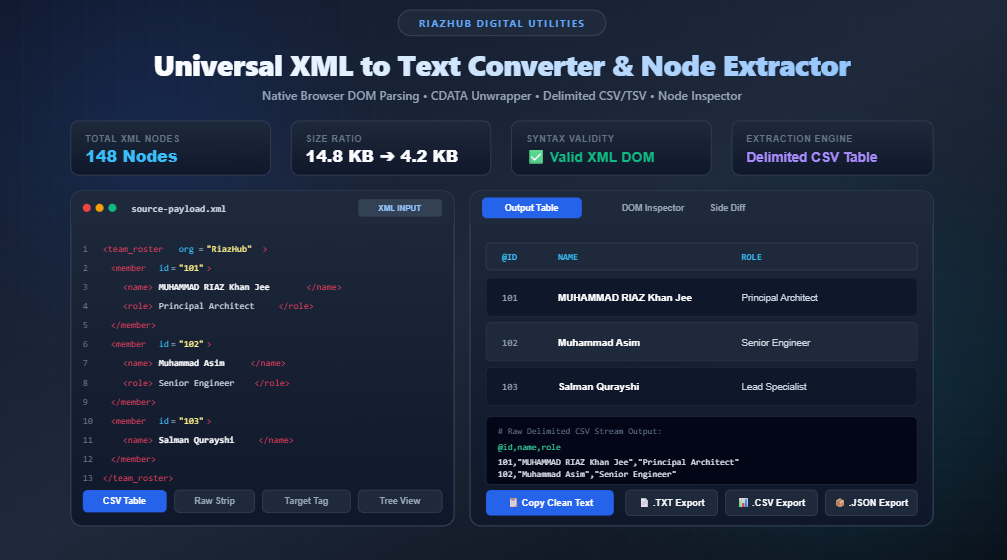
To solve this challenge quickly and securely, you can use the free XML to Text Converter & Node Content Extractor on RiazHub. This online utility transforms complex XML documents into stripped plain text, targeted tag lists, or delimited CSV/TSV tables directly in your browser with zero server roundtrips.
💡 Quick Utility Link: Need to parse an XML file right now? Launch the Universal XML to Text Converter Suite to extract clean data instantly.
Why Simple Regex Tag Stripping Fails on Real-World XML
A frequent shortcut when attempting to extract text from XML is executing a naive regular expression search-and-replace, such as substituting <[^>]+> with an empty string or newline. While this basic approach may seem functional on a 5-line snippet, it inevitably causes severe data corruption on real-world production feeds:
- Corrupted CDATA Sections: Unescaped special characters (e.g.,
&,<,>) wrapped inside<![CDATA[...]]>blocks can be partially destroyed or completely wiped out if a regex engine encounters unescaped nested brackets. - XML Entity Escapes: Characters encoded as
&,<,>,", and'remain in their raw encoded state rather than resolving to readable, authentic text symbols. - Loss of Semantic Context: Blind regex strips erase parent-child structural boundaries, merging disparate attributes, item headings, and body paragraphs into an unformatted, unreadable wall of text.
- Namespaced Prefixes: Feeds with namespaces (such as
<content:encoded>or<media:thumbnail>) require proper qualified name resolution rather than generic pattern guessing.
This is why the browser-based XML to Text Converter utilizes the native DOMParser interface. By constructing an in-memory Document Object Model (DOM) tree, the tool navigates node hierarchies with mathematical accuracy, preserving CDATA block payloads and decoding standard XML entities seamlessly.
The 5 Essential Extraction Modes Explained
Different workflows demand distinct output formats. The XML to Text Converter & Node Content Extractor provides five specialized extraction engines:
| Mode | Primary Use Case | Sample Output Format |
|---|---|---|
| 1. Raw Text Strip | Purging all markup from speeches, articles, or SOAP response payloads. | Clean, paragraph-separated plain text. |
| 2. Target Tag Extraction | Extracting URLs from <loc> sitemaps or titles from <title> feeds. |
A vertical, one-item-per-line list of matching values. |
| 3. Key-Value Pairs | Config files, server manifests, and metadata inspection. | Tag_Name (attributes): Node Value |
| 4. Delimited Table (CSV/TSV) | Exporting repeating records (e.g., products, transactions) into Excel. | Delimited spreadsheet columns with auto-detected headers. |
| 5. Hierarchical Indented Tree | Visualizing depth, branching, and attribute relationships. | Nested outline with two-space indentation per level. |
1. Raw Text Strip Mode
When you need only the readable human prose contained inside an XML document, Raw Text Strip purges all opening, closing, and self-closing tags. It automatically traverses all descendant nodes, unwraps CDATA sections, decodes HTML/XML entities, and cleans up irregular spacing according to your whitespace trimming options.
2. Target Tag Extraction (Sitemaps & Link Mining)
SEO professionals and web crawlers frequently need to extract thousands of URLs from an XML sitemap. Rather than writing a custom Python or Bash script, simply switch the mode to Target Tag Extraction and specify loc as the target tag name. The tool isolates every <loc> element across the entire document and generates a clean, newline-delimited URL list ready for Screaming Frog, Ahrefs, or Google Search Console.
3. Transpiling XML Records to Delimited CSV / TSV
Many e-commerce catalogs, CRM systems, and accounting platforms export data as repeating XML elements:
<team_roster>
<member id="101" department="Architecture">
<name>MUHAMMAD RIAZ Khan Jee</name>
<role>Founder & Principal Architect</role>
<status>Active</status>
</member>
<member id="102" department="Engineering">
<name>Muhammad Asim</name>
<role>Senior Software Engineer</role>
<status>Active</status>
</member>
<member id="103" department="Infrastructure">
<name>Salman Qurayshi</name>
<role>Lead Systems Specialist</role>
<status>Active</status>
</member>
</team_roster>By selecting Delimited Table / CSV in the Node Content Extractor Suite, the engine inspects all child elements and attribute tags (such as @id and @department), builds the header row, and generates standardized tabular rows:
@id,@department,name,role,status
101,Architecture,MUHAMMAD RIAZ Khan Jee,Founder & Principal Architect,Active
102,Engineering,Muhammad Asim,Senior Software Engineer,Active
103,Infrastructure,Salman Qurayshi,Lead Systems Specialist,Active
Real-Time DOM Hierarchy Inspector & Side-by-Side Diff
In addition to raw text conversion, the utility features two built-in developer tools:
- Interactive XML Node Hierarchy Table: A filterable data table detailing every parsed element, its depth level in the document tree, attached XML attributes, and raw textual content. You can search by tag name or attribute value in real time.
- Side-by-Side Diff Comparison: A synchronized visual split-pane highlighting the original raw XML on the left against the final stripped output on the right, allowing you to verify that no essential data was omitted.
100% Client-Side Processing: Your Data Remains Private
Data privacy is paramount when dealing with customer catalogs, proprietary configurations, financial statements, or internal feeds. Unlike server-side converters that upload your files to remote cloud endpoints (introducing risks of server logging and security vulnerabilities), the RiazHub XML to Text Converter operates 100% inside your browser session.
All node parsing, CDATA unwrapping, CSV transcription, and file downloads are computed in your computer’s local memory using pure ES6 JavaScript. Not a single byte of your XML input or converted text is transmitted to an external server.
Ready to Convert Your XML Feeds?
Experience lightning-fast, zero-install, private XML parsing with the Universal XML to Text Converter & Node Content Extractor on RiazHub.
Summary: Why Use RiazHub’s XML Extraction Suite?
- Multi-Mode Flexibility: Switch between raw text stripping, target element extraction, key-value mapping, CSV tables, and hierarchical trees with a single click.
- Drag-and-Drop Convenience: Load
.xml,.rss,.atom,.svg,.soap,.plist, or.txtfiles directly into the workspace. - One-Click Preset Profiles: Instant configurations for XML Sitemaps, RSS feeds, CSV exports, and clean text cleanup.
- Multi-Format Exports: Download your processed output as
.txt,.csv, or structured.jsonwith zero friction.
Visit the XML to Text Converter & Node Content Extractor today to streamline your data transformation workflows!
Universal XML to Text Converter DOM & CDATA Safe
Strip XML markup, extract node text values, transpile XML records into plain lists or delimited tables, and inspect node hierarchies in real time. 100% private, client-side browser execution.
Source XML Input
| Tag Name | Depth | Attributes | Node Text Content |
|---|---|---|---|
| No XML DOM parsed yet. Enter XML or load sample. | |||
XML Architecture, Parsing Standards & DOM Extraction Guide
DOMParser interface. Unlike naive regular expressions that break on nested tags or CDATA blocks, DOM traversal respects document hierarchies, node depths, and element relationships.
node.textContent concatenates all descendent text indiscriminately into one string. This converter provides granular control: choose between full raw stripping, targeting specific element tags, extracting key-value outlines, or transcribing records into tab/comma tables.
<![CDATA[...]]>) allow special characters such as &, <, and > without manual entity escaping. Our engine unwraps CDATA sections seamlessly and normalizes namespace prefixes (like content:encoded in RSS feeds).