
How to Blur, Censor & Redact Images in Your Browser (100% Private, Zero Uploads)
In an era of relentless data scraping, identity theft, and algorithmic facial recognition, posting photos online without sanitizing confidential data is an enormous security risk. Whether you are sharing a rental agreement, tweeting an electricity bill, posting a driver’s license or national identity card (CNIC) on social media, or uploading a product screenshot containing API keys, private passwords, and credit card CVVs, failing to redact this information can lead to catastrophic identity theft or financial fraud.
Unfortunately, most web-based image blurring tools harbor a critical security flaw: they upload your raw, unredacted private documents to their remote cloud servers before performing the blur. This creates an unencrypted server-side record of your most confidential credentials.
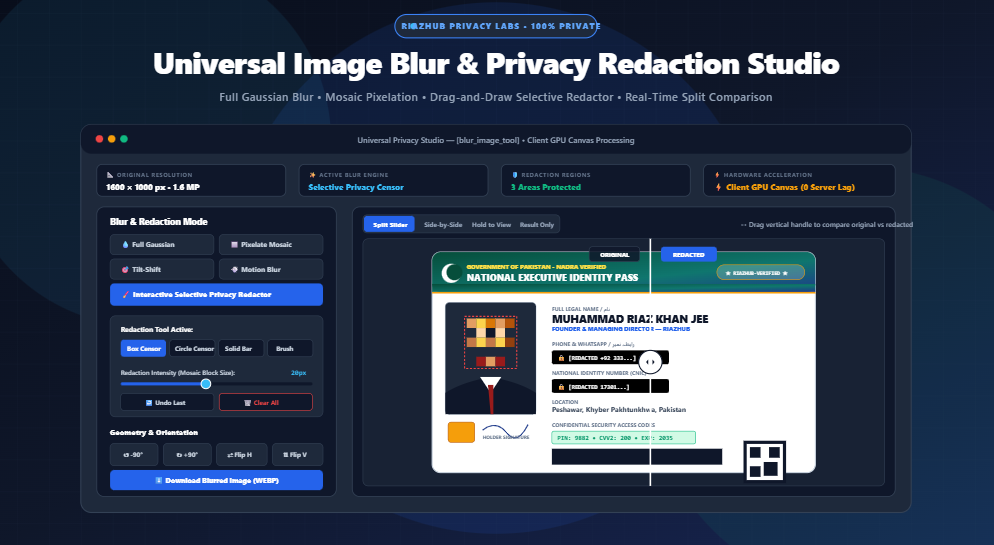
To solve this vulnerability once and for all, we engineered the Universal Image Blurring, Censoring & Privacy Redaction Studio. Operating 100% inside your local device’s memory via client-side HTML5 Canvas rasterization, our studio ensures that zero bytes, pixels, or photos are ever uploaded to any web server.
Need to Censor a Document or Photo Right Now?
Launch RiazHub’s zero-upload privacy studio. Apply Gaussian blur, 16px mosaic censor, or drag-and-draw black bars completely offline in your browser.
1. The 5 Blurring & Redaction Engines: Which One Should You Use?
Different redaction tasks require different mathematical optics. An aesthetic UI background card requires soft diffusion, while a banking document requires total byte-level destruction. The Universal Privacy Studio on RiazHub provides five specialized engines tailored for specific redaction and creative workflows:
Convolves image pixels with a 2D normal bell curve. Adjustable from 1px to 100px radius with multi-pass smoothing for soft aesthetic backdrops or soft-focus photography.
Replaces $N \times N$ cell clusters (4px to 64px) with averaged solid color blocks. Safely destroys high-frequency edge detail so faces and vehicle license plates cannot be reversed.
Draw rectangular boxes, circular masks, freehand brush strokes, or solid black bars directly over passport numbers, signatures, and credit card CVVs with instant undo support.
Simulates shallow depth-of-field optics. Maintains a sharp, in-focus focal band or central circle while smoothly fading the periphery into cinematic bokeh blur.
Simulates fast-moving action and dynamic velocity across any vector from $0^\circ$ to $360^\circ$ with customizable stroke distance.
2. The Mathematics: Why Pixelation Permanently Destroys Data (And Cannot Be “De-Blurred”)
A frequent question from users is: “Can someone use modern AI or Photoshop de-blurring filters to reverse my redacted text?”
The answer depends strictly on whether you applied optical convolution (Gaussian blur) or mosaic decimation (pixelation):
A. 2D Gaussian Kernel (Mathematical Diffusion)
Gaussian blur calculates each pixel’s new color value by weighing its spatial distance from neighboring pixels using the normal distribution equation:
Because Gaussian blur is a linear continuous convolution, low-radius blurs (under 6px) leave tiny residual mathematical gradients. While humans cannot read the text, state-of-the-art neural deconvolution models can sometimes recover blurred characters if the blur radius is too small.
B. Pixelation / Mosaic Decimation (Entropy Destruction)
In contrast, our pixelation algorithm divides the image into discrete $N \times N$ cell grids and averages the color values of all pixels in the cluster:
When you set the mosaic slider to 16px or 24px in the RiazHub Privacy Redaction Studio, over 256 to 576 individual color variations are collapsed into one uniform block. The original pixel entropy is physically erased from the binary matrix. No artificial intelligence model in the world can resurrect high-frequency characters from a single homogeneous block of color.
Many amateur web utilities and social tools use CSS filters like filter: blur(12px). This is merely an illusion. The raw unredacted image is still embedded in the webpage’s DOM. Anyone can press Right-Click → Inspect Element, disable the CSS property, and view your private credentials in high definition.
The RiazHub Difference: Our studio uses HTML5 Canvas ImageData buffer rasterization. When you download a WEBP, PNG, or JPEG, the original pixels have been physically overwritten in memory.
3. Step-by-Step Guide: How to Redact Sensitive IDs, Passports & Documents
Follow this 4-step workflow to redact sensitive IDs, utility bills, and face portraits safely:
- Open the Studio & Load Your Image: Navigate to the Image Blurring & Privacy Redaction Studio. Drag and drop your JPG, PNG, WEBP, AVIF, or BMP file into the upload zone. Alternatively, click “Load Sample Photo” to practice on an official ID card mockup.
- Select “Interactive Selective Privacy Redactor”: Click on the purple “Interactive Selective Privacy Redactor” tab on the left control panel.
- Choose Your Redaction Tool:
- For Faces & Avatars: Choose “Box Censor” or “Circle Censor” with the “Pixelate” effect set to 16px. Drag a bounding box directly over the face on the canvas viewport.
- For ID Numbers & Phone Numbers: Select “Solid Black Bar”. Drag a sleek black security box across the CNIC, passport number, or mobile number.
- For Security PINs & Passwords: Select “Heavy Blur” with 20px intensity and draw over confidential codes.
- Compare with the Split-Screen Slider & Export: Drag the interactive vertical divider to inspect the original vs. redacted image. Once satisfied, click “Download Blurred Image (WEBP)” or “PNG HD” for permanent, lossless export.
4. Technical Comparison: Client-Side Canvas vs. Traditional Cloud Tools
| Security Feature | RiazHub Privacy Studio | Standard Cloud Editors |
|---|---|---|
| File Transmission | Zero (100% Client-Side) | Uploaded to Cloud AWS/GCP Bucket |
| Private Document Safety | Never leaves device memory sandbox | Subject to server logging & cloud leaks |
| Processing Speed | Instant (60 FPS GPU Canvas) | Delayed by server upload/download queue |
| Permanent Rasterization | Yes (Byte-level destructive canvas export) | Varies (often display-only or reversible) |
| Usage Cost & Sign-Up | 100% Free • No Sign-Up Required | Requires registration or monthly paywalls |
Protect Your Personal Identity Online Today
Safeguard your documents before sharing them on Facebook, WhatsApp, X (Twitter), or LinkedIn. Use our free, bank-grade redaction suite.
5. Frequently Asked Questions (FAQ)
No. Absolutely zero image data is transmitted to RiazHub or any third-party server. All decoding, spatial matrix convolution, pixel replacement, and binary blob generation occur strictly inside your device’s local browser memory using the HTML5 Canvas 2DContext API. You can even disconnect your internet after loading the page and the tool will continue to work flawlessly.
No. When you export an image from the Privacy Redaction Studio, the downloaded WEBP, PNG, or JPEG file contains permanently flattened byte values. Because the original pixel coordinates have been replaced with averaged colors or solid #000000 pixels, the original data is physically absent from the file.
For maximum privacy and web efficiency, choose WEBP; it offers ultra-small file sizes with near-lossless clarity. If you are redacting transparent logos or high-resolution architectural scans, choose PNG HD to preserve crisp alpha transparency. Choose JPEG for broad compatibility with legacy portal uploaders.
Yes! Click the “Copy to Clipboard” button on the export toolbar. Using the modern browser navigator.clipboard.write() API, the studio copies the redacted PNG blob directly to your clipboard, allowing you to instantly paste (Ctrl+V or Cmd+V) into Slack, Discord, WhatsApp Web, or email composers.
Universal Image Blur & Privacy Redaction Studio
Censor sensitive info, apply Gaussian or motion blur, create tilt-shift effects, and pixelate faces with real-time before/after comparison.
Blur & Redaction Mode
Geometry & Transforms
Image Blurring Optics, Privacy Redaction & Convolution Algorithms
Learn how mathematical convolutions and client-side rasterization protect personal data.
filter: blur(10px) for redaction. CSS blur is merely a cosmetic layer; inspecting the DOM or saving the underlying source file reveals the un-blurred original.
Our Studio Engine: Every operation executes through direct HTML5 Canvas
2DContext rasterization. When downloaded or copied, the output file contains physically replaced byte matrices—the original pixels no longer exist in the exported file.