
How to Make Official Biometric Passport & ID Photos at Home (Complete Guide & Free Studio)
Compounding this headache is the extortionate pricing charged by local pharmacies, postal shops, and photo kiosks. Walk into any major drugstore or post office, and you will routinely pay between $15.00 and $25.00 for two small 2×2 inch paper prints that take five minutes to produce.
Fortunately, you no longer need expensive studio visits or overpriced kiosks. With modern smartphone cameras and the free Universal ID & Biometric Passport Photo Maker on RiazHub, you can crop portraits to exact consular millimeter standards, align facial landmarks to official ICAO guidelines, adjust background colors, and export high-resolution 300 DPI print-ready sheets for mere pennies.
⚡ 100% Privacy Guarantee: Unlike sketchy mobile apps or cloud-based photo editors that store your facial scans on remote servers, the RiazHub Passport Photo Studio operates completely inside your web browser. Zero biometric portraits or personal identity scans are ever uploaded across the internet.
1. Understanding Official Global Biometric Document Standards
Different sovereign nations and immigration authorities enforce strict geometrical and dimensional requirements for identity photos. Submitting a UK-dimensioned photo to the US Department of State (or vice versa) guarantees instant rejection. Here is a breakdown of the most widely used international standards:
| Document Type | Physical Dimensions | Pixel Size @ 300 DPI | Required Background |
|---|---|---|---|
| US Passport & Visa | 2 × 2 inches (51 × 51 mm) | 600 × 600 px | Pure White (#FFFFFF) |
| UK / EU / Schengen Passport | 35 × 45 mm | 413 × 531 px | Off-White or Light Grey |
| Global Consular Visa | 50 × 50 mm | 600 × 600 px | Pure White |
| National ID Card | 30 × 40 mm | 354 × 472 px | White or Light Blue |
| Standard Driving Licence | 35 × 45 mm | 413 × 531 px | Solid White / Light Grey |
Instead of manually calculating pixels and aspect ratios in Photoshop, you can select these exact presets in one click using the RiazHub Biometric ID Studio.
2. The ICAO 9303 Biometric Facial Alignment Rules
The International Civil Aviation Organization (ICAO Doc 9303) and ISO/IEC 19794-5 dictate the strict biometric parameters used by automated electronic passport gates (e-Gates) and consular facial recognition scanners:
- Head Size Proportion (70% to 80% Rule): The vertical distance measured from the base of the chin to the crown of the head (the top of the skull, excluding voluminous hair) must occupy between 70% and 80% of the entire frame height (typically 32 mm to 36 mm on a 45 mm photo).
- Eye Level Horizon (56% to 65% Height): The subject’s eye axis must sit horizontally level between 56% and 65% measured from the bottom edge of the photo.
- Neutral Facial Expression: The applicant must look straight into the camera lens with both eyes wide open and clearly visible. The mouth must be closed with no smiling, frowning, or baring of teeth.
- No Eyeglasses Glare or Tint: Tinted sunglasses are universally prohibited. While clear prescription spectacles were once permitted in certain regions, most jurisdictions (including the US) now require removing all eyeglasses to eliminate reflections and glare on automated scanners.
- No Head Coverings: Hats, baseball caps, beanies, hoods, and decorative headbands are banned. Exceptions are granted solely for documented religious or medical reasons, provided the entire facial oval from chin to forehead remains fully visible.
Create Your Biometric Passport Photo in 60 Seconds
Crop portraits, align facial proportions to ICAO guidelines, and generate print sheets for free.
3. Background Rules: Why Solid White & Light Tones Are Mandatory
Why do passport agencies care so deeply about your background? Automated biometric recognition software separates the subject’s face and hair contours from the surrounding backdrop by evaluating edge contrast. Busy wallpaper, textured plaster, door frames, or shadows confuse the algorithmic landmarking algorithms.
Depending on the destination country, official guidelines mandate specific solid matte backdrop tones:
- Pure White (
#FFFFFF): Mandated by the United States, Canada, Australia, India, and most Latin American embassies. - Off-White / Cream (
#F8FAFC): Preferred by several European Union and Schengen member states to provide subtle contrast for fair-haired subjects. - Light Grey (
#F1F5F9): An accepted standard in the United Kingdom for subjects with light or white hair. - Light Sky Blue (
#E0F2FE): Standard for specific Middle Eastern, Gulf, and Southeast Asian employment and residence visas. - Solid Red (
#DC2626): Required for specific official administrative cards in Indonesia and select Asian registries.
With RiazHub’s built-in Official Background Color Replacer, you can switch between pure white, light sky blue, off-white, light grey, or custom hex codes with a single click, ensuring 100% consular alignment.
4. Step-by-Step Tutorial: Making Your ID Photo at Home
- Capture a Crisp Portrait: Stand approximately 4 to 6 feet away from your smartphone or camera in a brightly lit room. Facing a large window provides natural, diffused lighting that banishes harsh shadows behind your head and neck. Keep your shoulders relaxed, spine upright, and eyes pointed directly into the camera lens.
- Open the Studio: Navigate to the Universal ID & Biometric Passport Photo Maker on your mobile device, tablet, or desktop computer.
- Upload or Drop Your Photo: Drag and drop your image into the uploader dropzone or click “Select Portrait Photo” (supports JPG, PNG, WEBP, and AVIF formats up to 25MB).
- Select Your Target Document: Pick your required document preset (e.g., US Passport 2×2 in, UK/EU 35×45 mm, Global Visa, or National ID).
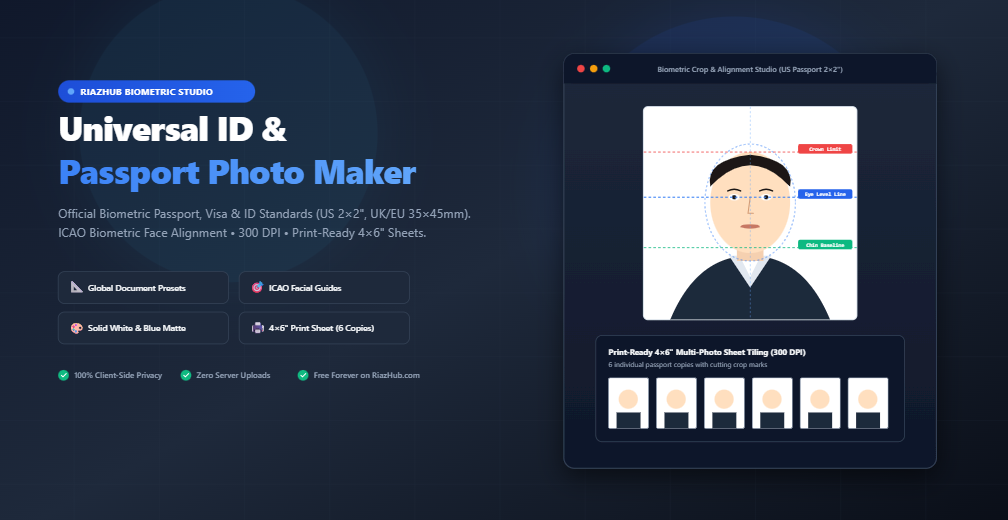
- Align Facial Landmarks: Toggle the Biometric ICAO Guidelines Overlay. Use the intuitive drag-and-pan canvas and Zoom slider to position your face so that the top of your hair touches the red Crown Limit and your eyes align with the blue Eye Level guideline.
- Pick Your Background Color: Choose the government-required background color swatch (Pure White, Light Sky Blue, Off-White, or Light Grey).
- Review the Biometric Compliance Audit: Click the “ICAO Audit” tab to review automated checks for resolution (300 DPI), head proportion boundaries, and background clarity.
- Export & Download: Click “Download Single ID Photo” for digital visa portals, or generate a tiled 4×6 inch print-ready sheet for physical paper submissions.
5. The 4×6 Inch Sheet Printing Secret: Save Up to 95% on Photo Printing
Here is the industry secret that pharmacy photo counters hope you never discover:
If you visit a CVS, Walgreens, Walmart, Boots, or local print shop and ask the staff to print a “passport photo”, they will ring you up for a specialized passport package that costs between $14.99 and $17.99. However, if you submit an ordinary 4 × 6 inch (10 × 15 cm) standard photo print, the exact same machine prints the sheet for merely $0.35 to $0.40!
The RiazHub Print Sheet Layout Generator automatically arranges 6 perfectly dimensioned passport photos onto a standard 4×6 inch canvas rendered at an ultra-sharp 300 DPI (1200 × 1800 pixels), complete with subtle scissor cutting crop marks.
Simply download the 4×6 sheet, send it to your local drugstore’s online 1-hour photo service or print it on your home color inkjet printer with glossy photo paper, cut along the dotted crop lines, and you have six official, government-compliant passport photos for less than fifty cents.
6. Consular Pre-Submission Self-Audit Checklist
Before mailing your official document package or uploading your photo to an online visa portal, run through this quick checklist:
- Photo was taken within the last 6 months to reflect current appearance.
- No eyeglasses, colored contact lenses, or tinted glasses are worn.
- No hats, wireless earbuds, headgear, or military uniforms are visible.
- Facial expression is neutral, mouth is closed, and both ears/cheeks are clearly lit.
- Background is uniform, solid, and free from shadows, patterns, or wall textures.
- Physical print is on heavyweight photo paper (glossy or matte as specified by your consulate).
- Physical print is free from staple holes, paper clips, creases, smudges, or ink marks.
7. Frequently Asked Questions (FAQ)
Can I take a passport photo with my iPhone or Android smartphone?
Yes! Modern smartphone sensors possess more than enough megapixels to exceed the 300 DPI consular printing threshold. The key is proper lighting (stand facing a window) and framing using the alignment guides on the RiazHub ID Studio.
Is my photo uploaded or saved on RiazHub’s servers?
No. Your privacy is paramount. All image rendering, facial guideline overlays, background replacements, and sheet tiling calculations take place 100% locally inside your web browser using HTML5 Canvas. No biometric files or photos are ever transmitted to our servers or stored in any database.
What paper should I use when printing passport photos at home?
Always use dedicated photographic paper (minimum 200 GSM weight), preferably premium glossy or semi-gloss finish. Standard multi-purpose office copy paper will be rejected immediately by passport processing centers.
What resolution (DPI) do passport agencies require?
Consular authorities uniformly mandate 300 DPI (Dots Per Inch) for printed identity photos to prevent pixelation and ensure automated biometric scanning accuracy. RiazHub exports both single passport files and 4×6 print sheets at exact 300 DPI resolution.
Ready to Create Your Passport Photos?
Experience hassle-free, millimeter-accurate biometric photo creation right from your browser.
Universal ID & Passport Photo Maker
Crop portraits to official passport and visa dimensions, align face proportions to international ICAO guidelines, replace background colors, and generate print-ready sheets instantly inside your browser.
Rendered Single ID Passport Photo
Print-Ready Tiled Photo Sheet
ICAO & Global Biometric Compliance Checklist
Verify your photo meets standard requirements before government or consular submission.
Output photo is rendered at true 300 Dots Per Inch matching high-resolution consular specifications.
Distance between chin and crown of head conforms to standard 32mm to 36mm (approx. 75% of total height).
Official solid matte background is active with no harsh drop shadows, halos, or cluttered surroundings.
Ensure your original photo has a neutral expression, mouth closed, both eyes open and directly facing the camera with no glare on spectacles.
Government agencies prohibit hats, caps, wireless earphones, headphones, and military uniforms in official documents.
Passport Photo Standards, ICAO Guidelines & Printing Instructions
What are the official ICAO 9303 head size & eye position standards?
The International Civil Aviation Organization (ICAO Doc 9303) and ISO/IEC 19794-5 require passport portraits to follow strict biometric geometrical rules. The head height (from chin baseline to the crown or top of hair) must occupy between 70% and 80% of the total image height. The eye level must sit vertically at approximately 56% to 65% from the bottom of the photo. Our interactive alignment guides automatically project these limits so you can compose your portrait with millimeter precision.
Why are solid white and light-colored backgrounds mandatory?
Automated e-Passport gates and border control biometric facial recognition scanners extract facial landmarks by analyzing edge contrast. Complex wallpapers, shadows, or colored home backgrounds disrupt the neural networks and cause instant visa rejections. Most nations (including the US, Canada, UK, and Schengen countries) mandate pure white (#FFFFFF) or off-white. Some Asian and Middle Eastern visas accept light sky blue (#E0F2FE).
How does the 4×6 inch print-ready sheet work at home or print shops?
Printing individual 2×2 inch or 35×45 mm photos can be expensive at photo kiosks. By tiling 4 to 8 copies onto a standard 4 × 6 inch (10 × 15 cm) photo sheet at 300 DPI (1200×1800 px), you can print the sheet as a standard photo print for pennies at CVS, Walgreens, Walmart, Boots, or on any home inkjet printer with glossy photo paper. Thin crop guides make it easy to cut out with a ruler and hobby knife or scissors.
Privacy Guarantee: Is my photo uploaded or saved anywhere?
Never. This studio executes 100% locally inside your web browser using HTML5 Canvas and vanilla JavaScript. Your biometric portraits, ID cards, and files never touch RiazHub's server, any cloud database, or third-party AI endpoints. All processing occurs strictly on your device's memory.