
The Art of Visual Framing: How to Create Stunning Image Borders, 3D Bevels, Polaroid Frames, and CSS Code in Your Browser
Whether you are designing a high-converting eCommerce hero banner, polishing screenshots for a software documentation portal, or turning family photos into nostalgic Polaroid keepsakes, the right frame commands attention and defines visual hierarchy. Learn how to craft 9 professional border styles and export print-ready assets or production CSS using the free Universal Image Border Generator & Creative Framing Studio on RiazHub.
Try the Universal Image Border Generator Now
Zero file uploads, zero server latency, and zero watermarks. Launch the free RiazHub Image Border Studio to instantly apply solid strokes, conic gradients, authentic Polaroid mats, 3D sunlit bevels, postage stamps, and 35mm cinema film strips right in your browser.
1. The Psychology of Framing: Why Borders Transform Digital Imagery
In both classical art galleries and modern digital product design, a frame does much more than outline a rectangular boundary. According to Gestalt principles of visual perception specifically the Law of Common Region elements enclosed within a distinct boundary are immediately perceived by the human brain as belonging together as a unified, high-priority subject.
When an unbordered image is placed against a plain white or dark website backdrop, low-contrast edges blend into the surroundings, causing visual bleed and making the layout feel unpolished. By applying intentional borders, you achieve three critical visual enhancements:
- Definitive Visual Contrast: Establishes clear separation between foreground media and background typography, stopping user eye fatigue.
- Emotional Context & Storytelling: A warm Polaroid frame instantly evokes nostalgic memory, while a 35mm film strip signals cinematic storytelling, and a 3D gold bevel conveys prestige and museum-grade luxury.
- Device & UI Grounding: Adding rounded outer corners and subtle drop shadows provides depth, making flat UI mockups pop out of the viewport.
2. Exploring 9 Distinct Framing Styles in the RiazHub Studio
Traditional photo editors often bury framing options under dozens of submenus, or limit you to rigid box outlines. The RiazHub Image Border Generator re-engineers this process with real-time HTML5 Canvas processing and dedicated control panels for 9 creative framing architectures:
🎨 Solid Stroke & Independent Sides
The bedrock of responsive web design. Customize global border thickness from 1px to 100px with any hex color, or toggle the Independent Sides switch to specify asymmetrical top, right, bottom, and left border widths (e.g., a stylish 8px bottom accent bar).
🌈 Multi-Color Linear Gradients
Modernize tech screenshots and marketing graphics with vibrant dual-color linear gradient borders. Adjust the gradient angle continuously from 0° to 360°, reverse color order with a single click, or select curated color harmonies like Sunset Blaze, Electric Neon, Platinum Silver, and Royal Gold.
📷 Classic Polaroid & Instant Photo
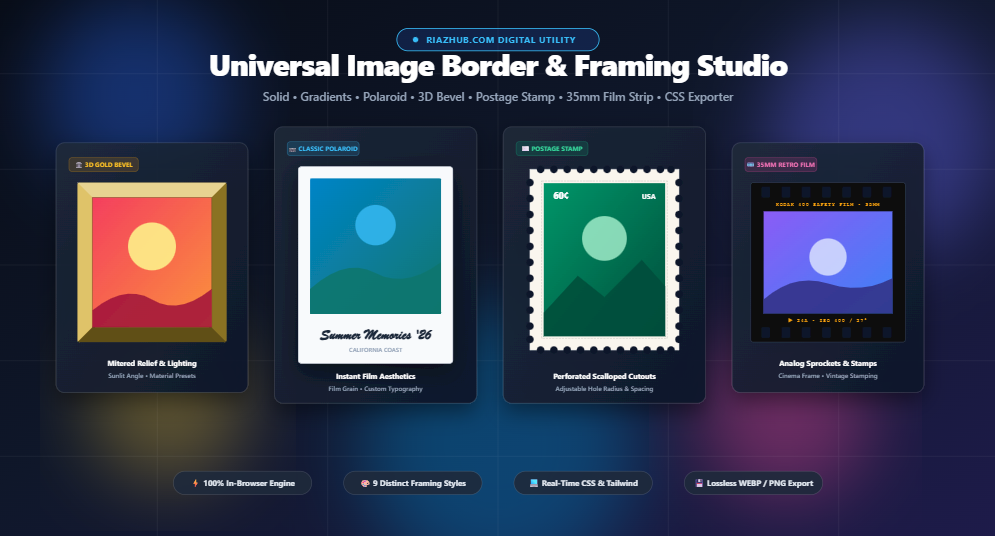
Transforms modern smartphone photos into nostalgic instant film prints. Features authentic asymmetric matting (narrow top and sides with a signature wide bottom chin), custom handwritten captions, vintage fonts, paper tint selectors, and organic analog film grain simulation.
✨ Soft Drop Shadows & Cyberpunk Glow
Replicates multi-layered diffused ambient shadows with customizable blur radius, X/Y directional offset coordinates, and opacity. Switch to high-saturation colors to create electric neon glows ideal for gaming avatars and Web3 portfolios.
➖ Dashed & Dotted Stitch Lines
Provides customizable dash lengths and gap intervals with rounded or square stroke caps. Perfect for creating digital coupon cutouts, craft blog visuals, or tactile scrapbook motifs.
🖼️ Double Multi-Line Framing
A sophisticated double-frame layout featuring a heavy outer border, a customizable transparent gap spacer, and a fine inner accent stroke in contrasting colors (e.g., charcoal outer with an antique bronze inner rule).
🏛️ 3D Architectural Beveled Frame
Generates a realistic mitered picture frame with sunlit highlight and cast shadow trapezoids that adapt dynamically to your chosen light source angle (Top-Left 135°, Overhead 45°, Upward Flare 225°, or Sunken 315°). Includes material presets like Antique Gold, Walnut Wood, Platinum Silver, and Matte Obsidian.
✉️ Postage Stamp Perforations
Applies true circular scalloped perforations along all four outer edges using alpha mask composition (destination-out). Adjust hole radius and perforation spacing to turn any portrait or landscape into a collectible postage stamp.
🎞️ 35mm Retro Analog Film Strip
Wraps your image in an authentic 35mm cinema negative frame complete with rounded-rectangular sprocket perforations along the top and bottom margins, customizable film brand title stamps (e.g., KODAK 400 SAFETY FILM), and vintage amber frame counters (▶ 24A).
3. Step-by-Step Guide: How to Frame an Image in 4 Simple Steps
The Universal Image Border Generator operates entirely within your web browser, delivering instant feedback with every slider movement. Follow this straightforward walkthrough:
4. Technical Deep-Dive: Canvas Expansion vs. Overlay Framing
One common pitfall in graphic editing is border clipping. When you add a 30px border or a 50px Polaroid mat to an image, what should happen to the canvas dimensions? In the RiazHub Border Studio, you have complete control via the Border Placement Mode toggle:
| Feature | Expand Canvas (Default) | Overlay (Inside Dimensions) |
|---|---|---|
| Image Integrity | 100% preserved; zero cropping or covered pixels. | Edges of the source image are covered by the border stroke. |
| Output Resolution | Grows dynamically by: Original + (Border × 2) + Matting |
Matches exact input image dimensions (e.g., exactly 1920×1080 px). |
| Recommended Use Case | Art prints, Polaroid cards, social media posts, stamps, and film strips. | Avatar thumbnails, strict grid layouts, fixed aspect ratio banners. |
| Corner Radius Behavior | Smooth clipping applied to image and frame perimeter independently. | Direct inner stroke clipping with anti-aliasing. |
5. Instant CSS & Tailwind Code Generator for Web Developers
If you are building a modern web application with React, Vue, Next.js, or WordPress, you might not want to export a static raster image. Instead, you can use the built-in Code Studio tab in the Image Border Generator on RiazHub to instantly copy clean, responsive CSS and Tailwind CSS classes.
As you tweak the sliders in real time, the tool automatically constructs semantic code matching your active style:
.framed-image {
  border: 16px solid #2563eb;
  border-radius: 20px;
  max-width: 100%;
  height: auto;
  box-shadow: 0 10px 25px -5px rgba(0, 0, 0, 0.1);
}<img src="photo.webp" class="border-[16px] border-[#2563eb] rounded-[20px] shadow-xl max-w-full h-auto" />For gradient styles, the tool automatically outputs modern border-image declarations with linear gradient angle mappings, saving you from tedious manual trial-and-error in developer tools.
6. Privacy First: 100% Client-Side In-Browser Processing
In an era where digital privacy is paramount, uploading personal photos, confidential business charts, or unreleased product screenshots to remote cloud servers creates significant security and compliance risks.
The RiazHub Universal Image Border Generator is engineered with a strict 100% client-side offline execution model. All pixel operations, canvas drawing routines, and high-resolution WebP/PNG encodings are executed locally within your device’s memory using standard browser APIs:
- ✅ Zero Cloud Uploads: Your images never leave your computer or mobile device.
- ✅ No Account Required: No registration, login, email subscriptions, or hidden fees.
- ✅ Offline Capable: Once the page is loaded, you can disconnect your internet connection and the studio will continue operating seamlessly.
- ✅ No Watermarks: All exported graphics are 100% clean and ready for commercial or personal publication.
7. Frequently Asked Questions (FAQ)
Will adding a border reduce the quality or resolution of my photo?
No. The canvas engine processes your image using its full natural pixel dimensions (naturalWidth and naturalHeight). In Expand Canvas mode, your image remains 100% uncompressed and uncropped, with the border width added on top of the original resolution.
What is the difference between WebP, PNG, and JPEG export formats?
PNG is a lossless format ideal for graphics requiring sharp borders and transparent backgrounds (such as postage stamps with scalloped cutouts). WebP offers cutting-edge compression with smaller file sizes while preserving both transparency and high clarity. JPEG is best for standard photographic prints without transparent backgrounds.
Can I paste screenshots directly from my clipboard?
Yes! You can press Ctrl+V (or Cmd+V on macOS) at any time while viewing the Image Border Studio, or click the Paste button in the dropzone to frame screenshots immediately.
How do I create a museum gallery mat frame?
Select the Solid style, set the Outer Matting / Passe-Partout slider to 40px–60px with a pure white (#ffffff) or eggshell tint, set the border width to a slim 2px–4px dark charcoal stroke, and keep corner radius at 0px. You can also apply this with one click using the 🏛️ Museum Mat preset button.
Universal Image Border Generator
Add stylish solid, gradient, and Polaroid frames, customize corner radius, generate CSS border code, and export print-ready framed images in real time.
Border Geometry, CSS Box Model & Print Matting Guide
roundRect() path definition. By executing ctx.clip() with sub-pixel floating point calculations, the browser's hardware graphics acceleration performs multi-sampled anti-aliasing (MSAA), eliminating jagged stair-step artifacts common in traditional bitmap editing.
box-sizing: border-box insets borders inside existing element boundaries, while content-box adds to layout width without affecting image pixel data. Our Expand Dimensions Mode calculates physical canvas enlargement: Width = SourceWidth + (BorderWidth * 2) + (Matting * 2). This guarantees zero cropping or loss of your original subject pixels.