
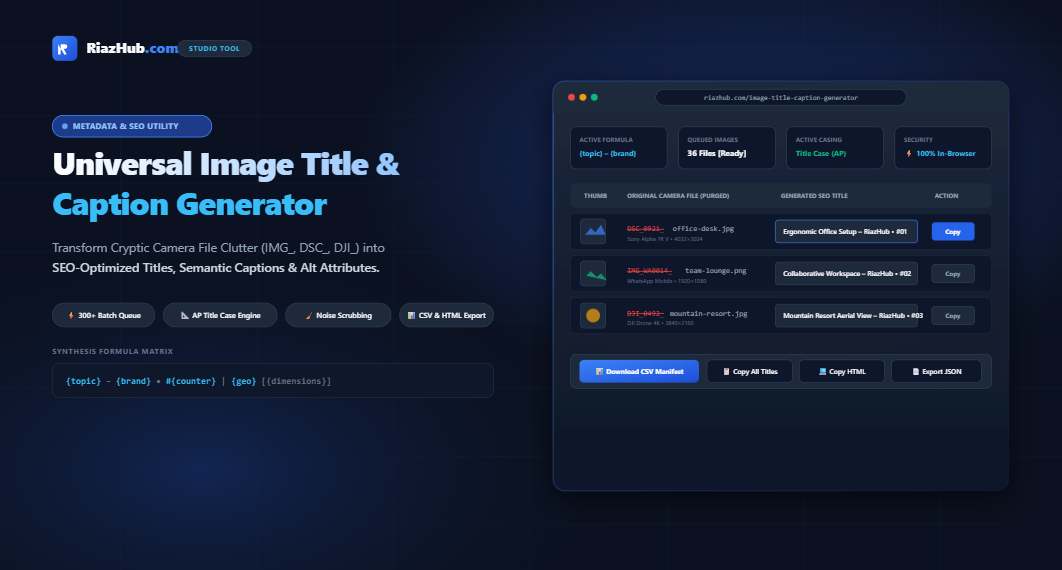
The Ultimate Guide to Image Title & Caption Optimization: How to Turn Camera Junk Filenames into High-Ranking SEO Metadata
Every single day, content creators, ecommerce store owners, photographers, and WordPress administrators upload thousands of media files into their content management systems with cryptic filenames straight out of digital cameras, smartphones, or messaging apps. Filenames like DSC_0921.jpg, IMG_20240815_WA0014.png, or PXL_20231102_142359.webp are widespread and they represent a massive, overlooked drag on search visibility and accessibility.
Search engine web crawlers and Google Images bots rely heavily on descriptive, topical metadata to index visual media accurately. When your image library is littered with uncurated camera hashes, search engines miss crucial semantic associations. Fortunately, you can instantly cleanse, format, and generate cohesive titles, alt attributes, and captions in bulk using the Universal Image Title & Caption Generator on RiazHub.
1. The Four Pillars of Image Metadata: Title vs. Alt-Text vs. Caption vs. Filename
A common misunderstanding in WordPress and web development is treating Image Titles, Alt-Text, and Captions as interchangeable. Each element performs a unique, complementary role across user experience, accessibility, and search engine algorithms:
| Metadata Element | HTML Location | Primary Purpose | Visibility |
|---|---|---|---|
| Image Title | title="Text" / post_title |
Provides catalog organization in media libraries and desktop browser hover tooltips. | On mouse hover & lightboxes |
| Alt-Text (Alternative Text) | alt="Text" |
Describes the physical image content for screen readers (WCAG accessibility) and search engine indexing. | Hidden (visible if image breaks) |
| Caption | <figcaption>Text</figcaption> |
Offers contextual narrative, photo credits, or editorial context directly underneath the visual. | Always visible on page |
| File Basename | src="image-name.jpg" |
URL slug referenced by web crawlers and direct asset requests. | In address bar & source code |
When you use the Image Title & Caption Studio, it synthesizes synchronized pairs of Titles, Alt-Texts, and HTML <figure> structures with a single click, ensuring strict compliance across all four pillars.
2. Why Camera Noise Scrubbing (IMG_, DSC_, DJI_) Is Essential for SEO
Raw camera hardware attaches automated prefixes based on technical manufacturer specifications:
DSC_orDSLR_: Digital Still Camera (Sony, Nikon).IMG_orPXL_: iOS and Google Pixel mobile phone cameras.DJI_: Drone aerial captures.Screenshot_orWhatsApp Image: Operating system screen clips and compressed messaging media.
These prefixes dilute keyword density and provide zero relevance to human visitors. By employing automatic noise purging, our browser-based title generator isolates the true subject of the filename (for instance, transforming DSC_0921_ergonomic-desk.jpg into clean, capitalized keywords) while stripping arbitrary trailing hex hashes.
SEO Insight: Google Image Search treats descriptive image titles and nearby contextual text as high-priority ranking signals. Upgrading generic filenames to formula-driven titles can dramatically increase impressions in Google Image carousel snippets.
3. The Deterministic Synthesis Formula Engine Explained
Rather than manually typing titles for dozens or hundreds of photos, modern content managers utilize deterministic formulas. With the Image Title & Caption Generator on RiazHub, you can construct custom formulas using dynamic tokens:
{topic} – {brand} • #{counter} [{geo}]Available dynamic placeholders include:
{topic}: The primary subject matter (e.g., Minimalist Workspace).{brand}: Your website or publication brand (e.g., RiazHub).{category}: Product collection or editorial taxonomy (e.g., Office Furniture).{geo}: Local SEO geographic modifier (e.g., London Studio or Dubai HQ).{counter}: Sequential numbering with customizable padding (1, 2, 3or01, 02, 03or001, 002, 003).{dimensions}: Physical pixel resolution sniffed directly from the file (e.g.,1920 × 1080).{date}: Current calendar year or EXIF capture year.{original}: Cleaned base name of the uploaded file.
4. Editorial Title Case vs. Sentence Case: Journalistic AP Standards
Naive scripts often capitalize every single character in a sentence, yielding clumsy headings such as “The Beauty Of The Sunset In The West”. In contrast, professional publishers adhere to Associated Press (AP) Stylebook Title Case rules.
The modulation engine inside the Universal Title Generator automatically keeps minor functional prepositions, conjunctions, and articles lowercased such as a, an, the, and, but, or, for, nor, on, at, to, from, by, with, in, of—unless they occur as the first or last word of the title.
5. Step-by-Step Workflow: Processing 300+ Images in Under 60 Seconds
- Queue Media: Open the Universal Image Title & Caption Generator and drag-and-drop your image files or select an entire folder. You can also paste screenshots directly from your clipboard using
Ctrl+V. - Select a Preset or Build a Formula: Choose from built-in presets (Editorial Blog, E-Commerce SKU, Photography Portfolio, or Real Estate Listing) or click token chips to create your custom syntax.
- Choose Casing & Sanitization: Pick between Title Case, Sentence case, Clean Spaced, or UPPERCASE, and ensure the “Strip Camera Noise” checkbox is active.
- Review Live Comparison Table: Verify the side-by-side results in the real-time stage. You can manually tweak any generated title directly in the editable table field.
- Export Your Assets: Download the complete WordPress CSV manifest, copy formatted semantic HTML
<figure>tags, or export copyable WP-CLI and MySQL update queries.
6. How to Import Generated Titles into WordPress
Once you have exported your CSV manifest or SQL script from the RiazHub Title Studio, you can update your media library seamlessly:
Option A: Using WP All Import (CSV)
If you manage bulk uploads via CSV, map the Filename column to the attachment file, and the Title and Alt Text columns directly to the respective media taxonomy fields.
Option B: Using WP-CLI (Command Line)
For high-performance server administration, the tool automatically prepares shell commands ready to paste into your terminal:
wp post update $(wp post list --post_type=attachment --name="office-desk" --field=ID) --post_title="Ergonomic Office Setup – RiazHub • #01"7. Privacy & In-Browser Performance Guarantee
Unlike third-party cloud services that require uploading gigabytes of private photos to remote servers, the Universal Image Title & Caption Generator on RiazHub runs 100% client-side in vanilla JavaScript. Your original photos, personal snapshots, or confidential client mockups never leave your computer, ensuring absolute privacy and zero latency.
Frequently Asked Questions (FAQ)
Does this tool change my original image file on disk?
No. The generator creates titles, captions, HTML snippets, and CSV manifests for import into WordPress, databases, or content management systems without altering the physical files on your hard drive.
How many images can I queue simultaneously?
Because the engine is fully optimized with client-side Web APIs, modern browsers can effortlessly process 300+ images in seconds without slowdown.
Will using descriptive image titles increase my Google rankings?
Yes. Descriptive titles and synchronized alt attributes assist search engines in contextualizing visual assets, helping your imagery rank in Google Image search results, carousel cards, and rich snippets.
Visit the Universal Image Title & Caption Generator at RiazHub.com to start standardizing your media catalog now.
Universal Image Title & Caption Studio
Convert cryptic camera filenames into clean, polished WordPress titles, accessible captions, and SEO-friendly metadata in real time. 100% In-Browser & Privacy Safe.
| Preview | Original Filename | Generated Title (Editable) | Dimensions | Action |
|---|---|---|---|---|
|
No images in queue yet Drag and drop files, select images, or click "Load Samples" to begin. |
||||
<!-- Add images to generate semantic HTML tags -->
Filename,Title,Alt Text,Dimensions
# WP-CLI and SQL commands will be generated here
Image Titles are stored in the WordPress Media Library as post_title, displayed as hover tooltips (HTML title="..."), and utilized in modern lightboxes and image carousels. They provide human-friendly cataloging and context.
Image Alt-Text (alt="...") serves screen readers for visually impaired users and provides Google Image bots with explicit visual context when an image fails to load. This studio automatically generates cohesive titles and alt texts calibrated for both purposes.
Raw camera file naming schemes such as DSC_0921.jpg or IMG_20240815_WA0012.png offer zero contextual keywords. Search engine algorithms rely heavily on descriptive filenames and titles to index imagery within Google Images and Web Search carousel snippets.
By purging noisy prefixes and applying a deterministic formula (e.g. {topic} – {brand} • #{counter}), your media instantly transforms into structured, indexable assets.
Standard naive programming title capitalization often capitalizes every single word, which looks unpolished (e.g. "The Beauty Of The Sunset In The Evening").
Our AP Style modulation engine keeps minor conjunctions, prepositions, and articles (e.g., a, an, the, and, but, or, for, nor, on, at, to, from, by, with, in, of) properly lowercased unless they occur as the first or last word of the title, preserving high editorial standards.
All file reading, string parsing, EXIF dimension sniffing, and manifest downloads happen entirely inside your local browser via JavaScript standard Web APIs (FileReader, Blob, and URL.createObjectURL).
None of your photos, client assets, or generated titles ever touch a remote server or third-party cloud service.