
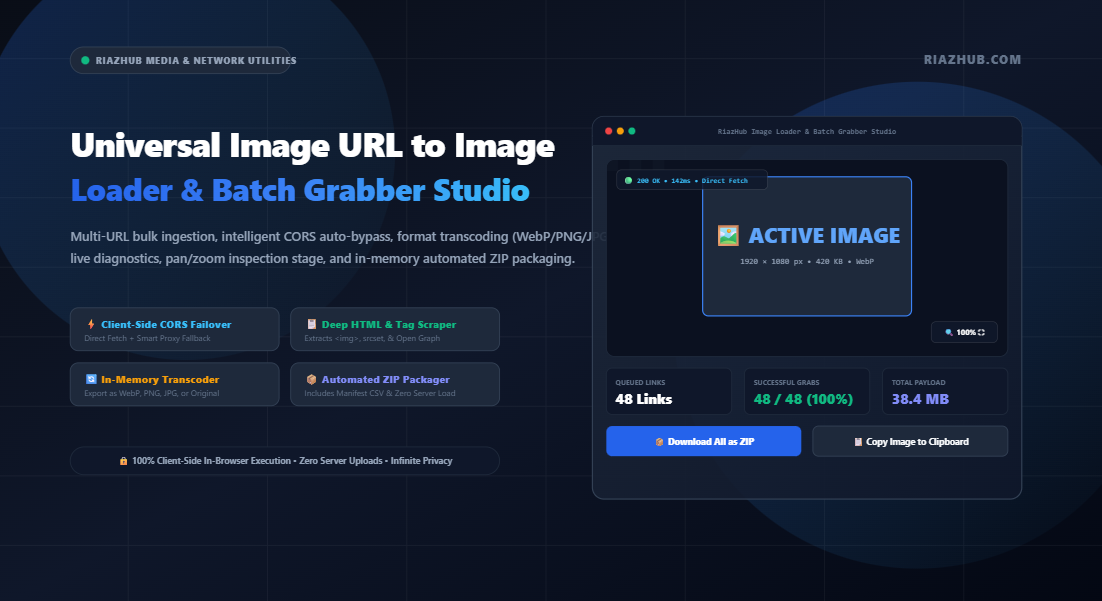
Downloading images one by one from remote servers, CDNs, social platforms, and media hosts is one of the most frustrating bottlenecks in modern digital workflows. Between aggressive Cross-Origin Resource Sharing (CORS) blocks, tainted canvas restrictions, and complex HTML markup structures, retrieving remote photos without third-party desktop scrapers often feels impossible. Here is how modern in-browser pipeline engineering solves these challenges completely.
The Anatomy of Remote Image Ingestion: CORS, Canvas Tainting, and Rate Limits
Every time a web developer, content creator, or eCommerce manager wants to collect images from web links, they face a common set of technical barricades:
- Cross-Origin Resource Sharing (CORS) Strict Enforcements: When your browser issues an asynchronous
fetch()orXMLHttpRequestto an external CDN, AWS S3 bucket, or image hosting provider, the remote server must explicitly return anAccess-Control-Allow-Originheader allowing cross-origin requests. Without this header, modern browsers block the response payload entirely. - The “Tainted Canvas” Security Trap: Even if you load an external link into a standard HTML
<img>element, attempting to manipulate or export that image using an HTML5Canvas 2D Context(viatoBlob()ortoDataURL()) triggers a fatal DOM security exception: “The canvas has been tainted by cross-origin data.” - Cumbersome Bulk Workflows: Saving 50 or 100 images manually through right-click menus wastes hours, clutters download directories with generic filenames like
photo.jpg, and fails to offer format conversion options.
To eliminate these friction points, RiazHub developed the Universal Image URL to Image Loader & Batch Grabber Studio — a zero-installation, 100% client-side application designed to ingest multi-line URL lists, bypass cross-origin restrictions, transcode formats, and compress everything into a single ZIP archive directly in browser memory.
How the Resilient Multi-Tier CORS Auto-Bypass Engine Works
Traditional download scripts fail whenever a server omits permissive CORS headers. To guarantee a high success rate across diverse hosts, Cloudinary endpoints, Unsplash galleries, Wikipedia media, and private CDNs, our pipeline implements a multi-tier asynchronous failover engine:
1. Tier 1 — Direct Native CORS Fetch: The engine first attempts a native fetch(url, { mode: 'cors' }). If the host supports permissive origin sharing, the binary array buffer is streamed directly without intermediate hops.
2. Tier 2 — Smart Public Proxy Failover: If the direct fetch fails due to a network error or CORS denial, the engine automatically routes the request through privacy-preserving proxy relays (AllOrigins, Corsproxy.io, or CodeTabs). These relays append the necessary cross-origin headers and stream the clean binary stream back to your browser.
3. Tier 3 — Anonymous Canvas Decoding: The resulting binary Blob is transformed into an in-memory Image() with crossOrigin = 'anonymous', enabling safe canvas pixel rendering without tainting.
You can experience this seamless failover mechanism live by testing any remote link inside the Image URL to Image Studio on RiazHub.
Deep HTML Scraping: Extracting Images from Source Code
Often, users don’t have a clean, isolated list of image URLs. Instead, they might have raw HTML markup, a snippet from a blog post, or full webpage source code. The Image URL to Image tool includes a client-side DOMParser engine capable of automatically isolating:
- Standard
<img src="...">tags and lazy-loading attributes (data-src,data-original,data-lazy-src). - High-resolution candidates from responsive
srcset="..."attributes across both<img>and<picture> <source>elements. - Social media Open Graph metadata (
<meta property="og:image" content="...">) and Twitter Cards. - Inline CSS
background-image: url(...)styling rules.
If the pasted HTML contains relative paths (such as /assets/banner.png), the tool provides an optional Base URL input that automatically resolves relative paths to fully qualified, fetchable absolute URLs.
Network Diagnostics Matrix & Interactive Pan/Zoom Viewport
Understanding the health and specifications of remote media assets is critical before downloading or publishing. The RiazHub Batch Grabber delivers a comprehensive diagnostics suite:
| Diagnostic Parameter | How It’s Measured | Workflow Benefit |
|---|---|---|
| HTTP Status & Proxy Indicator | HTTP response headers & fallback tracker | Instantly see if links were loaded directly (🟢 200 OK) or via proxy (🟡 CORS Proxy). |
| Natural Dimensions & Ratio | Canvas context naturalWidth / naturalHeight |
Verify exact resolution and calculated aspect ratio (16:9, 4:3, 1:1) before publishing. |
| Byte Weight | Binary Blob.size reading |
Identify heavy, unoptimized assets exceeding payload budgets. |
| Latency in Milliseconds | High-resolution performance.now() delta |
Detect slow remote servers or failing CDN endpoints in real time. |
The built-in Interactive Image Stage features mouse-wheel zooming, click-and-drag panning, and one-click presets (Zoom In, Zoom Out, 1:1 Actual Size, and Fit to Screen), letting you scrutinize pixel clarity without leaving your web browser.
Dynamic Transcoding & In-Memory Batch PKZIP Archiving
Why download legacy formats when modern web projects require optimized next-gen assets? The transcoder integrated into the Image URL to Image Studio gives you complete control over your final output:
- Preserve Original Format: Retain the source file’s native binary stream with zero re-encoding artifacts.
- Convert to WebP: Re-encode remote JPGs or PNGs into Google’s modern WebP format with calibrated quality sliders (10% to 100%) to slash payload weight.
- Lossless PNG: Transform compressed photos into crystal-clear 32-bit RGBA PNG files.
- Convert to JPG: Flattens transparent alpha layers onto a clean, solid white matte so transparent logos don’t render with unsightly black backgrounds.
Zero-Dependency In-Memory ZIP Packager
Instead of loading heavy, bloated JavaScript archives, RiazHub engineers built a lightweight, native PKZIP generator that constructs compliant .zip archives directly inside browser RAM using pure byte-level TypedArrays (Uint8Array and DataView). When you click “Download All as ZIP”, the tool:
- Calculates standard CRC-32 checksums for every grabbed image.
- Assembles valid Local File Headers and Central Directory Records using the uncompressed STORE method (which avoids wasteful double compression on already-encoded images).
- Automatically injects an
audit_manifest.csvlisting all source URLs, filenames, dimensions, byte sizes, and response times. - Generates a
README.txtwith generation timestamps and website metadata.
Step-by-Step: How to Batch Grab Images with RiazHub
Ready to process your remote links? Follow this simple walkthrough using the Image URL to Image Loader & Batch Grabber:
- Select Your Ingestion Mode: Choose between Bulk URL List (for line-by-line links), Scrape HTML Code (for raw markup), or Import File (for
.txtor.csvlists). - Paste Your URLs: Enter direct image links. Use the helper chips (Paste Clipboard, Load Samples, or Deduplicate Links) to refine your list.
- Configure Output & Transcoding: Choose whether to preserve the original format or convert to WebP, PNG, or JPG. Set your preferred compression quality.
- Set Dynamic Naming Patterns: Customize your export filename structure using token chips such as
{name},{index},{domain},{date}, and{w}x{h}. - Click ⚡ Fetch & Load All Images: Watch the real-time progress bar as the engine queries endpoints and executes CORS proxy fallbacks.
- Inspect and Export: Browse the Batch Media Gallery, inspect items in the Image Stage, or click 📦 Download All as ZIP to package everything in seconds.
Client-Side Security vs. Cloud Scraping Services
Most online batch image downloaders send your URLs to an external cloud server, where the scraping and packaging take place. This introduces serious privacy and security risks. Here is how client-side processing on RiazHub.com compares:
| Security & Privacy Aspect | RiazHub In-Browser Studio | Traditional Cloud Scrapers |
|---|---|---|
| Server Data Storage | Zero (Never touches web host) | Files saved on remote servers |
| Private / Intranet Links | Supported (Accessible via local network) | Failed (Cloud servers cannot see intranet) |
| Data Logging & Tracking | None (Complete visitor privacy) | URLs often logged for analytics |
| Bandwidth Quotas | Unlimited (Bound only by local device RAM) | Strict rate limits & paywalls |
Frequently Asked Questions (FAQ)
1. Why do some images fail to download directly without a CORS proxy?
Browsers enforce the Same-Origin Policy to prevent malicious sites from unauthorized reading of sensitive cross-origin data. When an image server lacks the Access-Control-Allow-Origin: * header, standard JavaScript fetch calls are rejected. The RiazHub Image Loader overcomes this by automatically falling back to secure public proxies that bridge the binary data safely.
2. How many images can I load and download at once?
Because all image processing and ZIP archiving happen inside your browser memory, there are no artificial tool limits. You can easily process 50 to 200+ images simultaneously on modern laptops and desktop computers.
3. Can I copy fetched images directly to my clipboard?
Yes! The tool leverages the native ClipboardItem API. Selecting any active image and clicking “📋 Copy Image to Clipboard” copies the high-resolution PNG bitmap directly into your system clipboard, ready to paste into Photoshop, Figma, Slack, or Google Docs.
4. Does converting remote images to WebP reduce file size?
Typically, yes. Converting high-resolution JPEG or PNG assets into WebP with an 80%–90% quality setting often yields a 25% to 40% file size reduction with negligible visual fidelity loss, significantly accelerating page speed and boosting Core Web Vitals.
Universal Image URL to Image Loader & Batch Grabber
Load, preview, and download images from remote web links, bypass CORS restrictions, convert formats, and batch export in real time directly inside your browser.
URL Ingestion & Controls
| # | Preview | Source URL | Status | MIME Type | Dimensions | Size | Latency | Action |
|---|---|---|---|---|---|---|---|---|
| No network requests recorded yet. Click "Fetch & Load" to run network diagnostics. | ||||||||
Image Networking, CORS Security & Client-Side Architecture
Access-Control-Allow-Origin headers, the canvas becomes "tainted" and rejects export requests (e.g. toBlob() or toDataURL()). Our multi-tier pipeline seamlessly fails over to privacy-preserving CORS proxies to retrieve the clean raw image binary stream.
Blob objects and parsed directly inside the visitor's local browser memory. Unlike Base64 strings, which introduce a 33% memory size overhead, binary Blobs and native Canvas 2D contexts allow processing dozens of high-resolution images smoothly without UI freezes or server memory limits.
<img>, <source>, Open Graph tags (og:image), Twitter Cards, and CSS inline backgrounds. It automatically extracts full-resolution candidates from responsive srcset rules and resolves relative paths using your base domain.