
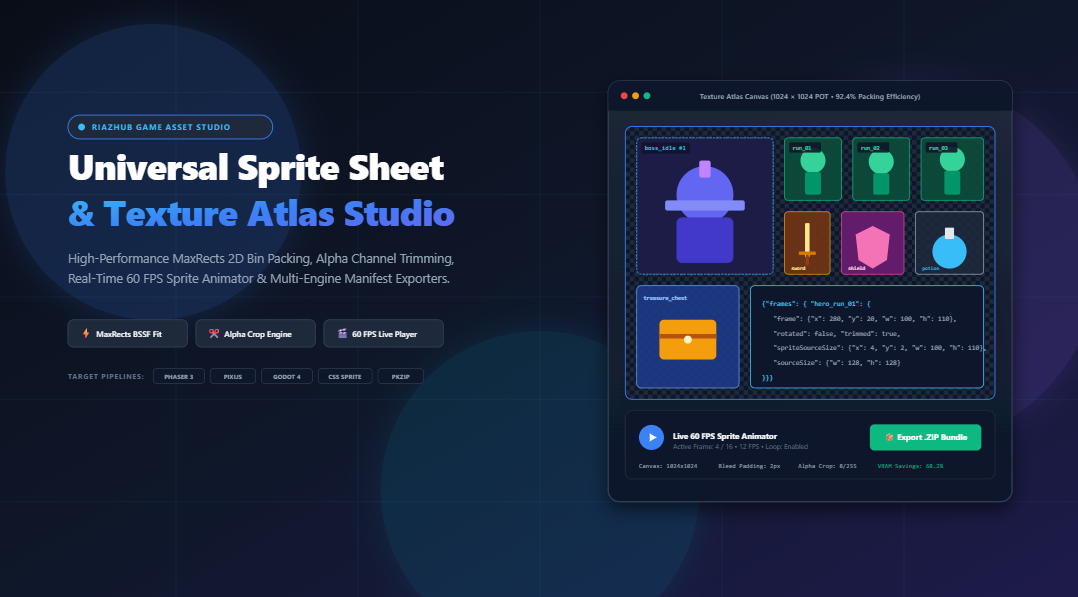
Mastering 2D Game Asset Pipelines: The Ultimate Guide to Sprite Sheets, MaxRects Bin-Packing, and Texture Atlases
The solution that professional game studios and graphics engineers rely upon is the texture atlas (commonly referred to as a sprite sheet). By packing dozens or hundreds of discrete animation frames, UI icons, and particle textures into a single contiguous image accompanied by a coordinate data manifest, you fundamentally transform how the graphics processing unit (GPU) handles your rendering pipeline.
To streamline this pipeline without requiring cumbersome desktop software, heavy command-line toolchains, or insecure cloud upload portals, you can utilize the free browser-based Universal Sprite Sheet Generator & Texture Atlas Studio on RiazHub. In this deep dive, we explore the computational mathematics of 2D bin packing, alpha margin trimming, draw call batching, and multi-engine code generation.
Ready to pack your character animation frames and export manifests immediately? Jump directly into the live Universal Sprite Sheet Generator & Texture Atlas Studio. It operates 100% client-side in your browser with zero server uploads.
1. The Performance Imperative: Why Loose Sprites Kill Game Framerates
To understand why sprite sheets are essential, one must look at how modern graphics hardware (GPUs) communicates with your CPU via rendering APIs such as WebGL, WebGPU, OpenGL, and Vulkan.
The Draw Call Bottleneck
A draw call is a command issued by the CPU to the GPU instructing it to render a set of primitives (such as textured triangles). Before a GPU can draw a sprite, it must bind the corresponding texture into active video memory (VRAM).
If your game character has 24 loose PNG animation frames and there are 10 enemies on screen, rendering each frame from individual image files forces the CPU to issue hundreds of context switches and texture bind operations per frame:
// Inefficient Loose Texture Flow:
Bind Texture "hero_run_01.png" -> Draw -> State Change
Bind Texture "hero_run_02.png" -> Draw -> State Change
Bind Texture "enemy_walk_01.png" -> Draw -> State Change
// Result: Hundreds of costly GPU context switches per tick!
These constant state changes stall the rendering pipeline, causing the CPU to bottleneck the GPU.
Draw Call Batching with Texture Atlases
When all sprites are compiled into a unified texture atlas using the RiazHub Sprite Sheet Generator, every game entity references regions of the exact same texture. The engine binds the texture once and renders hundreds of sprites in a single batch pass:
// Optimized Texture Atlas Flow:
Bind Texture "spritesheet.png" -> Draw ALL 100 Sprites via Quad UV Coordinates
// Result: 1 single draw call, massive VRAM bandwidth savings, steady 60+ FPS!
2. Computational 2D Bin Packing: The Mathematics of MaxRects
Packing dozens of arbitrarily shaped rectangular frames into the smallest possible canvas bounding box is an NP-hard combinatorial optimization problem. A naive shelf packing or linear stacking approach leaves massive empty voids, resulting in bloated texture dimensions and wasted GPU memory.
The Universal Sprite Sheet Generator on RiazHub employs the industry-standard Maximal Rectangles (MaxRects) 2D bin-packing algorithm.
How the MaxRects Algorithm Operates:
- Free-Space Tracking: Rather than dividing space into rigid grid cells, MaxRects maintains a dynamic free-list of maximal non-overlapping rectangular spaces spanning the entire canvas.
- Sorting Heuristics: Ingested sprite frames are presorted in descending order by height and area. Placing larger, bulkier sprites first establishes a compact foundation for smaller item icons to nestle into.
- Best Short Side Fit (BSSF): For each incoming sprite frame $F$ with dimensions $(W_F, H_F)$ and candidate free rectangle $R$ with dimensions $(W_R, H_R)$, the algorithm computes:
BSSF(F, R) = min(|W_R - W_F|, |H_R - H_F|)The rectangle that minimizes the leftover margin along its shortest side is selected.
- Best Area Fit (BAF) Tiebreaker: If multiple candidates yield equal BSSF scores, MaxRects selects the rectangle with minimum remaining area:
BAF(F, R) = (W_R * H_R) - (W_F * H_F) - Space Subdivision & Redundancy Pruning: Once a sprite is placed, intersecting free rectangles are split along horizontal and vertical edges into up to four sub-rectangles. Any sub-rectangle completely enclosed within another is purged to prevent combinatorial explosion.
| Packing Topology | Best Use Case | Average Packing Efficiency |
|---|---|---|
| MaxRects (BSSF) | Complex characters, mixed-dimension UI elements & props | 88% – 95% |
| Uniform Fixed Grid | Retro 16-bit pixel art, RPG map tilesets, static icon sets | 70% – 85% |
| Horizontal Strip | Linear character walk/run cycles, CSS step() animations | 65% – 80% |
| Vertical Filmstrip | Legacy mobile game engines, vertical UI scrollers | 65% – 80% |
You can effortlessly switch between all four topologies with one click inside the RiazHub Texture Atlas Studio.
3. The Alpha Channel Trimming Engine: Eliminating Wasted Transparency
Animators frequently export character frames on a uniform canvas (e.g., $256 \times 256\text{ px}$ per frame) so all limbs align naturally. However, during a running animation, the character’s body might only occupy an area of $80 \times 110\text{ px}$. The surrounding empty pixels are completely transparent alpha wedges ($A = 0$).
Packing untrimmed frames wastes up to 70% of your texture atlas surface area on invisible pixels!
Automatic Alpha Perimeter Cropping
The online Sprite Sheet Generator features an integrated 32-bit pixel analysis engine:
- Bounding Box Scanning: Iterates across the 32-bit RGBA pixel array via HTML5 Canvas
getImageData, measuring inward from edges to detect the tightest rectangle containing visible pixels above an opacity threshold (e.g., $\text{Alpha} > 8 / 255$). - Sub-Pixel Cropping: Extracts only the cropped bounding box into video memory, stripping dead margin space.
- Telemetry Preservation: Retains original dimensions (
sourceSize) and top-left crop offsets (spriteSourceSize) in the manifest so the game engine renders the sprite at its exact original pivot with zero visual jumping or drift.
// Output JSON Hash preserving trimmed telemetry:
"hero_attack_03": {
  "frame": {"x": 42, "y": 18, "w": 78, "h": 104},
  "trimmed": true,
  "spriteSourceSize": {"x": 25, "y": 12, "w": 78, "h": 104},
  "sourceSize": {"w": 128, "h": 128}
}
4. Power-of-Two (POT) Textures: Why GPU Hardware Demands Them
In 3D and 2D hardware acceleration, textures with dimensions equal to powers of two ($256, 512, 1024, 2048, 4096$) receive special treatment by mobile GPUs (Apple Silicon, Mali, Adreno) and desktop graphics cards (NVIDIA, AMD).
Why Force Power-of-Two Clamping?
- Hardware Mipmapping: GPUs generate progressive downsampled levels of textures (mipmaps) by repeatedly halving dimensions ($1024 \to 512 \to 256 \dots \to 1$). Non-power-of-two (NPOT) textures either fail to generate hardware mipmaps or incur runtime CPU resampling penalties.
- Texture Compression: Formats like ASTC, ETC2, and DXT (DirectX) require block-based dimensions that align with POT boundary rules.
- WebGL 1.0 Strict Fallback: While WebGL 2.0 supports NPOT textures for simple 2D rendering, wrapping modes such as
REPEATandMIRRORED_REPEATstill strictly require POT textures.
With the RiazHub Texture Atlas Studio, enabling the [x] Force Power-of-Two (POT) toggle automatically snaps your final atlas dimensions to standard GPU bounds ($512\times 512$, $1024\times 1024$, $2048\times 1024$, etc.) with zero manual math.
5. Multi-Target Manifest Exporters: Phaser, PixiJS, Godot 4 & CSS
A packed texture atlas is useless without coordinate metadata that tells the game engine where each frame resides. The Universal Sprite Sheet Generator synthesizes production-ready manifests across four major formats:
A. Phaser 3 & PixiJS (JSON Hash / Array)
The gold standard for HTML5 game development. Load the atlas directly in Phaser’s preload scene:
// Loading in Phaser 3:
function preload() {
  this.load.atlas('hero', 'spritesheet.png', 'spritesheet_phaser.json');
}

function create() {
  // Play animation using packed atlas frame tags
  this.anims.create({
    key: 'run',
    frames: this.anims.generateFrameNames('hero', { prefix: 'hero_run_', start: 1, end: 8, zeroPad: 2 }),
    frameRate: 12,
    repeat: -1
  });
  this.add.sprite(400, 300, 'hero').play('run');
}
B. Godot 4 XML Format
Godot 4’s AtlasTexture and SpriteFrames natively ingest XML texture descriptors, establishing frame coordinates and margin offsets for AnimatedSprite2D nodes without requiring manual sprite slice editing in the editor.
C. Modern CSS Sprites for High-Performance Web UI
For web designers looking to bundle dozens of SVG or PNG navigation icons, the tool generates instant, modular CSS classes:
.sprite {
  background-image: url('spritesheet.png');
  background-repeat: no-repeat;
  display: inline-block;
}

.sprite-icon_cart {
  width: 32px;
  height: 32px;
  background-position: -64px -128px;
}
6. Interactive 60 FPS Inspection Stage & Zero-Dependency In-Memory ZIP
Unlike static command-line tools where you must export, load into a game engine, and re-export if an animation jitter occurs, the RiazHub Sprite Sheet Studio provides an all-in-one real-time inspection suite:
- Pan & Zoom Texture Viewport: Inspect high-resolution atlases with mouse-wheel zoom (10% to 800%), boundary outlines, and frame ID coordinate tags.
- Live 60 FPS Animation Player: Test your sprite sequence with real-time variable playback speed (1 to 60 FPS), loop toggles, step forward/backward buttons, and scale magnification ($1\times$ to $4\times$).
- Before/After Split-Screen Divider: A draggable comparative slider demonstrating the visual difference between your raw ingested frames and the densely packed texture atlas.
- Zero-Dependency In-Memory PKZIP Packager: Compiles the 32-bit lossless PNG/WebP atlas image, JSON Hash, Flat JSON, CSS, Godot XML, and a technical README into a valid
.ziparchive directly in your browser’s RAM. No third-party servers, no waiting, and 100% data privacy.
7. Step-by-Step: How to Generate Your First Optimized Texture Atlas
Follow this four-step walkthrough using the free web tool:
- Ingest Your Frames: Drag and drop your character animation sequence or UI graphics into the upload dropzone (or click “Load Sample Hero” to experiment with pre-rendered running cycle frames).
- Select Packing Topology: Choose MaxRects for game characters, Fixed Grid for retro tilemaps, or Horizontal Strip for walk cycles. Set an inner padding of
2pxto eliminate texture bleeding during GPU filtering. - Calibrate Alpha & GPU Constraints: Ensure “Auto-Trim Empty Transparent Margins” is enabled, and check “Force Power-of-Two (POT)” if targeting mobile or WebGL games.
- Generate & Download: Click “⚡ Generate Sprite Sheet & Atlas”. Test the animation in the 60 FPS Player tab, copy your manifest code, or click “Download Complete Bundle (.zip)” for immediate engine integration.
8. Frequently Asked Questions (FAQ)
Is my artwork uploaded to any cloud server?
No. The Universal Sprite Sheet Generator & Texture Atlas Studio executes 100% locally inside your web browser via HTML5 Canvas 2D and JavaScript. Your game sprites, proprietary art, and textures never leave your local device.
What is texture bleeding and how do I prevent it?
Texture bleeding occurs when the GPU applies bilinear filtering or mipmapping to adjacent sprites in an atlas, inadvertently blending pixel colors from neighboring frames into the edge of the current sprite. Setting an Inner Padding of 2px or 4px in the tool creates a safe gutter that completely prevents bleeding.
How many frames can the tool pack simultaneously?
Because processing is executed client-side via hardware-accelerated OffscreenCanvas, the tool comfortably handles from 2 to 200+ high-resolution frames up to $4096 \times 4096\text{ px}$ canvas dimensions.
Can I use the exported atlases in commercial video games?
Yes, absolutely. The code manifests, textures, and ZIP bundles generated by RiazHub’s Sprite Sheet Generator are completely royalty-free and production-ready for commercial and indie releases on Steam, Nintendo Switch, mobile app stores, and the web.
Universal Sprite Sheet & Texture Atlas Studio
Pack multi-frame game sprites into memory-efficient texture atlases, auto-trim transparent alpha margins, preview real-time 60 FPS animations, and export production-ready manifests for Phaser 3, PixiJS, Godot 4, and CSS.
Draw Call Batching & GPU Texture Binds
In WebGL and modern game engines (Phaser, Godot, Unity, PixiJS), each distinct image texture requires a GPU state change and a separate draw call. Combining loose frames into a single texture atlas allows the graphics card to render hundreds of game objects in a single ultra-fast batch pass.
MaxRects Bin-Packing Mathematics
The Maximal Rectangles (MaxRects) algorithm dynamically tracks non-overlapping free bounding boxes. By employing the Best Short Side Fit (BSSF) heuristic, it fits complex irregular sprites with minimal interstitial void waste, achieving over 85–95% packing efficiency.
Power-of-Two (POT) Memory Alignment
Graphics hardware naturally accelerates textures with dimensions that are powers of two ($256, 512, 1024, 2048, 4096$). POT dimensions enable hardware mipmap generation, texture compression (ETC2, ASTC, DXT), and optimal VRAM memory allocation.
Zero-Server Security & Instant PKZIP
All canvas rendering, 32-bit alpha channel perimeter scanning, MaxRects bin packing, and ZIP archive compilation execute natively in browser memory. Your proprietary 2D artwork and assets never leave your computer.