
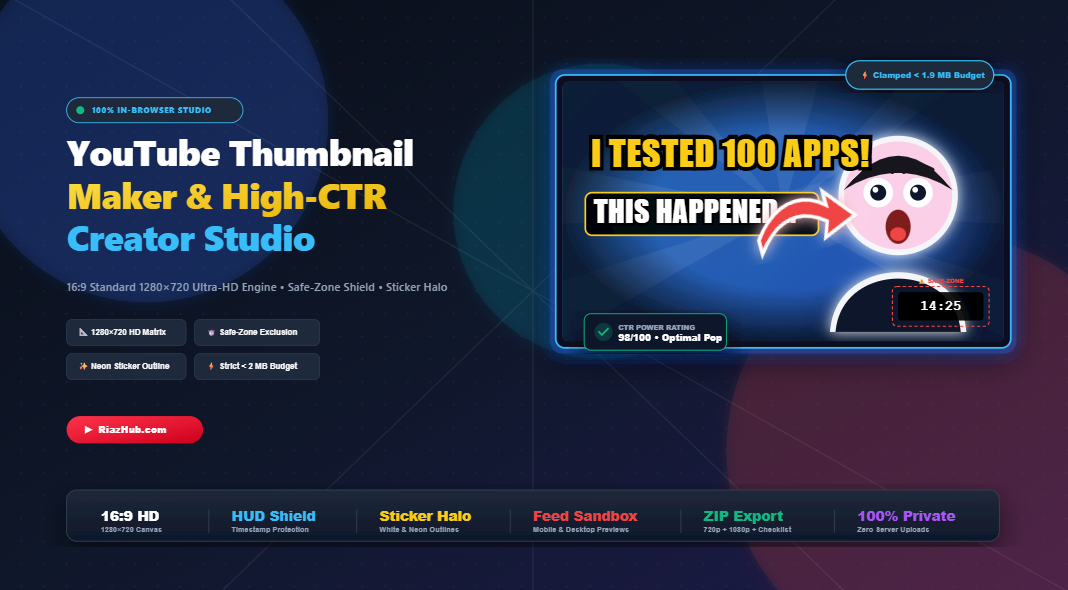
The Science of 10%+ YouTube CTR: How to Create High-Converting 1280×720 Thumbnails
On YouTube, your video title and thumbnail represent 90% of your video’s success. Even if your content features Hollywood-grade cinematography, world-class audio, and life-changing insights, nobody will experience it if they never click. YouTube’s recommendation algorithm prioritizes one metric above almost everything else during initial impression rollouts: Click-Through Rate (CTR).
If your thumbnail scores a modest 3% CTR while a competitor gets 9%, YouTube’s neural network redirects algorithmic traffic toward them. But creating a thumbnail that pierces through a crowded home feed requires more than arbitrary design choices it requires adherence to platform standards, visual psychology, interactive spatial layout, and defensive safe-zone engineering.
⚡ Create High-CTR Thumbnails in Seconds (100% Free)
Looking to build high-converting 1280×720 thumbnails with interactive corner zoom dots, glowing sticker halos, 3D extruded headlines, and real-time safe-zone overlays? Launch the free, client-side YouTube Thumbnail Maker & High-CTR Creator Studio on RiazHub. No login, no watermarks, and zero server uploads required.
1. Strict Technical Standards: 16:9 Aspect Ratio & The 2 MB File Barrier
Before exploring artistic principles, every creator must master YouTube’s uncompromising upload specifications:
| Specification | Official YouTube Standard | Optimal Creator Practice |
|---|---|---|
| Aspect Ratio | 16:9 Landscape | Strictly $1280 \times 720\text{ px}$ (or $1920 \times 1080\text{ px}$) |
| Minimum Width | 640 pixels | Never render under 1280 pixels to avoid compression pixelation |
| Maximum File Size | 2,000,000 Bytes (2.0 MB) | Clamped between 1.2 MB and 1.85 MB for guaranteed upload speed |
| Supported Formats | PNG, JPG, WEBP, GIF | Lossless PNG for crisp typography, High-Q JPEG for complex photos |
One of the most frustrating errors creators encounter inside YouTube Studio is the dreaded “File is bigger than 2 MB” alert. High-resolution PNG exports with rich color gradients and uncompressed textures often exceed 2.2 MB. That is why the RiazHub YouTube Thumbnail Studio features an automated binary-search JPEG/WebP solver: if a lossless PNG exceeds 1.95 MB, the browser automatically optimizes the compression quality to guarantee you stay strictly under the 2 MB ceiling while retaining pristine visual sharpness.
2. Interactive Canvas: Click-to-Select, Dashed Corner Zoom & Free Movement
Traditional graphic design software requires users to dig through complex layer trees just to adjust a single headline or move a sticker. Modern YouTube creators need speed, tactile manipulation, and immediate visual feedback.
🎯 Direct Hit-Testing Selection
Click directly on Headline Line 1, Headline Line 2, your person cutout, or any sticker on the canvas to instantly select it. An anti-aliased dual-contrast dashed border (`#000000` shadow + `#38bdf8` cyan stroke) highlights your active object.
🔍 Tactile Corner Zoom Dots
Four high-contrast corner dots let you smoothly zoom and scale any selected layer proportionally with a single drag. A floating live measurement HUD displays exact dimensions (e.g., Size: 84px or Scale: 1.25x) in real time.
🔄 Top Rotation Handle Stem
An intuitive top rotation stem with an amber control dot lets you dial in punchy tilt angles without leaving the canvas, giving your headlines dynamic energy.
⌨️ Keyboard Precision Nudging
Fine-tune placements with pixel perfection: use the keyboard Arrow keys to nudge any active layer by 2px, or hold Shift + Arrow to jump by 10px. Tap Escape to deselect immediately.
Best of all, all dashed selection gizmos, corner dots, rotation stems, and safe-zone guides are automatically suppressed during export so your downloaded PNG or JPG is 100% clean and publish-ready.
🎨 Experience Interactive On-Canvas Drag & Zoom
Try clicking directly on headlines, person cutouts, and viral arrows on the canvas. Adjust sizes from corner dots and test live rotation inside the Universal YouTube Thumbnail Maker.
3. Dynamic Layer Inspector: Independent Multi-Line Typography
A viral YouTube thumbnail almost never uses the exact same styling for every line of text. The primary hook needs massive, punchy contrast (e.g., bright yellow with heavy black stroke), while the secondary line often benefits from a high-contrast backing pill badge to anchor readability.
Inside the RiazHub Thumbnail Maker, selecting any element triggers a floating contextual Layer Inspector Toolbar providing granular controls:
- Independent Line 1 & Line 2 Styling: Customize font family, font size, text color, stroke width, custom stroke color, 3D extrusion depth, and tilt independently for each headline line.
- High-Contrast Pill Badges: Toggle a dark contrast pill behind either text line to ensure instant legibility against chaotic backdrops.
- One-Click Canvas Centering: Instantly center any active text, subject cutout, or sticker with the
🎯 Centerbutton. - Subject Cutout Tools: Adjust halo border width, choose electric glow presets (White, Cyan, Yellow, Red, Purple), dial in shadow elevation, or mirror flip the subject with a single click.
4. The “Timestamp Trap”: Why Lower-Right Placement Destroys Views
Open the YouTube app on your phone right now. Notice the small dark badge in the lower-right corner displaying video length, such as “14:25” or “08:12”?
That timestamp badge is rendered natively by YouTube’s app across mobile devices, smart TVs, and desktop browsers. It permanently covers an area of roughly 170 × 60 pixels in the lower-right corner of every thumbnail.
“Placing faces, reaction badges, punchlines, or sponsor logos in the lower-right corner is known as the Timestamp Trap. Viewers simply cannot read what the video player HUD blocks.”
To defend against this fatal mistake, the YouTube Thumbnail Maker incorporates an active YouTube Safe-Zone Exclusion HUD. It projects an authentic simulated 14:25 badge with a dashed red alert border directly onto your working canvas, ensuring you never position critical graphics where YouTube’s interface will obscure them.
5. The Anatomy of High-CTR Visual Contrast: Halos & Sticker Outlines
Why do top creators like MrBeast, Ali Abdaal, and leading gaming creators consistently outline their cutouts with solid white strokes or electric neon halos? It comes down to human ocular biology:
✨ Edge Contrast Separation
A dark head of hair against a dark backdrop blends together and reduces visual punch. A 10px to 14px solid white sticker outline separates the human subject from complex backgrounds instantaneously.
🎯 Foveal Attention Pull
The human fovea seeks exaggerated contrast edges. Radiant neon yellow, cyan, or white halos force the viewer’s eye to lock onto the central emotional subject within 200 milliseconds of scrolling.
😱 Emotional Micro-Expressions
Viewers rarely click neutral faces. High-converting thumbnails prioritize expressive eyes, raised eyebrows, and wide-open shock or curiosity reactions that trigger empathetic curiosity.
🌈 +25% Saturation Pop
Modern OLED and Retina screens handle rich, vivid color spaces. Boosting background saturation to 140% and adding corner vignettes prevents thumbnails from appearing washed out in YouTube’s dark mode.
6. 25+ Viral Creator Fonts Suite: From MrBeast Hype to Global RTL Typography
A widespread beginner mistake is using thin, delicate system fonts or repeating the entire video title inside the thumbnail. Your video title is already positioned right below the thumbnail on mobile feeds. Re-writing a 12-word title inside the artwork creates cognitive clutter.
The Formula for Thumbnails That Convert:
- Maximum 3 to 4 Words: Treat the thumbnail text as an exclamation or curiosity gap (e.g., “I TESTED 100 APPS!” or “DON’T DO THIS!”).
- 🔥 Viral Heavy & Hype Fonts: Use high-converting creator favorites including Impact, Luckiest Guy (gaming & challenge videos), Bangers (comic/action), Titan One (bold cartoon punch), Anton, Bebas Neue, Teko (tall condensed), Bungee (3D block ready), and Permanent Marker.
- 💎 Modern Authority Sans: Choose Montserrat Extra Bold (finance & business), Outfit Black (tech & minimalism), Rubik Black, Righteous (sci-fi), Russo One (heavy gaming), Syne 800, Cinzel (documentaries), and Black Han Sans.
- 🌍 Global Multilingual & RTL Support: If targeting Arabic, Urdu, Persian, Hebrew, or Hindi audiences, use specialized high-contrast typefaces such as Cairo Black, Changa Heavy, Tajawal, Almarai, Noto Sans Arabic, Heebo Black (Hebrew), and Rozha One / Poppins (Hindi) with natural right-to-left alignment to engage international viewership.
- Multi-Layer 3D Extrusions: Layer dark extruded drop shadows (6px to 12px) behind high-contrast yellow or white fills to make text leap off the screen.
7. Viral Stickers, Vector Arrows & Badges Library
Directional cues and reaction graphics act as visual accelerators. When viewers scan a YouTube feed, a curved red arrow pointing toward a reaction face or mysterious object immediately directs eye movement.
The redesigned Stickers & Badges Library in the YouTube Thumbnail Maker Studio features a modern, non-cluttered 2×2 category grid:
- 🏹 Viral Arrows: High-CTR curved red YouTube arrows with white border outlines, neon cyan electric arrows, gold viral arrows, and finger pointer icons.
- ⭕ Badges & Rings: Red high-contrast focus rings (the classic “Look Here!” circle), red VS Duel battle shields, green 100% PROOF guarantee badges, and red NEW! / LIVE pill badges.
- 😱 16 Viral Reaction Emojis: High-resolution emojis (Shock, Fire, Skull, Mind Blown, Money Bag, Rocket, Secret, Warning, Crown, Stop, Rich Face, Wide Eyes, 100, Boom, Bolt, Star).
- 📁 Custom PNG & Logo Upload: Upload proprietary sponsor logos, custom stickers, or product PNGs with transparency directly into your project.
Every stamped sticker or badge automatically appears on canvas with an active dashed selection box and corner dots so you can scale, rotate, and move it freely.
📱 Test Your Thumbnail in a Simulated YouTube Feed
Never publish blindly. Using the built-in Mobile Feed Simulator inside the RiazHub Thumbnail Maker, test how your artwork looks next to simulated competitor videos at authentic 360×202 px display sizes before uploading to your channel.
8. Small-Screen Mobile Testing & Distraction-Free Flow
Over 75% of YouTube watch time originates on mobile devices. A thumbnail that looks magnificent on a 27-inch desktop monitor often turns into an illegible muddy blur when shrunk down to a 3-inch box on a smartphone screen.
Before finalizing any thumbnail, conduct the “Squint Test”: shrink your artwork to 15% scale or squint your eyes. Can you still tell who the subject is? Can you read the primary headline word? Does the color pop from the background?
The studio includes a 5-tab preview system letting you cycle between:
- Studio Stage: Full-resolution 1280×720 canvas editing with interactive dashed bounding handles.
- Mobile Feed Simulation: Photorealistic smartphone feed showing your title, channel name, and duration badge alongside competitor thumbnails.
- Desktop Browse Grid: Homepage card layout rendered at 360 × 202 px dimensions.
- Split-Screen Before/After Slider: Interactive swipe divider comparing raw backdrop photography against the finished high-contrast master.
- CTR Diagnostic HUD: Telemetry scoring evaluating text brevity, safe-zone clearance, and mobile legibility scores.
To keep the creation process fast and organized, the sidebar features Accordion Auto-Collapse: opening any section (Typography, Subject Cutout, Stickers, or Backdrop) automatically collapses all other sections, eliminating endless scrolling and keeping creators fully focused on the task at hand.
9. Privacy-First In-Browser Architecture & ZIP Bundling
Many online graphic editors force creators to upload proprietary, unreleased video assets, client headshots, or copyrighted artwork to remote servers. This introduces latency, subscription paywalls, and privacy risks.
The Universal YouTube Thumbnail Maker on RiazHub.com operates on a 100% client-side computing model:
- All layer compositing, filters, sticker glow convolution, and rendering run locally on your device via HTML5 Canvas (2DContext).
- Zero creator photos or personal data are transmitted over the network.
- Direct 1-click clipboard integration allows you to paste screenshots via
Ctrl+Vand copy finalized thumbnails straight to your clipboard. - The built-in ZIP bundler generates an in-memory release package containing your 1280×720 standard thumbnail, a 1920×1080 Full-HD master file, and a CTR optimization checklist without any third-party server dependencies.
Conclusion: Supercharge Your Click-Through Rate Today
A great thumbnail is the gatekeeper to your video’s content. By respecting platform safe zones, employing high-contrast sticker outlines, leveraging interactive canvas zoom dots, utilizing viral fonts, and testing against small-screen mobile feeds, you give your content the competitive advantage it deserves.
🚀 Ready to Craft Your Next Viral Thumbnail?
Take your channel’s CTR to the next level with the free Universal YouTube Thumbnail Maker & High-CTR Creator Studio on RiazHub. Start designing immediately with procedural sample presets, safe-zone defenses, tactile canvas controls, and lossless exports.
Universal YouTube Thumbnail Maker
Click any text, cutout, or sticker on the canvas to select, zoom from corner dots, and drag freely. Features multilingual/RTL typography, safe-zone defense, and live feed previews.
📐 YouTube 16:9 HD Canvas & Strict < 2 MB Rule
YouTube displays thumbnails in a strict 16:9 aspect ratio at a native $1280 \times 720\text{ px}$ canvas resolution. Uploads larger than 2,000,000 bytes ($2\text{ MB}$) are automatically rejected by YouTube's API. This studio includes an automated binary-search budget solver to safeguard your exports under 1.95 MB with zero visual fidelity loss.
⏱️ The "Timestamp Trap" in the Lower Right
Every thumbnail uploaded to YouTube gets covered in the bottom-right corner by a dark video duration overlay ($14:25$). Placing punchline reactions, face cutouts, key text, or company logos in that zone renders them invisible to browsing viewers. Keep that area shielded at all times.
🌍 Global Multilingual & RTL Typography Support
Audiences across the globe browse YouTube in diverse linguistic formats. Full bidirectional typography support with dedicated fonts like Cairo (Arabic/Urdu), Heebo (Hebrew), Rozha One (Hindi), and Anton delivers viral, high-converting readability for every demographic.
🔒 100% In-Browser Privacy & Zero Server Transfer
Your creator images, headshot cutouts, and creative assets never leave your computer. All graphics compositing, filter math, and ZIP generation run entirely inside your browser's native HTML5 Canvas and Offscreen memory buffers.