
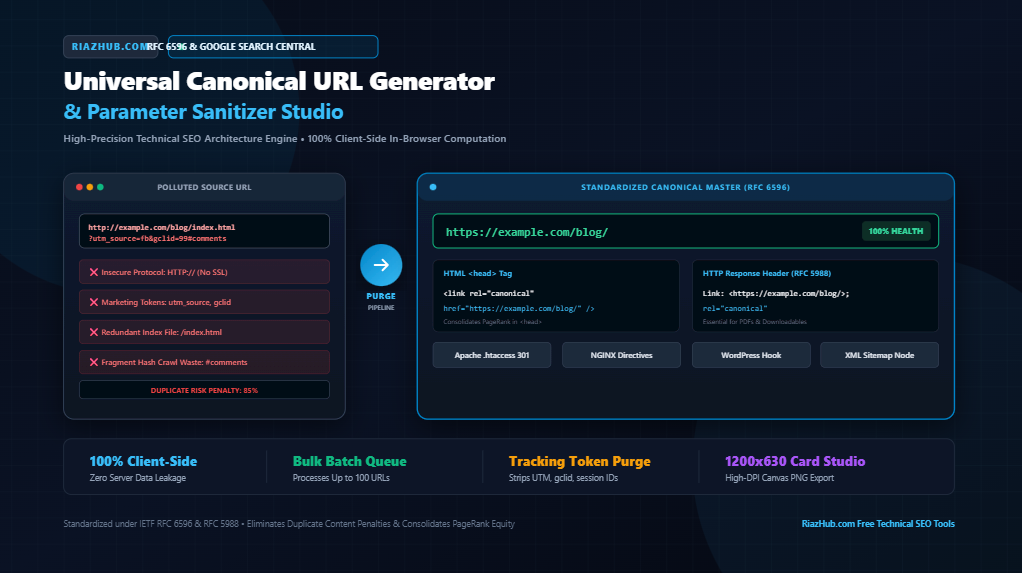
The Ultimate Technical SEO Guide to Canonical URLs, Parameter Sanitization & Duplicate Content Defense
How modern web architecture, e-commerce faceted navigation, and marketing click tokens dilute PageRank authority and how to build an airtight canonical pipeline that protects your organic search equity.
1. The Silent SEO Killer: How Duplicate URLs Bleed Crawl Equity
In modern web engineering, a single unique piece of content rarely exists on just one URL. Between marketing tracking identifiers (?utm_source=..., ?gclid=..., ?fbclid=...), e-commerce sorting parameters (?sort=price_asc&page=2), session IDs, protocol mismatches (http:// vs. https://), subdomain fragmentation (www. vs. apex), and trailing slash discrepancies (/guide vs. /guide/), search bots frequently discover dozens—or even thousands—of disparate URLs delivering functionally identical content.
When search engines encounter this URL sprawl, three catastrophic technical SEO failures occur:
- Crawl Budget Hemorrhaging: Googlebot spends valuable crawling resources requesting and re-parsing duplicate variations rather than crawling newly published articles or updated inventory.
- Link Equity Dilution: External backlinks from blogs, press releases, and social channels get split across parameter variations instead of consolidating their PageRank into one authoritative master URL.
- Keyword Cannibalization & Algorithmic Filtering: Google’s indexing systems are forced to guess which URL is authoritative. If the crawler picks an ephemeral tracking URL over your clean master slug, rankings fluctuate wildly or get filtered out of top SERP positions entirely.
To eliminate these risks automatically, digital engineers and SEO architects utilize the free Canonical URL Generator & Parameter Sanitizer on RiazHub, an in-browser normalization suite built to enforce pristine canonical directives.
2. What is a Canonical URL? Decoding RFC 6596 & Google Search Central
Formally standardized in April 2012 under IETF RFC 6596 and championed by Google Search Central, the canonical link relation (rel="canonical") provides webmasters with an explicit mechanism to designate the authoritative master address of a document.
When embedded in the <head> section of an HTML document:
<link rel="canonical" href="https://riazhub.com/blog/technical-seo-guide/" />It communicates an authoritative hint to search engine crawlers:
“A canonical URL is the URL of the page that Google thinks is most representative from a set of duplicate pages on your site. For example, if you have URLs for the same page (such as example.com?dress=1234 and example.com/dresses/1234), Google chooses one as canonical.”
Crucially, Google emphasizes that while rel="canonical" is treated as a very strong recommendation, search engines reserve the right to ignore it if your server signals conflict such as returning a 404, pointing to a redirect loop, having contradictory internal links, or submitting non-canonical links in your XML sitemap.
3. rel=”canonical” vs. 301 Permanent Redirects: The Engineering Decision Matrix
One of the most frequent points of confusion among developers is whether to apply a server-level HTTP 301 redirect or an in-page rel="canonical" tag. While both consolidate ranking signals, their use cases are fundamentally different:
| Architectural Scenario | Recommended Solution | Technical Rationale |
|---|---|---|
| HTTP to HTTPS Migration | 301 Permanent Redirect | Insecure HTTP pages should never be viewed by human users or bots. |
| WWW to Non-WWW (Apex Domain) | 301 Permanent Redirect | Enforces a single consistent hostname sitewide at the DNS/server boundary. |
| Permanent Page Deletion / URL Renaming | 301 Permanent Redirect | Forwards all legacy incoming traffic and link equity to the new permalink. |
| Ad Campaign Tracking (UTM / gclid / fbclid) | rel=”canonical” Tag | Users must remain on the tracking URL for analytics, but bots must index the clean master. |
| E-Commerce Filter Sorting (Price, Color, Size) | rel=”canonical” Tag | Shoppers need dynamic sorting, but Googlebot should index only the primary category slug. |
| Syndicated Articles on Partner Sites | Cross-Domain rel=”canonical” | Allows the partner site to host the story while crediting the original publisher as master. |
If you need both server-level 301 rules and in-page canonical headers, you can generate ready-to-deploy Apache and NGINX rewrite directives directly using the RiazHub Canonical URL Generator tool.
Audit & Canonize Your URLs in Real Time
Paste any polluted tracking URL into our zero-leakage, 100% client-side tool to instantly sanitize marketing parameters, resolve trailing slashes, and compile standardized HTML, HTTP link headers, and rewrite directives.
4. The Anatomy of Parameter Pollution: Purging Tracking Tokens
Marketing campaigns rely on query parameters to attribute conversions. However, ad networks and tracking pixels append ephemeral tokens that create exponential duplicate variants:
- Google Ads:
gclid,dclid,_gl,_ga - Meta / Facebook:
fbclid - Microsoft Advertising:
msclkid - Standard Analytics:
utm_source,utm_medium,utm_campaign,utm_term,utm_content,utm_id - Email & CRM Platforms:
mc_eid,_hsenc,_hsmi - Session State Variables:
PHPSESSID,jsessionid,session_id
Why Alphabetical Parameter Sorting Prevents Indexation Permutations
Consider two shoppers browsing an e-commerce catalog:
URL A: https://example.com/shoes?category=running&sort=price
URL B: https://example.com/shoes?sort=price&category=running
From a web server perspective, URL A and URL B render the exact same page. However, because standard string comparison algorithms treat query strings as distinct keys, search crawlers may process them as two distinct pages!
By running your URLs through the Universal Canonical URL Generator & Duplicate Content Shield, remaining functional parameters (such as pagination page=2 or sorting sort=price) are sorted alphabetically by key, eliminating parameter permutation duplication permanently.
5. The 6 Pillars of a Pristine Canonical URL
Before deploying a canonical directive, verify that it adheres to these six web engineering standards:
- Strict Protocol Canonization: Always enforce
https://. Never point a canonical tag to an unencryptedhttp://address. - Subdomain Unification: Pick either the apex domain (
https://riazhub.com/) or the subdomain (https://www.riazhub.com/) and enforce it consistently across your entire internal link architecture. - Trailing Slash Standardization: In HTTP specifications,
/seo-toolsand/seo-tools/represent two distinct resources. Always standardize on one policy (typically trailing slashes for directory routes, non-trailing slashes for root apex, and preserving file extensions like.pdfor.html). - Redundant Index File Stripping: Never permit index files like
/index.html,/index.php, or/default.aspxin your canonical targets. Strip them back to the directory root. - Fragment / Anchor Hash Elimination: URL hashes (
#reviews,#:~:text=...) are processed exclusively client-side by browsers and are never sent to web servers or indexed by search bots. Canonical URLs must always have fragments stripped. - Self-Referential Placement: Every standalone master page must point its canonical tag to itself. If Google scrapes your page or an external site hotlinks it with rogue parameters, the self-referential canonical tag instructs crawlers to ignore the extraneous query string.
6. Multi-Format Canonical Implementation: HTML, HTTP Headers & Sitemaps
While the HTML <link rel="canonical"> element is the most common method, it is not the only format. Depending on your stack and content type, you should deploy canonical directives across three distinct layers:
1. Standard HTML <head> Tag
<head>
  <!-- Place high inside the <head> tag before scripts -->
  <link rel="canonical" href="https://riazhub.com/seo-tools/" />
</head>
2. HTTP Response Link Header (IETF RFC 5988 for PDFs & Documents)
What happens when you publish a downloadable whitepaper, corporate PDF, or spreadsheet? Because non-HTML documents do not have an HTML <head> element, you cannot embed a traditional tag. The solution is the HTTP response link header specified in RFC 5988:
HTTP/1.1 200 OK
Content-Type: application/pdf
Link: <https://riazhub.com/whitepapers/technical-seo/>; rel="canonical"
This tells Google that when the PDF is downloaded, all indexing signals should flow back to your HTML landing page.
3. XML Sitemap Alignment
Every URL included in your XML sitemap should be an authoritative, self-referential canonical master:
<url>
  <loc>https://riazhub.com/seo-tools/</loc>
  <changefreq>weekly</changefreq>
  <priority>0.8</priority>
</url>
Submitting non-canonical URLs in your XML sitemap triggers conflicting signals in Google Search Console under the “Alternate page with proper canonical tag” report.
7. How to Use the RiazHub Canonical URL Generator Studio
The RiazHub Canonical URL Generator & Duplicate Content Shield operates 100% in-browser with zero server transmission, guaranteeing complete data privacy for your internal client staging URLs or proprietary migrations.
Single URL Studio Mode
- Paste your source URL into the ingestion field (e.g., a dirty URL containing UTM codes, index files, or fragment anchors).
- Configure your desired normalization policy using the tactile buttons (Force HTTPS, Non-WWW apex, Trailing slash policy, and parameter sanitization mode).
- Observe the real-time Duplicate Shield Health Score and itemized modification breakdown.
- Copy your compiled HTML
<link>tag, HTTP link header, or server rewrite block with 1 click.
Bulk Batch Processing Queue (Up to 100 URLs)
Managing an e-commerce catalog migration or large publishing network? Switch to the Bulk Batch Queue tab:
- Paste up to 100 URLs simultaneously (one per line).
- The engine processes the entire batch client-side in milliseconds.
- Inspect the interactive results table displaying each URL’s health score, purged token count, and cleaned master address.
- Export a comprehensive technical audit report via Export CSV or copy all clean URLs to your clipboard in a single click.
Experience this automated batch pipeline directly on the batch canonical URL generator studio on RiazHub.
8. International SEO & hreflang Sync: The Fatal Self-Referential Trap
One of the most dangerous canonical blunders occurs on multilingual or multi-regional websites using hreflang annotations.
Each localized version of a page must point its canonical tag to itself, NOT to the global English root!
For example, if you have Spanish (/es/) and French (/fr/) variations:
<!-- On https://riazhub.com/es/seo-tools/ -->
<link rel="canonical" href="https://riazhub.com/es/seo-tools/" />
<link rel="alternate" hreflang="es" href="https://riazhub.com/es/seo-tools/" />
<link rel="alternate" hreflang="fr" href="https://riazhub.com/fr/seo-tools/" />
<link rel="alternate" hreflang="en" href="https://riazhub.com/seo-tools/" />
If your Spanish page mistakenly sets its canonical tag to the English version (https://riazhub.com/seo-tools/), Google’s crawler will interpret this as an instruction to de-index the Spanish translation completely, wiping out your international search visibility.
9. CMS & WordPress Implementation Patterns
For webmasters running WordPress, you can sanitize canonical URLs dynamically using the wp_head hook or popular SEO plugin filters:
Vanilla WordPress functions.php Snippet
add_action('wp_head', function() {
    if (is_singular()) {
        $canonical = get_permalink();
    } elseif (is_front_page()) {
        $canonical = home_url('/');
    } else {
        $canonical = home_url(add_query_arg([], $GLOBALS['wp']->request));
    }
    // Automatically purge marketing tokens
    $clean_canonical = remove_query_arg([
        'utm_source', 'utm_medium', 'utm_campaign',
        'gclid', 'fbclid', 'msclkid', 'session_id'
    ], $canonical);

    echo '<link rel="canonical" href="' . esc_url($clean_canonical) . '" />' . "\n";
}, 1);
Yoast SEO & Rank Math Filter Hooks
// Yoast SEO Canonical Filter
add_filter('wpseo_canonical', function($canonical) {
    return remove_query_arg(['utm_source', 'gclid', 'fbclid'], $canonical);
});

// Rank Math Canonical Filter
add_filter('rank_math/frontend/canonical_url', function($canonical) {
    return remove_query_arg(['utm_source', 'gclid', 'fbclid'], $canonical);
});
10. Frequently Asked Questions (Technical SEO FAQ)
Yes. According to official Google Search Central statements by Gary Illyes and John Mueller, a validated canonical tag consolidates internal PageRank, backlink signals, and anchor text associations across duplicate pages equivalently to a 301 permanent redirect.
While HTML specifications technically allow relative paths (e.g., <link rel="canonical" href="/blog/post/" />), Google strongly warns against this. Relative URLs are vulnerable to protocol mix-ups, subdomain scraping, and CDN origin confusion. Always use absolute, fully qualified URLs including https://.
If a document contains duplicate or conflicting rel="canonical" declarations (often caused by a theme outputting one tag and an SEO plugin outputting another), Google will ignore all canonical directives on that page, defaulting to algorithmic selection. Always inspect your raw source to ensure exactly one canonical tag exists.
You can audit, normalize, and generate multi-format canonical tags and server rewrite rules using the free, in-browser Canonical URL Generator & Duplicate Content Shield on RiazHub.
Universal Canonical URL Generator & Duplicate Content Shield
Standardize master canonical URLs, purge marketing & session tracking tokens, enforce protocol and trailing slash consistency, and generate implementation tags for HTML, HTTP link headers, and server rewrite directives.
<link rel="canonical" href="https://example.com/blog/seo-guide/" />
Link: <https://example.com/blog/seo-guide/>; rel="canonical"
<?php
header('Link: <https://example.com/blog/seo-guide/>; rel="canonical"');
?>
<url>
  <loc>https://example.com/blog/seo-guide/</loc>
  <changefreq>weekly</changefreq>
  <priority>0.8</priority>
</url>
# Apache 301 Canonical Normalization (.htaccess)
<IfModule mod_rewrite.c>
  RewriteEngine On

  # 1. Force HTTPS
  RewriteCond %{HTTPS} off
  RewriteRule ^(.*)$ https://%{HTTP_HOST}%{REQUEST_URI} [L,R=301]

  # 2. Force Non-WWW (Apex Domain)
  RewriteCond %{HTTP_HOST} ^www\.(.+)$ [NC]
  RewriteRule ^(.*)$ https://%1/$1 [R=301,L]

  # 3. Strip Trailing index.html / index.php
  RewriteCond %{THE_REQUEST} ^[A-Z]{3,9}\ /([^/]+/)*index\.(html|php)\ HTTP/
  RewriteRule ^(([^/]+/)*)index\.(html|php)$ https://%{HTTP_HOST}/$1 [R=301,L]
</IfModule>
<?php
/**
 * Custom WordPress Canonical Tag Hook
 * Paste into your child theme functions.php or Code Snippets plugin
 */
add_action('wp_head', function() {
    if (is_singular()) {
        $canonical_url = get_permalink();
    } elseif (is_front_page()) {
        $canonical_url = home_url('/');
    } else {
        $canonical_url = home_url(add_query_arg([], $GLOBALS['wp']->request));
    }
    // Remove query tracking tokens
    $canonical_url = remove_query_arg(['utm_source', 'utm_medium', 'utm_campaign', 'gclid', 'fbclid'], $canonical_url);
    echo '<link rel="canonical" href="' . esc_url($canonical_url) . '" />' . "\n";
}, 1);
?>
<?php
// Yoast SEO Canonical Filter
add_filter('wpseo_canonical', function($canonical) {
    return remove_query_arg(['utm_source', 'gclid', 'fbclid', 'msclkid'], $canonical);
});

// Rank Math SEO Canonical Filter
add_filter('rank_math/frontend/canonical_url', function($canonical) {
    return remove_query_arg(['utm_source', 'gclid', 'fbclid', 'msclkid'], $canonical);
});
?>
| # | Source Raw URL | Canonical Master URL | Purged | Health | Action |
|---|---|---|---|---|---|
| No URLs in queue. Switch to "Bulk Batch Queue" and enter URLs to process. | |||||
When deploying international hreflang alternate tags (e.g. hreflang="es", hreflang="de"), each localized page must have a self-referential canonical tag pointing to itself rather than the default English root. Never point hreflang alternates to a single global canonical URL, as this causes Google to de-index all translated variants.
📚 Technical SEO Architecture & Google Search Central Standards
?utm_source=..., ?gclid=..., or ?fbclid=..., search bot crawlers treat each distinct parameter string as a separate web document. Without a clean, self-referential canonical tag in place, search crawlers spend valuable crawl budget re-indexing identical content repeatedly, diluting your site's ranking potential.