
The Definitive Guide to Facial Privacy & Photo Anonymization: How to Redact, Blur, and Shield Identities Without Leaking Sensitive Data
In an era dominated by ubiquitous automated surveillance, commercial facial recognition scrapers, and hyper-scalable deep learning vision pipelines, a single candid photograph uploaded to the web carries unprecedented privacy risks. Whether you are a street photographer publishing urban documentary portraits, a journalist protecting confidential sources, a school administrator posting event galleries, or a parent sharing family memories, unshielded human faces represent unalterable Biometric Identifiers.
Unlike a compromised password or stolen credit card, you cannot reissue your facial geometry. Once scraped and cataloged into vast commercial AI surveillance networks, your interpupillary distance, jawline curvature, and nasal bridge vectors become permanent digital tracking tokens.
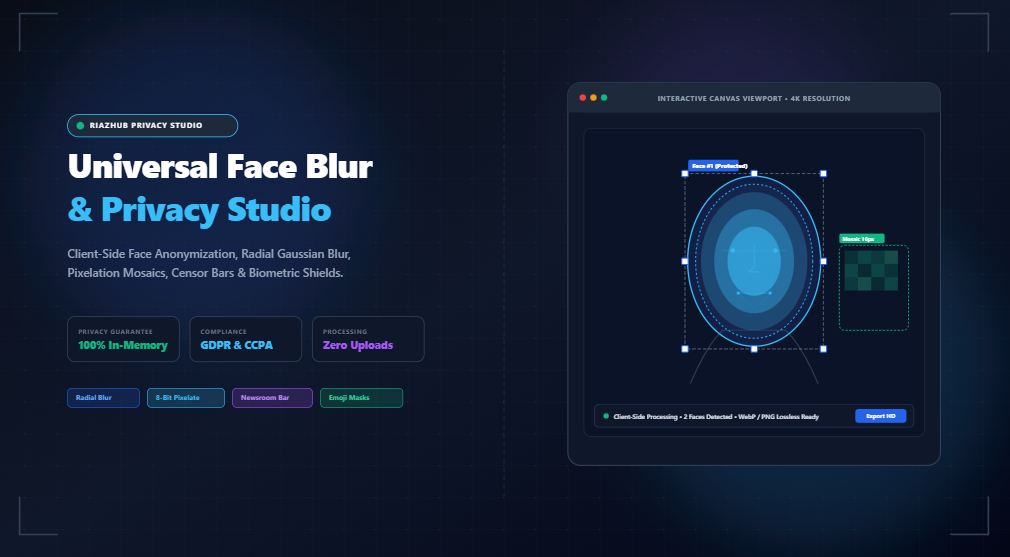
In this comprehensive guide, we examine the legal frameworks surrounding facial data (including the European Union’s GDPR and California’s CCPA/CPRA), deconstruct the mathematical optics behind AI-proof redaction techniques (radial Gaussian blur, mosaic pixelation, and newsroom censor bars), and demonstrate how you can immediately anonymize photographs using the 100% client-side Universal Face Blur & Privacy Studio on RiazHub.com without ever transmitting your private photos to a remote cloud server.
1. The Legal Imperative: GDPR, CCPA & Biometric Surveillance
Over the past decade, global data privacy legislation has evolved dramatically. Under modern regulatory definitions, unblurred facial imagery is no longer classified as mere media content—it is strictly categorized as Biometric Data.
European Union: GDPR Articles 4 & 9
Under European Union Regulation 2016/679 (General Data Protection Regulation):
- Article 4(14) defines biometric data as personal data resulting from specific technical processing relating to physical, physiological, or behavioral characteristics of an individual, allowing unique identification.
- Article 9 categorizes biometric data processed for the purpose of uniquely identifying a natural person as Special Category Data, imposing a strict prohibition against processing unless explicit, documented consent or rigorous legal exceptions exist.
Publishing photographs of identifiable individuals captured in public spaces without consent creates severe liability for commercial publishers, marketing agencies, educational organizations, and non-profits. Properly anonymizing facial regions permanently severs the causal link between the photograph and the subject’s legal identity.
United States: CCPA, CPRA & State Biometric Statutes
In the United States, legislation like the California Consumer Privacy Act (CCPA), the California Privacy Rights Act (CPRA), and Illinois’ Biometric Information Privacy Act (BIPA) enforces stringent statutory penalties against organizations collecting or publishing facial biometric markers without prior written consent. Redacting identifiable faces prior to publication provides immediate legal immunity against biometric scraping claims.
2. Deconstructing Redaction Optics: Blur vs. Pixelate vs. Censor Bars
Not all redaction methods are created equal. Different photographic contexts require distinct balances between aesthetic subtlety and absolute cryptographic irreversibility. With the RiazHub Face Blur Studio, you can switch between five tailored anonymization styles with a single click:
🌸 Radial Soft Blur with Feathering
Applies a Gaussian-weighted convolution matrix over natural elliptical facial contours. Edge feathering dissipates blur toward the perimeter, preserving hair fringes, hats, and artistic background lighting.
👾 8-Bit Pixelation / Mosaic
Subdivides facial regions into stepped color quantization cells (4px to 48px). Replaces thousands of high-frequency biometric vector coordinates with single color centroids, completely defeating AI feature extraction.
🕶️ Newsroom Censorship Eye-Bar
Places a solid blackout bar precisely across the eye line and nasal bridge. Widely recognized in legal reporting, crime journalism, and investigative dossiers to preserve facial context while concealing identity.
😎 Emoji & Sticker Stamp
Stamps playful sunglasses, smiling avatars, masquerade masks, or privacy padlocks over detected face regions. Popular for parenting blogs, school newsletters, and community social feeds.
Why Oval Radial Feathering Outperforms Harsh Square Boxes
Human skulls and jawlines naturally conform to elliptical geometry. Traditional rectangular blur tools create harsh, boxy artifacts that visually corrupt professional portraits and commercial photography. The RiazHub Universal Face Blur Studio applies an elliptical coordinate mask with adjustable radial feathering.
At 40% feathering, the inner 60% of the face (the eyes, nose, and lips) receives 100% blur saturation, while the outer 40% softly dissipates into the subject’s hairline and collar. The result is a clean, aesthetically pleasing, editorial-grade redaction that feels organic rather than destructive.
3. Inside the Studio: Interactive Features of RiazHub Face Blur
Built from the ground up for high performance and total privacy, the Universal Face Blur & Privacy Studio combines intuitive point-and-click editing with advanced computer graphics pipelines:
- Interactive Multi-Face Bounding Boxes: Click and drag anywhere on the photo to instantly create blur targets. Each box is equipped with eight draggable corner and edge anchor handles, enabling sub-millimeter precision resizing and positioning over subjects of any scale.
- ✨ 1-Click Skin-Luminance Heuristic Scanner: Need to process a group photo quickly? The built-in scanner evaluates chromatic skin-tone clustering in normalized RGB space, automatically detecting candidate face clusters and generating pre-positioned oval shield tags.
- Split-Screen Before/After Slider: Switch to the interactive split-screen slider view to swipe between the original photo and your anonymized output in real time. Verify that identities are completely concealed while background scenery remains crystal clear.
- Side-by-Side Dual Comparison: Simultaneously inspect the full original frame alongside the anonymized result to verify framing and composition.
- Multi-Format Lossless Export: Download your finished photograph in modern WebP (compact web distribution), lossless PNG (maximum fidelity archival), or standard JPEG with adjustable quality compression.
- 1-Click Clipboard Copying: Copy your redacted high-resolution image directly to your operating system’s clipboard via the modern HTML5 Clipboard API for instant pasting into Slack, Word, Google Docs, or email clients.
4. Step-by-Step Walkthrough: How to Blur Faces in Photos
Follow this 4-step workflow to anonymize any image using RiazHub’s Face Blur Tool:
- Load Your Photo: Open the Face Blur Studio and drag and drop your photo into the upload dropzone, or click “Select Photo”. The tool accepts JPG, PNG, WEBP, AVIF, BMP, and GIF formats. If you want to test the tool first, click “Load Sample Group” to test with a pre-configured multi-person portrait.
- Target Faces (Assisted or Manual): Click “✨ Scan Likely Face Zones” to let the heuristic scanner highlight faces, or simply click and drag your mouse/finger across any face on the canvas to draw a custom bounding box. Drag the 8 corner handles to refine the fit.
- Select Your Censor Style & Geometry: Choose between Radial Blur, Pixelate, Censor Bar, Emoji Stamp, or Frosted Glass. Adjust blur intensity (5px to 80px), edge feathering (0% to 100%), or mosaic block size (4px to 48px) using the responsive sliders. Toggle between Oval / Ellipse and Rectangle Box geometry to suit your subject.
- Compare and Export: Click the “Split Slider” tab to inspect the before/after comparison. When satisfied, choose your desired target format (WebP, PNG, or JPEG) and click “Download Blurred Image” or “Copy to Clipboard”.
5. Comparison: RiazHub vs. Cloud Converters vs. Desktop Software
| Feature | RiazHub Face Blur Studio | Generic Cloud Converters | Desktop Software (Photoshop/GIMP) |
|---|---|---|---|
| Privacy & Security | ✅ 100% In-Browser (Zero Uploads) | ❌ Transmits Photos to Cloud Server | ✅ Local Device Processing |
| Speed & Setup | Instant (Zero installation, runs in browser) | Requires upload & download wait times | Requires multi-GB installation & license |
| Face Targeting | Interactive 8-handle drag boxes + Heuristic scan | Rigid full-face or automated only | Manual lasso, layer masks, and filter adjustments |
| Cost & Licensing | 100% Free & Open Access | Freemium / Watermarks / Ads | Expensive subscription ($20+/month) |
| Split-Screen Comparison | ✅ Live Interactive Swipe Slider | ❌ Static or reload required | Requires toggling layer visibility |
| Cross-Platform | Windows, Mac, Linux, iOS, Android | Browser-dependent | Desktop OS only |
6. Frequently Asked Questions (FAQ)
Absolute Zero. All pixel buffer calculations, Gaussian filter convolutions, mosaic quantizations, and exports happen strictly inside your computer or smartphone’s browser RAM via the HTML5 Canvas API. No image data is ever transmitted over the network or stored on our servers.
For standard portrait photography, a Blur Intensity of 25px to 45px or a Mosaic Block Size of 16px or higher permanently obliterates all facial vector coordinates. This level of redaction makes it mathematically impossible for commercial facial recognition engines to match the subject against identity databases.
Yes! The Face Blur Studio supports an unlimited number of simultaneous face masks. You can click “✨ Scan Likely Face Zones” to auto-detect multiple faces, and click “➕ Add Custom Box” or drag directly on the canvas to add as many individual shield tags as needed.
Yes! When the canvas re-encodes the image into a newly synthesized WebP, PNG, or JPEG blob, all camera serial numbers, GPS latitude/longitude coordinates, and forensic telemetry markers are stripped automatically. For dedicated batch metadata sanitization, you can also use RiazHub’s standalone EXIF Metadata Remover.
Universal Face Blur & Privacy Studio
Anonymize faces in photos, pixelate identities, apply censor eye-bars, or add privacy masks with instant split-screen before/after comparison and high-resolution export.