
How to Create Fillable PDFs & Interactive AcroForms Online for Free
Converting a static document into an interactive, fillable PDF with form fields, checkboxes, dropdowns, and digital signature lines no longer requires expensive desktop software subscriptions. Discover how to create professional AcroForm PDFs in seconds right inside your browser.
Try our browser-based utility tool now! No software installation or user registration is required.
What is an AcroForm Fillable PDF?
An AcroForm (Adobe Acrobat Form) is a standardized PDF format that includes interactive form controls embedded directly into the document layer. When opened in standard PDF viewers like Adobe Acrobat Reader, Google Chrome, Microsoft Edge, or Apple Preview, these fields highlight automatically and respond to user inputs.
Key benefits of using interactive AcroForm PDFs include:
- Cross-Platform Compatibility: Works seamlessly across Windows, macOS, iOS, Android, and Linux without requiring dedicated apps.
- Data Integrity: Standardized field names (e.g.,
first_name,email_address) enable automated backend data extraction via Python, PHP, or Zapier. - Professional Presentation: Keeps branding, typography, and page structure completely fixed while allowing custom text entry.
- Digital Signatures: Enables compliant signature fields and drawn e-signature verification directly on the document.
Key Features of RiazHub’s Create Fillable PDF Tool
Our web utility was engineered from the ground up to offer enterprise-grade PDF editing capabilities without the complexity or cost of traditional software.
1. Dual Creation Modes (Upload or Create Blank)
You can choose between two creation workflows:
- Upload Existing PDF: Drag and drop any existing PDF document (such as an application form, agreement, or invoice template) and layer interactive fillable elements over standard page areas.
- Create From Blank Canvas: Build a document from scratch by selecting standard page sizes including A4, US Letter, US Legal, A3, A5, or entering custom millimeter/inch dimensions in portrait or landscape orientations.
2. Rich Palette of Interactive Form Controls
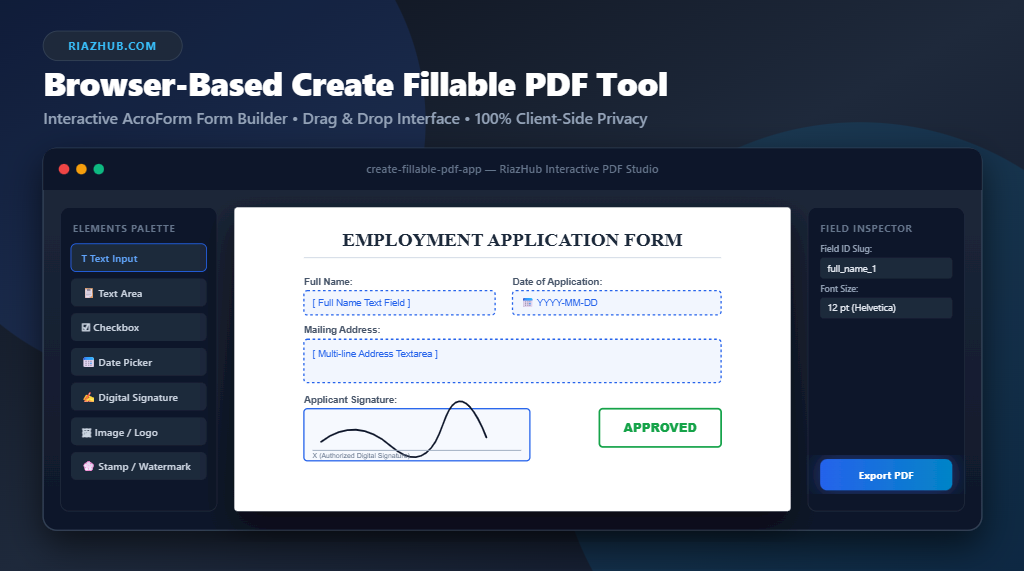
The tool provides a comprehensive array of customizable form elements that you can drag and drop directly onto your PDF canvas:
- Text Input Single-Line Text Boxes: Perfect for names, email addresses, phone numbers, and short answers.
- Text Area Multi-Line Text Areas: Built for detailed descriptions, notes, and comments.
- Checkbox Interactive Checkboxes: Allow single or multiple option selection.
- Radio Group Radio Buttons: Mutually exclusive choices (with built-in re-click deselect support).
- Dropdown Dropdown Menus: Compact selectable lists for state selection, countries, or departments.
- Date Picker Date Selection Fields: Formatted date pickers ensuring standard YYYY-MM-DD formatting.
- Signature Digital Signature Draw Pad: Integrated modal allowing users to draw e-signatures with touch, stylus, or mouse, or generate signed AcroForm lines.
- Image / Logo Image & Stamp Elements: Upload company logos, seals, or select dynamic stamps such as APPROVED, CONFIDENTIAL, DRAFT, PAID, or REJECTED.
3. 100% Private Client-Side Processing
Unlike typical online PDF converters that upload your confidential documents to third-party servers, the RiazHub Create Fillable PDF Tool operates 100% inside your web browser using HTML5 Canvas, WebAssembly, PDF.js, and PDF-Lib. Your sensitive document data never leaves your computer, ensuring complete GDPR and privacy compliance.
Step-by-Step Guide: How to Make a PDF Fillable
Follow these simple steps to turn any document into an editable PDF form:
- Access the Utility: Navigate to the RiazHub Create Fillable PDF Builder Page.
- Select Your Source Document: Click “Upload Existing PDF” to load a file from your hard drive, or click “Create From Blank Canvas” to pick a page size (e.g. A4 Portrait) and page count.
- Drag and Drop Form Fields: Click or drag elements from the left-hand Form Elements Palette onto the document canvas. Position and resize field boxes visually using the 8 resize handles.
- Configure Properties in the Inspector: Select any field on the canvas to open the Field Inspector. Customize the field ID slug (e.g.,
user_email), font size (locked to prevent text overflow), border color, transparency, and required status. - Preview Interactive Mode: Toggle “Preview Fillable Form Mode” to test typing text, picking dates, and selecting checkboxes live before exporting.
- Export & Download: Click “Generate & Download Fillable PDF”. Your interactive AcroForm PDF will compile instantly and save directly to your device!
Traditional PDF Editors vs. RiazHub Online Utility
| Feature / Capability | Traditional Desktop Editors | RiazHub Online Utility |
|---|---|---|
| Pricing | Expensive monthly subscriptions | 100% Free Forever |
| Data Privacy | Cloud syncing / external storage | 100% Private (Browser Local) |
| AcroForm Export | Supported | Native PDF-Lib AcroForms |
| Custom Page Sizes | Complex setup | Live Toolbar Selector (A4, Legal, A3…) |
| Digital Signatures | Requires extra add-ons | Built-In Touch Drawing Pad |
| Installation | Heavy software download | Instant Web Access |
Schema JSON Import & Export for Form Reusability
If you regularly create standardized forms, you do not need to rebuild field layouts from scratch every time. The RiazHub Form Builder includes a one-click Export Schema (JSON) feature.
Exporting your form schema saves all field coordinates, dimensions, field names, font sizes, and color settings into a lightweight JSON file. Whenever you need to make updates or apply the same form layout to a new PDF template, simply click Import Schema (JSON) to restore your interactive layout instantly.
Frequently Asked Questions (FAQs)
Will the fillable fields work in Adobe Acrobat Reader and Google Chrome?
Yes! Our utility generates standard native PDF AcroForm fields with embedded Helvetica appearance rules (`/DA`). They open and allow typing in Adobe Acrobat, Google Chrome, Microsoft Edge, Foxit Reader, Apple Preview, and mobile PDF viewer apps.
Is there a limit on how many pages or fields I can add?
There are no limits! You can create multi-page PDF forms with hundreds of interactive text boxes, checkboxes, and signature lines without any restrictions or watermarks.
How do I test the tool on my website or documents?
Simply visit the Create Fillable PDF Utility on RiazHub.com to start creating, editing, and downloading interactive PDF forms right now.
Create Fillable PDF & Interactive Form Builder
Transform static documents into interactive AcroForm PDFs with text boxes, checkboxes, images, stamps, and digital signatures.
Form Builder Best Practices & FAQs
first_name, user_email, agree_terms). Standardized field names allow backend PDF parsers (like PHP, Python, or Zapier) to extract submitted form data cleanly.
Use your mouse, touch, or stylus to draw your signature below.