
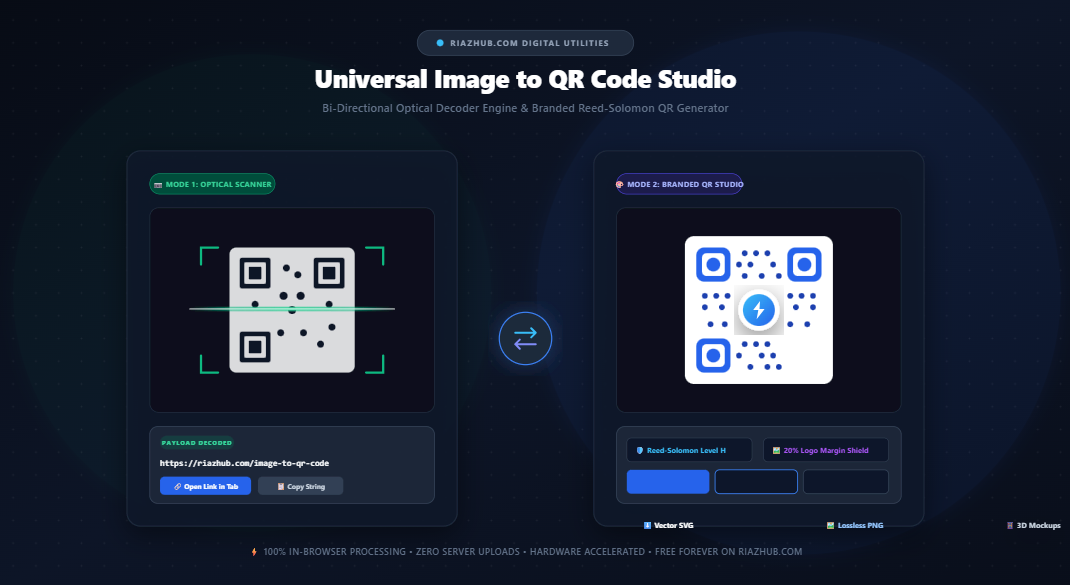
Universal Image to QR Code Bi-Directional Scanner & Branded QR Code Studio: The Complete Technical Guide
Quick Response (QR) codes have evolved from industrial automotive tracking tags into the world’s most ubiquitous bridge between physical surfaces and digital experiences. However, traditional QR workflows have long suffered from a glaring gap: generators only create codes, while optical scanners are locked inside native smartphone cameras or proprietary native apps. Discover how the Universal Image to QR Code Bi-Directional Scanner & Branded Studio on RiazHub.com unifies both sides of the 2D symbology ecosystem in a 100% private, client-side web application.
⚡ Experience the Bi-Directional Engine Live
Decode payloads from photos and screenshots, or design custom vector QR codes with embedded brand logos and Reed-Solomon Level H fault tolerance directly in your browser.
1. Understanding the Bi-Directional QR Engine Paradigm
Most online barcode utilities operate in a single direction: you type a URL to receive a generic black-and-white grid, or you download an ad-ridden native application just to read a screenshot on your desktop. A true bi-directional engine handles both inbound optical analysis and outbound mathematical synthesis seamlessly:
- Direction A (Inbound Optical Decoder): Ingests raster photos (JPEG, PNG, WEBP, AVIF, TIFF) or clipboard paste buffers, identifies the three corner Finder Patterns, calibrates contrast, and extracts the payload string without pinging any external server.
- Direction B (Outbound Branded Synthesizer): Translates strings, Wi-Fi credentials, vCards, or URLs into Galois Field $GF(2^8)$ polynomials, builds the matrix, applies custom module styling, and embeds a central company logo protected by an alpha clearance shield.
By utilizing the Universal Image to QR Code Studio, individuals and businesses eliminate fragmented toolsets while gaining enterprise-grade security and creative design freedom.
2. The Mathematics of Scannable Logos: Reed-Solomon Error Correction
A common misconception is that a logo placed in the center of a QR code is simply an image overlay. In reality, covering QR code modules destroys information. If you place a logo over a standard QR code generated with low fault tolerance, smartphone camera lenses will fail to read it entirely.
The secret to scannable branded QR codes lies in Reed-Solomon Error Correction Coding (ECC). Defined by ISO/IEC 18004 standards, Reed-Solomon algorithms add calculated redundant data blocks (codewords) to the matrix:
| ECC Level | Recovery Capacity | Recommended Use Case |
|---|---|---|
| Level L (Low) | ~7% Data Restoration | Compact QR codes with high data density and zero visual occlusion. |
| Level M (Medium) | ~15% Data Restoration | Standard digital screens, website menus, and clean marketing collateral. |
| Level Q (Quartile) | ~25% Data Restoration | Industrial packaging, printed billboards, and slight surface wear environments. |
| Level H (High) | ~30% Data Restoration | Mandatory for Branded Codes: Allows up to 30% of central matrix modules to be covered by logos without data loss. |
3. Anatomy of a 2D QR Symbology Matrix
To understand how custom styling works without breaking optical scannability, it helps to review the architectural components of a QR matrix:
- Finder Patterns: The three 7×7 module concentric squares positioned at the top-left, top-right, and bottom-left corners. These enable cameras to determine matrix scale, skew, and 360-degree orientation instantaneously.
- Timing Patterns: Alternating dark and light modules running horizontally and vertically between finder eyes, establishing the coordinate grid dimensions ($N \times N$).
- Alignment Patterns: Smaller concentric squares embedded in higher-version codes (Version 2 through 40) that compensate for optical distortion on curved surfaces such as bottles or mugs.
- Data and Error Correction Codewords: The payload bits arranged in zig-zag columns across available matrix modules.
- Quiet Zone: A solid 4-module margin surrounding the entire matrix, providing essential luminance boundary separation from background graphics.
4. Core Features of RiazHub’s Universal QR Studio
A. Optical Image & Photo Decoder (Mode 1)
Did someone send you a screenshot of a QR code on WhatsApp, Slack, or email? Instead of displaying the image on a computer just to scan it with your phone, simply drag and drop the image into the Image to QR Code Scanner on RiazHub or press Ctrl+V to paste directly from your clipboard.
- Native Hardware Acceleration: Utilizes the browser’s built-in
BarcodeDetectorAPI for millisecond decoding. - Cross-Browser Fallback Engine: Incorporates a pure client-side binarization analyzer for seamless compatibility on Firefox and desktop Safari.
- Preprocessing Sliders: Features real-time contrast adjustment ($-50\%$ to $+100\%$) and an inversion toggle to decode inverted white-on-black QR codes.
- Smart Payload Classification: Instantly recognizes URLs (with a 1-click “Open Link” action), Wi-Fi network strings, vCard contact cards, and raw alphanumeric text.
B. Custom Aesthetic Styling & Logo Embedding (Mode 2)
Say goodbye to bland, robotic black-and-white squares. The studio lets you craft agency-grade branded visual identities:
- Dot Geometry Customizer: Choose between crisp Sharp Squares, modern Rounded Dots, or elegant Smooth Pills.
- Finder Eye Shapes: Customize corner locator eyes independently with Classic Square, Rounded Squircle, or Target Circular centers.
- Palette & Gradients: Apply custom brand hex colors or smooth two-tone linear gradients that command visual attention.
- Center Logo Shield with Aspect-Ratio Protection: Upload any brand mark (PNG, SVG, JPG, WebP). The engine performs automated center-crop calculation so non-square images (such as rectangular logos or passport photos) never stretch, while rendering an alpha clearance shield to prevent surrounding modules from colliding with your artwork.
C. Real-World Mockup Previews
Before sending your code to the print shop, preview how it appears in practical environments:
- Tabletop Acrylic Stand: Simulates printed restaurant menus, trade show tables, and contactless payment stands.
- Smartphone Screen: Previews the digital presentation of event tickets, Wi-Fi share cards, and mobile landing pages.
D. Multi-Format High-Res Exports
Export your finalized asset in the exact format required for your medium:
- Scalable Vector SVG: Infinite resolution vector graphics ideal for billboards, signage, laser engraving, and merchandise.
- Lossless High-Res PNG (up to 2048px): Crystal-clear bitmaps perfect for websites, email signatures, flyers, and social media.
- 1-Click Clipboard Copies: Copy raw SVG markup or PNG bitmaps directly to your clipboard for instant pasting into Figma, Canva, or Photoshop.
5. How to Decode a QR Code from an Image (Step-by-Step)
- Navigate to the Universal Image to QR Code Studio.
- Click the 📷 Mode 1: Decode QR Code from Image tab at the top.
- Drag and drop your QR code photo, screenshot, or graphic into the dropzone (or click “Paste Clipboard”).
- If the photo was taken under dim lighting, expand the Image Preprocessing Filters accordion and boost contrast or toggle image inversion.
- Click ⚡ Scan & Extract Payload. The extracted URL or text will appear in the payload card with one-click copy and visit buttons.
6. How to Generate a Custom Branded QR Code (Step-by-Step)
- Switch to the 🎨 Mode 2: Generate QR Code with Embedded Logo tab on the RiazHub QR Studio.
- Select your payload type (URL, Plain Text, Wi-Fi, or vCard) and enter your destination content.
- Upload your brand logo into the Center Logo / Brand Image dropzone. The tool will automatically calibrate error correction to Level H.
- Fine-tune the logo scale (15%–22% recommended) and margin shield padding.
- Select your preferred module shapes (Rounded Dots or Smooth Pills) and eye styles.
- Pick your brand colors or activate a two-tone linear gradient.
- Switch between the Live QR Stage, Vector SVG Preview, and Real-World Mockups to inspect your design.
- Click ⬇️ Download Vector SVG for print collateral or 🖼️ Download PNG (1024px) for digital distribution.
7. Feature Comparison: Generic Online Generators vs. RiazHub Studio
| Feature | Generic Online Tools | RiazHub Universal Studio |
|---|---|---|
| Bi-Directional Engine | ❌ Generation only (No photo decoding) | ✅ Full Optical Decoder + Branded Generator |
| Client-Side Privacy | ❌ Data sent to third-party databases | ✅ 100% In-Browser Sandbox (Zero Server Uploads) |
| Center Logo Compositing | ⚠️ Often stretches non-square photos | ✅ Aspect-Ratio Center-Crop + Protective Shield |
| Fault Tolerance Calibration | ❌ Often locked at Level L/M (Broken logos) | ✅ Auto-elevates to Level H (30% Fault Recovery) |
| Export Options | ⚠️ Low-res PNG only (Paywall for SVG) | ✅ Free Unlimited Vector SVG & PNG up to 2048px |
| Real-World Mockups | ❌ Not available | ✅ Tabletop Display & Smartphone Screen Previews |
8. Practical Real-World Applications
- Hospitality & Dining: Place branded tabletop cards featuring your restaurant logo and high-scan rounded dots on every table to deliver instant digital menus.
- Corporate Networking: Generate a vCard QR code embedded with your profile headshot and add it to your Apple Wallet or physical business card.
- Contactless Wi-Fi Access: Print a clean Wi-Fi QR code with your office or cafe insignia so guests can connect without typing lengthy WPA passwords.
- Large-Scale Advertising: Download vector SVG assets and scale them up to billboard dimensions without experiencing pixelation or loss of edge definition.
🚀 Start Creating Professional QR Assets Now
Whether you need to decode an unreadable QR screenshot or produce an elegant branded vector code for your organization, RiazHub delivers speed, aesthetic precision, and zero-compromise privacy.
Frequently Asked Questions (FAQ)
Can a QR code with a logo be scanned by all mobile devices?
Yes, provided the code is generated with Reed-Solomon Error Correction Level H (30%) and the logo does not exceed 25%–30% of the total matrix area. The RiazHub QR Studio automatically enforces these safeguards.
Are my uploaded photos, passwords, or logos stored on RiazHub servers?
Never. All processing—including optical image binarization, Reed-Solomon polynomial math, canvas compositing, and SVG generation runs strictly inside your client browser using local JavaScript APIs. Zero bytes are uploaded to our servers.
Why is Vector SVG preferable to PNG for print design?
Vector SVG files store mathematical shapes rather than fixed pixel rasters. This means an SVG QR code can be scaled to any size from a 1-inch business card to a 50-foot billboard—while maintaining perfectly razor-sharp edges that camera sensors can read instantly.
What should I do if a QR code photo fails to scan?
In Mode 1, expand the Image Preprocessing Filters accordion. Increase the contrast slider to sharpen module edges, or toggle the Invert Image checkbox if the code has white dots on a dark backdrop.
Universal Image to QR Code Studio
Optical QR Code decoder to extract payloads from photos, plus a high-precision branded QR code generator with central logo shielding, Reed-Solomon Level H fault tolerance, and vector SVG exports.
Drag & Drop QR photo here, or click to browse
Supports JPG, PNG, WEBP, AVIF, BMP, TIFF & Clipboard (Ctrl+V)Drop brand logo (PNG, SVG, JPG, WebP)
Preserves aspect ratio with automatic center-cropUpload or paste an image to scan
Optical boundary lines will highlight detected QR markers| QR Code Standard | ISO/IEC 18004 Symbology |
| Matrix Version | Version Auto-Calibrated |
| Grid Dimensions | 29 × 29 Modules |
| Reed-Solomon Level | Level H (30% Data Recovery) |
| Finder Pattern Size | 7×7 Modules (3 Corners) |
| Mask Evaluation | Pattern 3 (Minimum Penalty) |
| Payload Character Count | 21 Characters |
📖 QR Code Symbology Architecture & Reed-Solomon Guide
📐 2D Matrix & Finder Patterns
QR (Quick Response) codes are two-dimensional matrix barcodes defined by ISO/IEC 18004. The three distinct 7×7 module squares located in the top-left, top-right, and bottom-left corners serve as omnidirectional Finder Patterns, enabling mobile camera sensors to determine scale, angle, and orientation across 360 degrees instantly.
🛡️ Reed-Solomon Fault Tolerance
Through Galois Field $GF(2^8)$ polynomial mathematics, Reed-Solomon error correction embeds redundant codewords. Level H reserves up to 30% of codewords for restoration, which makes center-logo embedding possible: even when central data modules are shielded or occluded by artwork, the surrounding matrix mathematically recalculates the original payload with zero corruption.
👁️ Contrast & Scan Readability
Optical sensors rely on luminance contrast (ΔE) to detect light and dark modules. While custom brand hex codes and subtle gradients look gorgeous, maintaining strong luminance differential between foreground dots and background is paramount for low-light smartphone cameras and outdoor signage.
🔒 100% In-Browser Privacy Protection
Every computation—from optical BarcodeDetector binarization to Reed-Solomon polynomial division, canvas rendering, and vector SVG serialization—executes entirely within your local browser sandbox. Zero images, URLs, WiFi passwords, or logos are uploaded to any external server.