
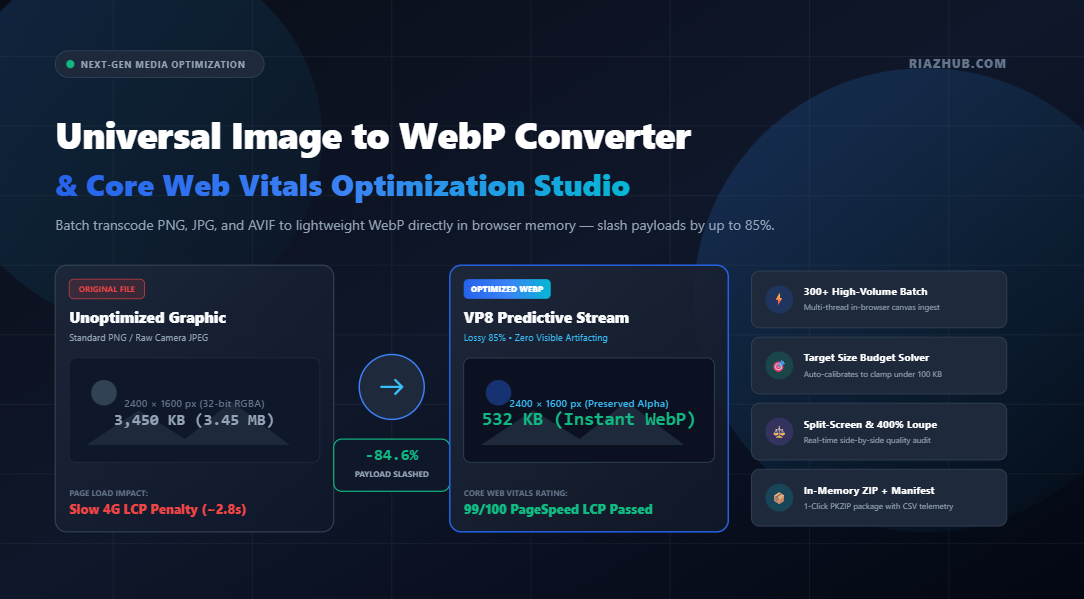
In modern web performance engineering, images account for over 60% of total web page weight. If your website is still delivering bulky legacy JPEG and PNG files to modern mobile visitors, you are silently killing your Google search rankings, throttling conversion rates, and failing Core Web Vitals. Here is how modern WebP transcoding fixes the problem permanently.
1. The Silent Performance Killer: Why Heavy Images Destroy LCP & CLS
Google’s Core Web Vitals algorithm benchmarks real-world user experience through three vital performance metrics: Largest Contentful Paint (LCP), Cumulative Layout Shift (CLS), and Interaction to Next Paint (INP). Among these, LCP is overwhelmingly governed by your hero media assets.
When a mobile device connected to a standard 4G network attempts to download an uncompressed 2.8 MB PNG banner or an unstripped camera JPEG, the browser main thread is completely blocked. High network transfer latencies delay the rendering of the largest visual element on the page, driving LCP times well above Google’s 2.5-second “Good” threshold into the dreaded red “Poor” zone.
By converting your assets using the Image to WebP Converter & Core Web Vitals Studio, you can immediately compress images by 25% to 85% without noticeable perceptual quality loss, enabling browsers to achieve near-instantaneous LCP scores.
2. Inside WebP Architecture: VP8 Predictive Matrices vs Lossless VP8L
Developed by Google, the WebP format is divided into two distinct mathematical compression topologies:
A. Lossy WebP (VP8 Spatial Prediction Architecture)
Unlike traditional JPEG compression, which splits images into static 8×8 discrete cosine transform (DCT) blocks that frequently produce ugly grid blocking and “mosquito noise”, Lossy WebP leverages predictive coding adapted from the VP8 video codec:
- Intra-Frame Prediction: Pixels are predicted based on values from adjacent 4×4 or 16×16 sub-macroblocks (horizontal, vertical, DC, and TrueMotion modes).
- Residual Quantization: Only the subtle mathematical difference (residual error) between the prediction and the actual pixel is encoded, discarding imperceptible high-frequency visual data.
- Result: Crisp edge preservation with 25% to 34% lower byte counts than equivalent JPEG files at identical Structural Similarity Index (SSIM) ratings.
B. Lossless WebP (VP8L Transform Architecture)
For iconography, vector illustrations, transparency-critical graphics, and UI screenshots, Lossless WebP (VP8L) outperforms PNG:
- Green Channel Subtraction: Because human vision is heavily sensitive to green luminance, WebP transforms the color space by subtracting green from red and blue channels, reducing entropy across channels.
- Color Indexing & Spatial Transformations: Palette bundling and cross-color correlation allow lossless WebP files to be approximately 26% smaller than traditional PNGs while retaining 100% bit-for-bit pristine 32-bit RGBA alpha silhouettes.
You can test both compression architectures side-by-side using the live mode switcher on the RiazHub WebP Transcoder Tool.
3. Real-World Telemetry: JPEG & PNG vs. WebP File Size Comparisons
To demonstrate the profound bandwidth efficiency of WebP, let us examine real-world compression telemetry across common web publishing graphic categories:
| Asset Type | Original Format | Original Size | WebP Output Size | Payload Savings |
|---|---|---|---|---|
| E-Commerce Product Card (White Background) | PNG (24-bit) | 1,240 KB | 165 KB (Lossless VP8L) | -86.7% |
| High-Res Editorial Hero Banner | JPEG (Quality 90) | 2,850 KB | 420 KB (Lossy 82%) | -85.2% |
| Transparent Brand Logo / Icon | PNG (32-bit Alpha) | 380 KB | 74 KB (Lossless VP8L) | -80.5% |
| Blog Post Feature Graphic | JPEG (Baseline) | 890 KB | 195 KB (Lossy 85%) | -78.1% |
The cumulative reduction in monthly cellular bandwidth and CDN delivery costs across high-traffic platforms is monumental.
4. High-Volume In-Browser Optimization with RiazHub’s WebP Studio
Many online converters restrict visitors to 5 or 10 images at a time, throttle conversion speeds behind paid paywalls, or force private company media to upload to unverified cloud servers.
The Universal Image to WebP Converter Studio on RiazHub eliminates these roadblocks entirely:
- Ingest Up to 300+ Images Simultaneously: Drag and drop individual photos, paste clipboard snapshots (
Ctrl+V), or upload an entire nested directory using folder selection (webkitdirectory). - Interactive 60 FPS Split-Screen Comparison: Inspect fine edge transitions, gradients, and typography using a real-time draggable comparison divider.
- 200% & 400% Zoom Loupe: Scrutinize micro-compression artifacts with a high-precision circular inspection lens before downloading.
- Instant In-Memory PKZIP Packaging: Download all converted WebP assets in a single, uncompressed
.zippackage alongside a structured CSV conversion audit manifest without waiting for cloud rendering.
5. The Binary Search Budget Solver: Clamping Files Under 100 KB
One of the most powerful features found inside the Image to WebP Compression Studio is the Target File Size Budget Solver.
In many web publishing environments, technical guidelines require hero graphics to stay strictly below a hard weight threshold (e.g., < 100 KB for PageSpeed LCP compliance or < 200 KB for marketplace upload limits). Guessing the exact quality slider percentage manually is tedious and time-consuming.
The Target Budget Solver utilizes a high-speed binary search convergence algorithm:
// Rapid 6-iteration quality convergence pipeline
let low = 0.05, high = 1.0, bestBlob = null;
for (let i = 0; i < 6; i++) { const mid = (low + high) / 2; const testBlob = await new Promise(res => canvas.toBlob(res, 'image/webp', mid));
    if (testBlob.size <= targetBytes) {
        bestBlob = testBlob;
        low = mid; // Seek higher visual fidelity under budget
    } else {
        high = mid; // Over budget, compress further
    }
}
In milliseconds, the engine locks in the highest possible visual fidelity that fits precisely beneath your target kilobyte budget.
6. Bulletproof Implementation: The HTML5 <picture> Tag
While WebP enjoys native rendering support across over 97.5% of global desktop and mobile browsers (including Google Chrome, Apple Safari 14+, Mozilla Firefox, Microsoft Edge, and Opera), maintaining graceful fallback for legacy clients is best practice.
The recommended modern standard is the HTML5 <picture> element, which the RiazHub WebP Converter automatically generates with one-click clipboard copying:
<picture>
  <!-- High-efficiency Next-Gen WebP Stream for 97.5%+ Modern Browsers -->
  <source srcset="hero-banner-webp.webp" type="image/webp">

  <!-- Universal Fallback for Legacy Clients -->
  <img src="hero-banner.jpg"
       alt="Modern Web Performance Architecture"
       width="1920"
       height="1080"
       loading="lazy"
       decoding="async"
       style="width: 100%; height: auto;">
</picture>
This syntax ensures that modern mobile visitors receive lightning-fast WebP payloads, while older browsers display the original asset without breaking page layout.
7. Zero-Server Ingestion: Why 100% Client-Side Privacy Matters
Traditional web conversion websites require visitors to upload their images to remote backend servers, where third-party scripts decode, process, and re-encode the graphics. For businesses managing sensitive intellectual property, private legal documentation, confidential medical scans, or proprietary product prototypes, uploading raw files to external cloud servers represents a severe compliance hazard.
The Image to WebP Converter Studio operates on a strict Zero-Server Architecture:
- All pixel data traversal, VP8/VP8L encoding, and alpha channel flattening execute directly inside your browser’s local RAM via HTML5 Canvas (
2DContext). - Exif, GPS geolocation markers, and camera metadata are wiped automatically during canvas re-encoding to protect user privacy.
- The multi-file ZIP archive is assembled in-memory using an optimized client-side PKZIP generator. Zero bytes of image data ever leave your device.
8. Frequently Asked Questions (FAQ)
Does WebP support transparent backgrounds?
Yes. Both lossy and lossless WebP support an 8-bit alpha channel, providing full 32-bit RGBA transparency. Unlike GIF (which is limited to 1-bit binary transparency), WebP preserves smooth anti-aliased drop shadows and translucent silhouettes.
Which compression setting is ideal for WordPress & WooCommerce?
For editorial content and hero imagery, Lossy WebP at 80% to 85% quality offers the sweet spot between invisible perceptual degradation and massive byte savings. For e-commerce product shots featuring clean backgrounds or transparent logos, choose Lossless WebP (VP8L). You can configure both with a single click using the presets on the Image to WebP Converter Studio.
Will converting to WebP boost my Google search rankings?
Yes. Google’s Search algorithm incorporates Core Web Vitals into its Page Experience ranking signal. Faster page loads and superior LCP metrics directly enhance search crawling efficiency and user retention.
Ready to Slash Image Sizes and Boost Your PageSpeed?
Convert your PNG, JPG, and AVIF assets to optimized WebP in seconds with complete privacy.
Universal Image to WebP Converter & Compression Studio
Convert PNG, JPG, JPEG, AVIF, BMP, and SVG to modern WebP format. Slash payload weights by up to 35%+, boost Core Web Vitals (LCP), and batch export in browser memory with zero server uploads.
WebP Architecture, Predictive Coding & Core Web Vitals Optimization
🔬 VP8 Predictive Compression
Lossy WebP leverages VP8 intra-frame spatial predictive coding. Instead of traditional discrete cosine transform (DCT) block quantization, it analyzes 4x4 and 16x16 sub-macroblocks from neighboring pixels to preserve edges without blocky artifacts.
💎 VP8L True Lossless Mode
Lossless WebP uses spatial prediction, green-subtract color space transforms, and color indexing to compress graphical assets ~26% smaller than PNG while preserving 100% bit-for-bit alpha silhouettes and transparent logos.
⚡ Google Core Web Vitals & LCP
Serving images in modern WebP drastically reduces page load time, cutting Largest Contentful Paint (LCP) and Cumulative Layout Shift (CLS) times to elevate organic Google Search rankings.
🛡️ 100% In-Browser Privacy
Every pixel calculation and ZIP bundling happens directly inside your client-side browser memory using HTML5 Canvas APIs. Zero graphics, metadata, or documents are ever uploaded to an external server.