
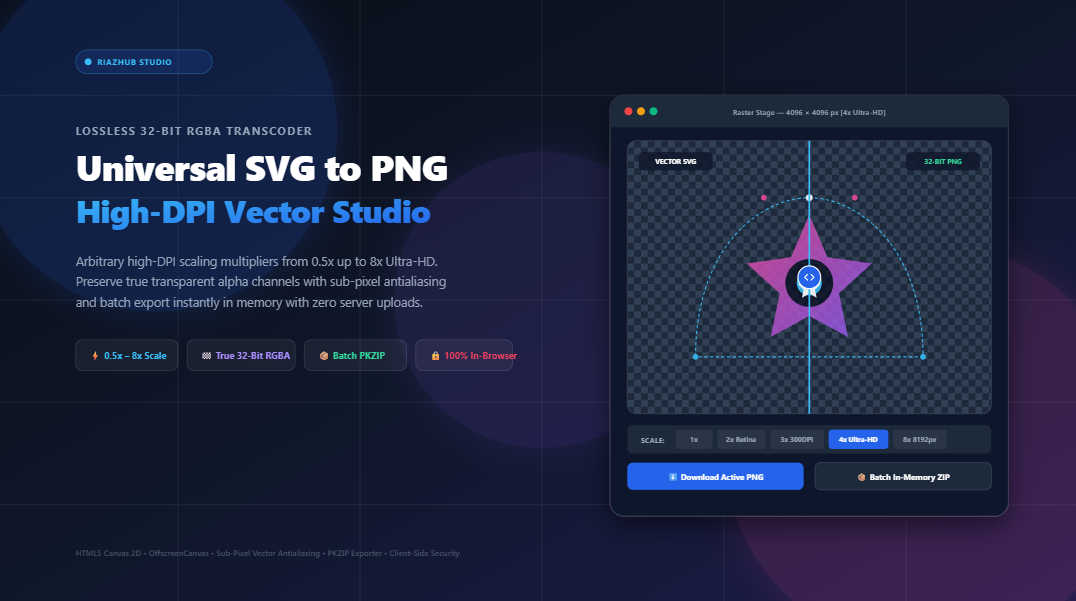
Lossless SVG to PNG Rasterization at Arbitrary High-DPI: The Definitive Vector Transcoding Guide
When engineers and graphic designers attempt this conversion using naive browser tools or basic screenshot tools, the results are routinely disastrous: blurry edges on Apple Retina displays, dark matte fringing around anti-aliased curves, truncated dimensions, and leaked sensitive vectors to third-party web servers.
To resolve this structural challenge, RiazHub developed the SVG to PNG High-DPI Transcoder & Vector Rasterization Studio. In this deep architectural guide, we will deconstruct the mathematics of vector-to-raster transformations, explore how arbitrary high-DPI scaling multipliers eliminate pixelation, inspect the mechanics of true 32-bit RGBA alpha channel preservation, and review how to leverage client-side browser pipelines to execute batch conversions with absolute zero privacy leakage.
⚡ Launch the Live In-Browser Transcoder Studio
Rasterize your vector SVGs at 1x, 2x Retina, 4x Ultra-HD, or custom pixel limits with zero server uploads and 100% transparent alpha channels.
1. Mathematical Vectors vs. Discrete Rasters: Why Scaling Before Rasterization Matters
To grasp why conventional image upscalers produce blurred images while an SVG transcoder delivers razor-sharp clarity, one must examine their underlying coordinate paradigms:
- Discrete Bitmap Rasters (PNG / JPEG): A raster image is a rigid rectangular grid of $M \times N$ pixels, where each pixel is assigned an explicit color tuple $(R, G, B, A)$. When you take a $512 \times 512$ PNG and scale it to $2048 \times 2048$, no new spatial data exists. Interpolation algorithms (bilinear or bicubic) merely duplicate or blend adjacent pixel values, introducing telltale blurring and edge softness.
- Continuous Vector Geometry (SVG XML): An SVG contains parametric equations. An arc is not a cluster of colored pixels; it is defined by a cubic Bézier equation:
Because $P₀, P₁, P₂, P₃$ represent continuous floating-point coordinates in a normalized coordinate space (the viewBox), the curve can be calculated for any discrete sampling frequency.
When you process an asset through the online SVG to PNG vector transcoder at a 4x Ultra-HD multiplier, the engine does not stretch pixels. Instead, it re-evaluates the continuous parametric polynomials at four times the spatial density, placing sub-pixel antialiasing boundaries precisely along the target raster grid.
💡 The Golden Rule of High-DPI Asset Export
Never upscale a rendered PNG. Always scale the mathematical SVG source code prior to rasterization. This preserves 100% mathematical fidelity and guarantees crisp rendering on 300 DPI print substrates and 5K Retina displays.
2. Understanding High-DPI Multipliers: From Web Icons to 8K Billboards
Standard legacy computer displays render graphics at approximately 72 to 96 Dots Per Inch (DPI). Modern mobile devices, iPads, Apple Retina MacBooks, and 4K desktop workstations operate with Device Pixel Ratios (DPR) between 2.0 and 3.0. On such displays, a 1x bitmap asset occupies multiple physical pixels, leading to blurred visual artifacts unless provided at an appropriate high-DPI scale.
The RiazHub SVG to PNG Studio features a dedicated resolution scaling matrix calibrated to industry publishing benchmarks:
| Multiplier Preset | Effective Resolution | Target Applications & Substrates |
|---|---|---|
| 0.5x Downscale | Half Native Dimensions | Compact thumbnails, micro-icons, and lightweight mobile data budgets. |
| 1x Native (1:1) | Exact viewBox Bounds | Standard legacy web displays, email signatures, and fallback UI assets. |
| 2x Retina | Double Native Resolution | High-density Apple Retina screens, iOS and Android app UI components. |
| 3x Print (300 DPI) | Triple Native Resolution | Professional physical publishing, magazines, brochures, and stationery. |
| 4x 4K Ultra-HD | Quadruple Resolution | Ultra-HD video production overlays, broadcast graphics, and hero banners. |
| 8x Billboard (8K) | Up to 8192px Canvas | Large-format signage, trade show booth backdrops, and architectural schematics. |
| Custom W × H | Arbitrary User Bounds | Strict dimensional clamping with integrated aspect-ratio lock ([ 🔒 ]). |
For custom requirements, the system allows designers to lock the intrinsic aspect ratio $R = W / H$ while specifying an exact pixel ceiling, preventing accidental distortion or non-uniform stretching.
3. True 32-Bit RGBA Alpha Channels vs. Dark Fringe Halos
One of the most persistent frustrations in vector-to-raster transcoding is the emergence of ugly dark or white “fringing” around curved silhouettes. When an icon with translucent or antialiased edges is exported, amateur transcoding scripts often draw the SVG over an invisible default black or white background buffer.
When that PNG is later composited on a colored website section, presentation slide, or dark-mode interface, a faint, discolored 1-pixel border appears.
The Sub-Pixel Antialiasing Architecture
True 32-bit RGBA representation allocates 8 bits (256 discrete levels) for Red, Green, and Blue, plus a dedicated 8-bit Alpha transparency channel ($256$ levels of fractional opacity).
When utilizing the in-browser SVG to PNG rasterization engine, the HTML5 canvas context remains unpainted prior to vector drawing. Sub-pixel antialiasing smoothly grades alpha coverage from $100\%$ ($255$) down to $0\%$ with zero background color contamination. The resulting PNG can be overlaid on pure white, deep slate, or vibrant gradients without color fringing.
4. Step-by-Step: How to Batch Convert SVGs to High-Res PNGs
Executing a conversion workflow via the SVG to PNG Transcoder Studio requires no software installations or command-line scripting:
Drag and drop up to 50+ .svg files into the multi-file ingestion zone, click Select Files, or paste raw SVG XML markup into the built-in XML sandbox modal. The parser will standardize viewBox parameters automatically.
Choose a quick preset such as 2x Retina, 4x Ultra-HD, or activate Custom W × H. The real-time KPI grid will instantly calculate your target output dimensions.
Select Transparent Alpha for zero-background graphics, or choose Solid Color Matte to bake a brand-specific background (Pure White, Dark Slate, Pitch Black, or custom hex) directly into the raster.
Examine your vector in the Live Stage, slide the Split-Screen Before/After Divider, or engage the 400% Zoom Loupe to verify clean edge geometry and zero fringing.
Download individual PNGs with 1-click, copy directly to your system clipboard for instant pasting into Figma or Photoshop, or click Download All as ZIP to package your entire batch alongside a detailed dimensional audit CSV manifest.
5. Zero-Upload Architecture: Guaranteed Enterprise Privacy
In corporate environments, vector SVG files frequently contain confidential intellectual property: unreleased product logos, patented engineering drawings, trademarked brand marks, and technical architectural flowcharts. Uploading these vectors to generic third-party web converters poses unacceptable security risks.
The RiazHub SVG to PNG Transcoder functions via a 100% client-side execution model:
- Local XML Parsing: Sanitization and DOM extraction happen inside your browser’s isolated JavaScript sandbox via native
DOMParser. - Local Offscreen Rasterization: High-DPI pixel rendering executes inside local device VRAM through the HTML5 Canvas 2D API.
- In-Memory PKZIP Packaging: Binary ZIP compilation is performed in-memory using pure TypedArrays (
Uint8ArrayandDataView) with real-time CRC-32 validation. - Zero Network Egress: Not a single byte of vector data or rasterized image data is ever dispatched to an external server.
6. Frequently Asked Questions (FAQ)
Will converting an SVG to PNG decrease image quality?
Because an SVG is scaled to your chosen pixel dimensions before rasterization occurs, the resulting PNG is mathematically sharp at that specific resolution. However, unlike an SVG, a PNG cannot be scaled up infinitely after it is exported. If you need larger dimensions later, re-export from the original SVG using a higher multiplier.
Can I paste the converted PNG directly into Figma or Photoshop?
Yes. The studio features a native Copy to Clipboard button powered by the asynchronous navigator.clipboard.write() API, allowing you to paste 32-bit transparent PNGs directly into design tools without saving them to your disk first.
What happens if my source SVG lacks width or height attributes?
The transcoding engine automatically inspects the SVG root element’s viewBox attribute (e.g., viewBox="0 0 800 600"), normalizes canonical dimensions, and calculates the exact aspect ratio to prevent clipping or canvas distortion.
Is there a file limit on batch conversions?
You can process 50+ SVG vector files concurrently. Because compression and ZIP archiving occur inside local browser memory, performance is governed by your computer’s CPU and RAM rather than remote server queues.
Conclusion: Upgrade Your Vector Production Pipeline
Rasterizing vector graphics no longer requires complex desktop software suites or privacy-compromising online converters. By harnessing the power of native browser 2D canvases, mathematical DPI multipliers, and true 32-bit RGBA alpha preservation, you can produce pristine, high-resolution PNG assets ready for web, mobile, and print.
Experience the difference today with the Universal SVG to PNG High-DPI Transcoder & Vector Rasterization Studio on RiazHub.com.
Universal SVG to PNG High-DPI Studio
Convert scalable vector SVG files into crystal-clear 32-bit transparent PNG images. Scale up to 8x Ultra-HD with zero quality degradation, inspect sub-pixel antialiased curves, and batch export with in-memory ZIP packaging.
<!-- SVG XML markup will appear here -->
| File | Native viewBox | Target Dimensions | Size | Action |
|---|---|---|---|---|
| No files converted yet. Click Convert or load sample vector. | ||||
Paste your raw <svg> XML markup below. The transcoder will normalize viewBox definitions, inline styles, and ingest it into the studio queue.